Dieses Bundle enthält das Arduino UNO Q (2 GB) und das Buch "Arduino UNO Q and AI".
Das Arduino UNO Q ist das erste UNO-Board mit einer hybriden Dual-Brain-Architektur, die einen leistungsstarken Linux-Prozessor mit einem Echtzeit-Mikrocontroller kombiniert – und so fortschrittliche Rechenleistung und präzise Steuerung auf einem Board vereint.
Angetrieben von einer Qualcomm Dragonwing QRB2210 MPU mit Debian Linux und einer STM32U585-MCU für Echtzeitaufgaben ist das UNO Q für Anwendungen der nächsten Generation konzipiert. Von Edge-Computing und KI bis hin zu Robotik und Automatisierung bietet es hohe Leistung, ohne dabei an Benutzerfreundlichkeit einzubüßen.
Schließen Sie einfach Ihre Peripheriegeräte an und legen Sie los – es ist keine zusätzliche Hardware erforderlich.
Features
Dual-Core-Architektur: Linux-MPU + Echtzeit-MCU
Qualcomm Dragonwing QRB2210 mit Debian-Linux-Unterstützung
STM32U585-Mikrocontroller für deterministische Steuerung
Führt Arduino-Sketches über Zephyr OS aus
Ideal für KI-, IoT-, Robotik- und Industrieprojekte
Technische Daten
Mikroprozessor (MPU)
Qualcomm Dragonwing QRB2210:Quad-Core Arm Cortex-A53 @ 2,0 GHzAdreno GPU 3D-Grafikbeschleuniger2× ISP (13 MP + 13 MP oder 25 MP) @ 30 fps
Mikrocontroller (MCU)
STM32U585Arm Cortex-M33 bis zu 160 MHz2 MB Flash-Speicher786 KB SRAM
RAM
2 GB LPDDR4
Stromversorgung
Über USB-C-Anschluss: max. 5 V bei 3 AEingangsspannung (VIN): 7–24 V
Speicher
16 GB eMMC
USB
1× USB-C-Anschluss mit Host-/Geräterollenumschaltung, Stromrollenumschaltung und Videoausgang
Konnektivität
Wi-Fi 5 (2,4/5 GHz) mit integrierter AntenneBluetooth 5.1 mit integrierter Antenne
Schnittstellen
I²C/I³CSPIPWMCANUARTPSSIGPIOJTAGADC
Video
Videoausgabe über USB-CMIPI-DSI-Pins am JMEDIA-Header
Extra
4× RGB-LEDs (vom Benutzer steuerbar)8× 13 blaue LED-Matrix1× Qwiic-Anschluss (3,3 V, I²C)1× BenutzertasteJCTL: MPU-Ferndebugging Anschluss
Audio
Mikrofon-Eingang / Kopfhörer-Ausgang / Line-Ausgang am JMISC
MPU-Betriebssystem
Linux Debian OS mit Upstream-Unterstützung
Echtzeit-Betriebssystem
Arduino Core auf Zephyr OS
Containerisierung
Docker- und Docker Compose-Unterstützung
Unterstützte Betriebssysteme für Arduino App Lab
Windows: Windows 10 oder höher (64-Bit)macOS: macOS 11 oder höher (64-Bit)Linux: Ubuntu 22.04 oder höher und Debian Trixie (64-Bit)
Abmessungen
68,85 × 53,34 mm (UNO-Formfaktor)
Downloads
Datasheet
User Manual
Pinout
Schematics
Buch: Arduino UNO Q and AI – Learn to Build Intelligent Embedded Systems
Entwickeln Sie intelligentere Embedded-Systeme mit dem Arduino UNO Q. Dieses Buch vermittelt Ihnen die Werkzeuge, das Wissen und das Vertrauen, um Ideen in intelligente, funktionierende Lösungen mit der Arduino UNO Q-Plattform umzusetzen. Entdecken Sie, wie Sie intelligente Embedded-Systeme mit dem Arduino UNO Q und KI realisieren können.
Schöpfen Sie das volle Potenzial des Arduino UNO Q aus – einer Next-Generation-Plattform, die die Echtzeit-Leistung des STM32U585-Mikrocontrollers mit der Flexibilität eines Qualcomm Dragonwing QRB2210-Mikroprozessors kombiniert.
Lernen Sie, wie Sie reale Anwendungen schnell prototypisieren können – mit der Arduino IDE für Low-Level-Embedded-Steuerung und Python im Arduino App Lab für High-Level-Entwicklung.
Gewinnen Sie Sicherheit durch praxisnahe Projekte, die Sie Schritt für Schritt von den grundlegenden Funktionen bis hin zu vollständig funktionsfähigen Systemen führen.
Entdecken Sie sofort einsatzbereite, KI-basierte Arduino App Lab-Beispiele und erfahren Sie, wie diese Ihre Entwicklung beschleunigen und die Time-to-Market verkürzen können.
Steigen Sie in die Welt der Edge AI ein – mit einer klaren und praxisorientierten Einführung in das Edge Impulse Studio, ganz ohne Vorkenntnisse im Bereich KI.
Folgen Sie einem vollständigen, praxisnahen Workflow zur Entwicklung einer Keyword-Spotting-KI-Anwendung – von der Datenerfassung über das Training und die Optimierung bis hin zur On-Device-Inferenz mit dem Edge Impulse Studio.
Schließen Sie die Lücke zwischen Embedded-Systemen und Machine Learning und lernen Sie, wie Sie Intelligenz direkt auf Ihre Hardware bringen.
Ideal für Embedded-Entwickler, Lehrkräfte, Studierende und Maker, die bei der KI-gestützten Produktentwicklung einen Schritt voraus sein möchten.
Dieses Bundle enthält:
Arduino UNO Q (2 GB) (Einzelpreis: 50 €)
Buch: Arduino UNO Q and AI (Einzelpreis: 35 €)
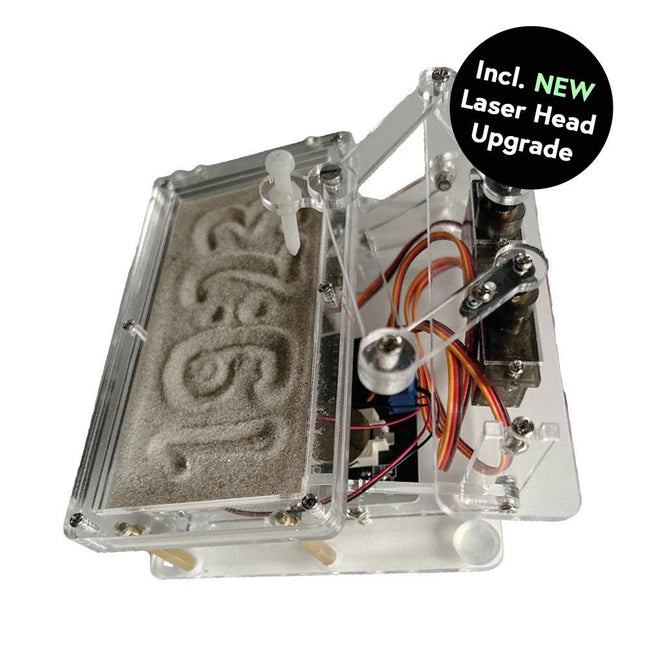
Dieses Bundle enthält die beliebte Elektor Sanduhr für Raspberry Pi Pico und das neue Elektor Laserkopf-Upgrade und bietet damit noch mehr Möglichkeiten zur Zeitanzeige. Sie können die aktuelle Uhrzeit nicht nur in Sand "gravieren", sondern sie jetzt auch alternativ auf eine im Dunkeln leuchtende Folie schreiben oder grüne Zeichnungen erstellen.
Inhalt des Bundles
Elektor Sanduhr für Raspberry Pi Pico (Einzelpreis: 50 €)
Elektor Laserkopf-Upgrade für Sanduhr (Einzelpreis: 35 €)
Elektor Sanduhr für Raspberry Pi Pico (Raspberry Pi-basierter Eyecatcher)
Eine handelsübliche Sanduhr zeigt nur, wie die Zeit verrinnt. Dagegen zeigt diese Raspberry Pi Pico-gesteuerte Sanduhr die genaue Uhrzeit an, indem die vier Ziffern für Stunde und Minute in die Sandschicht "eingraviert" werden. Nach einer einstellbaren Verzögerung wird der Sand durch zwei Vibrationsmotoren flachgedrückt und der Zyklus beginnt von vorne.
Das Herzstück der Sanduhr sind zwei Servomotoren, die über einen Pantographenmechanismus einen Schreibstift antreiben. Ein dritter Servomotor hebt den Stift auf und ab. Der Sandbehälter ist mit zwei Vibrationsmotoren ausgestattet, um den Sand zu glätten. Der elektronische Teil der Sanduhr besteht aus einem Raspberry Pi Pico und einer RTC/Treiberplatine mit Echtzeituhr, plus Treiberschaltungen für die Servomotoren.
Eine ausführliche Bauanleitung steht zum Download bereit.
Features
Abmessungen: 135 x 110 x 80 mm
Bauzeit: ca. 1,5 bis 2 Stunden
Lieferumfang
3x vorgeschnittene Acrylplatten mit allen mechanischen Teilen
3x Mini-Servomotoren
2x Vibrationsmotoren
1x Raspberry Pi Pico
1x RTC/Treiberplatine mit montierten Teilen
Muttern, Bolzen, Abstandshalter und Drähte für die Baugruppe
Feinkörniger weißer Sand
Elektor Laserkopf-Upgrade für Sanduhr
Der neue Elektor-Laserkopf verwandelt die Elektor Sanduhr in eine Uhr, die die Zeit auf eine im Dunkeln leuchtende Folie statt auf Sand schreibt. Neben der Anzeige der Zeit können damit auch flüchtige Zeichnungen erstellt werden. Der 5-mW-Laserpointer mit einer Wellenlänge von 405 nm erzeugt leuchtend grüne Zeichnungen auf der im Dunkeln leuchtenden Folie. Um optimale Ergebnisse zu erzielen, verwenden Sie das Kit in einem schwach beleuchteten Raum. Achtung: Schauen Sie niemals direkt in den Laserstrahl!
Der Bausatz enthält alle notwendigen Komponenten, es ist jedoch das Anlöten von drei Drähten erforderlich.
Hinweis: Dieses Kit ist auch mit der originalen Arduino-basierten Sanduhr aus dem Jahr 2017 kompatibel. Weitere Einzelheiten finden Sie unter Elektor 1-2/2017 und Elektor 1-2/2018.
Buch: Mastering the Arduino Uno R4
Das Arduino Uno R3 Board basiert auf dem kostengünstigen 8-Bit-Prozessor ATmega328P und dürfte sich als das beliebteste Mitglied der Arduino-Familie erweisen. Dieses zuverlässige Board begleitet uns seit vielen Jahren. Elf Jahre später erschien der lang erwartete Nachfolger, das Arduino Uno R4. Es basiert auf einem 48-MHz-32-Bit-Arm-Cortex-M4-Mikrocontroller und bietet deutlich erweiterten SRAM- und Flash-Speicher. Zusätzlich wurden ein hochpräziserer ADC und ein neuer DAC integriert. Das Uno R4 Board unterstützt außerdem den CAN-Bus mit einer entsprechenden Schnittstelle.
Das Board ist in zwei Versionen erhältlich: Uno R4 Minima und Uno R4 WiFi. Dieses Buch zeigt, wie man mit diesen neuen Boards und nur wenigen Bauteilen und externen Modulen viele verschiedene und interessante Projekte realisieren kann. Alle im Buch beschriebenen Projekte wurden, je nach Modell, vollständig auf dem Uno R4 Minima oder dem Uno R4 WiFi-Board getestet.
Die Projektthemen umfassen das Auslesen, Steuern und Ansteuern zahlreicher Komponenten und Module des Bausatzes sowie des jeweiligen Uno R4-Boards, einschließlich
LEDs
7-Segment-Anzeigen (mit Timer-Interrupts)
LCDs
Sensoren
RFID-Leser
4×4-Tastatur
Echtzeituhr (RTC)
Joystick
8×8 LED-Matrix
Motoren
DAC (Digital-Analog-Wandler)
LED-Matrix
WiFi-Konnektivität
Serieller UART
CAN-Bus
Infrarot-Controller und -Empfänger
Simulatoren
… alles auf kreative und lehrreiche Weise, wobei die Funktionsweise des Projekts und die zugehörige Software sehr detailliert erklärt werden.
Arduino Uno R4 WiFi
Der Arduino Uno R4 wird vom Renesas RA4M1 32-Bit ARM Cortex-M4 Prozessor angetrieben und bietet dadurch eine deutliche Steigerung der Rechenleistung, des Speichers und der Funktionalität. Die WiFi-Version verfügt zusätzlich zum RA4M1 über ein ESP32-S3 WLAN-Modul und erweitert so die kreativen Möglichkeiten für Maker und Ingenieure.
Der Arduino Uno R4 taktet mit 48 MHz und bietet damit eine dreifache Steigerung gegenüber dem beliebten Uno R3. Darüber hinaus wurde der SRAM von 2 kB auf 32 kB und der Flash-Speicher von 32 kB auf 256 kB erweitert, um komplexere Projekte zu unterstützen. Auf Wunsch der Community wurde der USB-Anschluss auf USB-C umgestellt und die maximale Versorgungsspannung dank eines verbesserten Wärmemanagements auf 24 V erhöht. Die Platine verfügt über einen CAN-Bus und einen SPI-Anschluss, wodurch Anwender den Verkabelungsaufwand reduzieren und durch den Anschluss mehrerer Shields parallele Aufgaben ausführen können. Ein 12-Bit-Analog-DAC ist ebenfalls auf der Platine vorhanden.
Technische Daten
Mikrocontroller
Renesas RA4M1 (ARM Cortex-M4)
USB
USB-C
Programmieranschluss
Anschlüsse
Digitale Ein-/Ausgangsanschlüsse
14
Anschlüsse
Analoge Eingangsanschlüsse
6
DAC
1
RTC
1
PWM-Anschlüsse
6
Kommunikation
UART
1x
I²C
1x
SPI
1x
Qwiic I²C-Anschluss
1x
CAN
1x CAN-Bus
Stromversorgung
Betriebsspannung
5 V
Eingangsspannung (VIN)
6-24 V
Gleichstrom pro I/O-Pin
8 mA
Taktfrequenz
Hauptkern
48 MHz
Speicher
RA4M1
256 kB Flash, 32 kB RAM
LED-Matrix
12 x 8 (96 rote LEDs)
Abmessungen
68,9 x 53,4 mm
Downloads
Datasheet
Schematics
Dieses Bundle enthält:
Buch: Mastering the Arduino Uno R4 (Einzelpreis: 45 €)
Arduino Uno R4 WiFi (Einzelpreis: 30 €)
Dieses Bundle enthält alles, was Sie brauchen, um direkt mit dem XIAO ESP32-C3 Development Board loszulegen. Lernen Sie die Grundlagen des ESP32-C3 kennen und entwickeln Sie praktische Projekte mit Wi-Fi, Bluetooth, Sensoren, Displays, PWM, Deep Sleep und vielem mehr.
Buch: Build Smart Projects with the XIAO ESP32-C3 Board
Das XIAO ESP32-C3 Board kombiniert den ultrakompakten Formfaktor der XIAO-Serie mit den umfangreichen Funktionen des ESP32-C3-Chips, einschließlich integriertem Wi-Fi und Bluetooth 5.0. Dieses Buch ist ein umfassender, praxisorientierter Leitfaden, mit dem Sie das Potenzial dieses leistungsstarken und dennoch preisgünstigen Development Boards voll ausschöpfen können.
Der Autor führt die Leser von den Grundlagen bis hin zu fortgeschrittenen Projekten. Angefangen beim Blinken und Dimmen von LEDs geht es weiter mit ADC und PWM für die präzise Anbindung von Sensoren und PWM-gesteuerte Lichteffekte, bevor praktische Anwendungen aus der realen Welt umgesetzt werden, darunter:
Eine Wi-Fi-Wetterstation mit OLED-Display und aktuellen Online-Wetterdaten
Ein Ultraschall-Einparkassistent mit akustischer Rückmeldung
Eine Kühlschrank-Messsonde mit Klimasensoren und Deep Sleep für jahrelangen Batteriebetrieb
Ein Retro-Pong-Spiel, das berührungslos per Sensor gesteuert wird
Eine mikrofonbasierte Party-App, die auf Klatschen reagiert
Und vieles mehr: Lichtsteuerung, Reaktionszeitmessung, Netzfrequenzanalyse, Bodenfeuchtemessung, LED-Ambientebeleuchtung und 7-Segment-Anzeigen
Seeed Studio XIAO ESP32C3
Das Seeed Studio XIAO ESP32C3 ist mit einem hochintegrierten ESP32-C3-Chip ausgestattet, der auf einem 32-Bit-RISC-V-Prozessor mit vierstufiger Pipeline basiert und mit bis zu 160 MHz arbeitet.
Das Board verfügt über ein hochintegriertes ESP32-C3-SoC. Der Chip ist mit einem vollständigen 2,4-GHz-Wi-Fi-Subsystem ausgestattet und unterstützt damit den Station-Modus, SoftAP-Modus, SoftAP-&-Station-Modus sowie den Promiscuous-Modus für unterschiedliche Wi-Fi-Anwendungen. Gleichzeitig arbeitet er äußerst energieeffizient und unterstützt Bluetooth 5 sowie Bluetooth Mesh. Mit 400 KB SRAM und 4 MB Flash bietet der Chip ausreichend Speicherplatz für Programme und eröffnet zahlreiche Möglichkeiten für IoT-Steuerungsanwendungen.
Anwendungen
Internet der Dinge (IoT)
Wearables
Gesundheitsüberwachung
Bildung
Energiesparende Netzwerke
Schnelle Prototypenentwicklung
Technische Daten
Processor
ESP32-C3 SoC
RISC-V single-core 32-bit chip processor with a four-stage pipeline that operates at up to 160 MHz
Wireless
Complete 2.4GHz Wi-Fi subsystem
Bluetooth Low Energy 5.0/ Bluetooth Mesh
On-chip Memory
400 KB SRAM & 4 MB Flash
Interface
1x UART, 1x I²C, 1x SPI, 11x GPIO (PWM), 4x ADC
1x Reset button, 1x Boot button
Power (Typ.)
Max 3.3 V Output Current: 500 mA Test Condition: BAT Pin Input @ 3.8 V Source Capability: 3 A
Charging current: 380 mA(Fast) / 40 mA(Trickle)
Input voltage (VIN): 5 VInput voltage (BAT): 3.7 V
Deep Sleep Power Consumption
Deep Sleep Mode: 44 μA
Wi-Fi Enabled Power Consumption
Active Mode: 75 mA
Modem-sleep Mode: 25 mA
Light-sleep Mode: 4 mA
BLE Enabled Power Consumption
Modem-sleep Mode: 27 mA
Light-sleep Mode: 10 mA
Dimensions
21 x 17.8 mm
Lieferumfang
1x Seeed Studio XIAO ESP32C3
1x Antenne
2x 7-Pin-Header
Downloads
Wiki
Datasheet
Dieses Bundle enthält:
Buch: Build Smart Projects with the XIAO ESP32-C3 Board (Einzelpreis: 35 €)
Board: Seeed Studio XIAO ESP32C3 (Einzelpreis: 10 €)
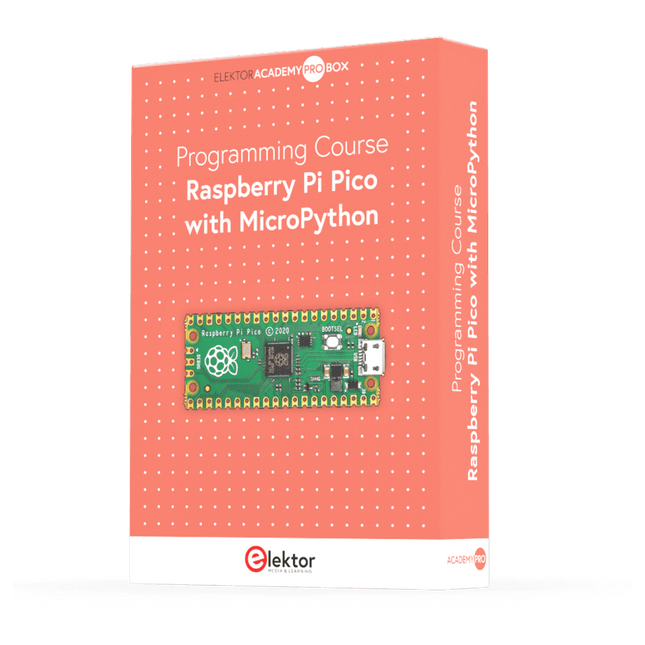
Dieser komplette Mikrocontroller-Programmierkurs auf Basis des Raspberry Pi Pico umfasst ein Lehrbuch, ein Komponenten-Kit, praxisnahe Projekte sowie einen umfassenden Online-Kurs mit Simulationen. Er eignet sich ideal für das schrittweise Erlernen der Embedded-Programmierung mit Arduino anhand eines praktischen, hands-on Ansatzes.
Eine praxisnahe Einführung in Embedded Systems mit dem Raspberry Pi Pico
Dieser Kurs richtet sich an Personen ohne Vorkenntnisse im Bereich Embedded Systems, die einen strukturierten und beispielbasierten Einstieg suchen.
Ein Kit bestehend aus LEDs und Widerständen, Schaltern, Sensoren und Aktoren, Displays, einem Breadboard und Kabeln sowie weiteren Komponenten ist enthalten. Diese werden im Kurs verwendet, um Beispielanwendungen zu veranschaulichen.
Vorkenntnisse mit Arduino oder Embedded-Entwicklung sind nicht erforderlich. Jeder Abschnitt enthält praktische Beispiele und Mini-Projekte, die wichtige Konzepte festigen und zur weiteren Vertiefung anregen. Am Ende des Kurses werden Sie nicht nur in der Lage sein, die Beispiele nachzuvollziehen, sondern auch eigene Ideen und Anwendungen umzusetzen.
Was werden Sie lernen?
Programmierung von Mikrocontrollern in MicroPython mit dem Raspberry Pi Pico unter Verwendung der Thonny IDE
Arbeiten mit digitalen Ein- und Ausgängen, Auslesen von Tastern und Encodern, Steuern von LEDs und Relais
Auslesen analoger Eingänge, Spannungen und analoger Sensoren
Erzeugung analoger Ausgangssignale und PWM
Verwendung serieller Kommunikation wie UART, I²C und SPI zur Steuerung von Displays und zum Auslesen digitaler Sensoren und SD-Karten
Zeitmanagement
Arbeiten mit Interrupts
Echtzeit-Sensordatenerfassung und Steuerung über Taster, LEDs und Displays
Steuerung von Aktoren wie Relais und Servomotoren
Für wen ist dieser Kurs geeignet?
Studierende und Selbstlerner im Bereich Embedded Systems
Makers und IoT-Enthusiasten, die ihre Hardware-Kenntnisse verbessern möchten
Lehrkräfte und Trainer, die sofort einsetzbares Unterrichtsmaterial suchen
Was ist im Lieferumfang enthalten?
Zugang zum vollständigen Kurs auf der Elektor Academy Pro-Lernplattform
Raspberry Pi Pico Mikrocontroller-Board (+ USB-Kabel)
Buch: Programming Microcontrollers in MicroPython
Downloadbare Projektdateien für jedes Modul
Komponenten-Set:
2× LED, rot, 5 mm
LED, grün, 5 mm
3× Widerstand, 470 Ω, 0,25 W
LDR
Potentiometer, 10 kΩ, linear
Taster
Drehencoder-Modul
Relaismodul
DHT22 Feuchtigkeits- und Temperatursensor
TM1637-kompatibles 4-stelliges 7-Segment-Display
MPU-6050 IMU mit Stiftleisten
SSD1306-kompatibles I²C OLED-Display
Micro-SD-Kartenadapter mit Stiftleiste
Buzzer
SG90 Mikro-Servo
ILI9341-kompatibles SPI 240×320 TFT-Display
20× Jumperkabel
Breadboard
Alle Programmierkurse (und Unterschiede im Inhalt)
Kurs
Arduino
Raspberry Pi Pico with Arduino C/C++
ESP32 with Arduino C/C++
Raspberry Pi Pico with MicroPython
ESP32 with MicroPython
Online-Kurs
Access to Arduino Course
Access to Pico with Arduino C/C++ Course
Access to ESP32 with Arduino C/C++ Course
Access to Pico with MicroPython Course
Access to ESP32 with MicroPython Course
Board
Uno R3
Raspberry Pi Pico
ESP32
Raspberry Pi Pico
ESP32
Buch
Programming Microcontrollers in C/C++ Using Arduino
Programming Microcontrollers in C/C++ Using Arduino
Programming Microcontrollers in C/C++ Using Arduino
Programming Microcontrollers in MicroPython
Programming Microcontrollers in MicroPython
Kit
40-teiliges Komponenten-Set
40-teiliges Komponenten-Set
40-teiliges Komponenten-Set
40-teiliges Komponenten-Set
40-teiliges Komponenten-Set
Dieses Bundle enthält das Red Pitaya STEMlab 125-14 PRO Gen 2 Starter Kit und das neue Buch "Experimenting with Red Pitaya STEMlab Gen 2".
Das Red Pitaya STEMlab 125-14 PRO Gen 2 Starter Kit ist eine leistungsstarke und flexible Plattform für Signalverarbeitung, Datenerfassung und elektronische Messanwendungen. Dieses Kit wurde für Ingenieure, Entwickler, Forscher und Dozenten konzipiert und bietet alles, was für den Einstieg in die Entwicklung fortschrittlicher Mess- und Steuerungssysteme erforderlich ist.
Das Herzstück des Kits ist das STEMlab 125-14 PRO Gen 2-Board, eine verbesserte und ultraleichte Entwicklungsplatine. Angetrieben vom Xilinx Zynq-7010 SoC mit 512 MB RAM kombiniert es die Programmierbarkeit eines FPGAs mit der Rechenleistung eines ARM-Prozessors, um leistungsstarke Messtechnik und kundenspezifische Signalverarbeitungslösungen zu ermöglichen.
Das Board bietet eine 14-Bit-ADC- und DAC-Auflösung, eine Abtastrate von 125 MS/s, einen Eingangsbereich von ±20 V und eine Bandbreite von bis zu 60 MHz. Dank seines verbesserten rauscharmen analogen Frontends, der USB-C-Konnektivität und des kompakten Designs eignet es sich für anspruchsvolle Anwendungen wie HF-Entwicklung, Radarsysteme, Photonikforschung, Software-Defined Radio (SDR) und industrielle Automatisierung.
Das Starter Kit enthält alles notwendige Zubehör für den sofortigen Einsatz: eine microSD-Karte mit vorinstalliertem Betriebssystem, ein Netzteil, ein Ethernet-Kabel für den Fernzugriff, zwei 100-MHz-Oszilloskop-Messspitzen sowie SMA-zu-BNC-Adapter für flexible Signalanschlüsse.
Das Red Pitaya STEMlab 125-14 PRO Gen 2 Starter Kit ist eine hervorragende Plattform für Rapid Prototyping, FPGA-Entwicklung, Messtechnik und fortgeschrittene Elektronikversuche.
Features
14-Bit-ADC- und DAC-Auflösung
Abtastrate: 125 MS/s
Eingangsspannungsbereich: ±20 V
Bandbreite: Bis zu 60 MHz
Xilinx Zynq-7010 SoC (FPGA + ARM-Prozessor)
512 MB RAM
Rauscharme analoge Front- und Backends
Anwendungen
HF-Entwicklung und -Test
Radar- und drahtlose Systeme
Software Defined Radio (SDR)
Photonik und optische Forschung
Industrielle Automatisierungs- und Steuerungssysteme
Signalanalyse und -instrumentierung
Schnelles Prototyping elektronischer Bauteile Messsysteme
Technische Daten
Prozessor
Dual-Core ARM Cortex-A9
FPGA
AMD Xilinx Zynq-7010 SoC
RAM
512 MB (4 Gb)
Speicher
microSD-Karte (bis zu 32 GB)
Betriebssystem
Linux-basiertes Red Pitaya OS
ADC-Auflösung
14 Bit
DAC Auflösung
14 Bit
Bandbreite
60 MHz (DC)
Abtastrate
125 MS/s
Analoge Eingangskanäle
2
Analoge Ausgangskanäle
2
Eingangsspannungsbereich
±1 V (LV) / ±20 V (HV)
Eingangsimpedanz
1 MΩ / 10 pF
Ausgangsspannungsbereich
±1 V
Ethernet
1x Gigabit Ethernet (RJ45)
USB
2x USB-C 2.0 (für Stromversorgung und Konsole)
Digitale Ein-/Ausgänge
16x GPIO (3,3 V)
Kommunikationsschnittstellen
I²C, SPI, UART, CAN
Stromversorgung
5 V/3 A über USB-C
Abmessungen
106,8 x 60,0 x 17,9 mm
Lieferumfang
1x Red Pitaya STEMlab 125-14 PRO Gen 2 Board
2x 100-MHz-Oszilloskop-Tastköpfe
2x SMA-zu-BNC-Adapter
1x microSD-Karte mit vorinstalliertem Betriebssystem
1x USB-C-Netzteil
1x Ethernet-Kabel
Downloads
Documentation
Schematics
Buch: Experimenting with Red Pitaya STEMlab Gen 2
Mit diesem neuen Buch geht Red Pitaya über ein vielseitiges Board hinaus – es wird zu einem leistungsstarken Laborinstrument für präzise Messungen, Analysen und Steuerungen.
Von den Grundlagen der Entwicklung elektronischer Projekte über Überwachung, Regelung und Design bis hin zu Tests führt Sie dieses Buch Schritt für Schritt durch alles, was Sie wissen müssen, um das volle Potenzial der Red Pitaya-Hardware und -Software auszuschöpfen.
Das Buch stellt Echtzeitprojekte auf FPGA-Basis vor, die auf einem PC mit der Vivado-Umgebung entwickelt und anschließend zur Ausführung und zum Testen auf die Red Pitaya übertragen werden.
Sie lernen mehr über gesteigerte Leistung, erweiterte I/O-Möglichkeiten, verbesserte FPGA-Funktionen sowie fortschrittliche Konnektivitätsoptionen, die neue Möglichkeiten für präzise Messungen, Überwachung und Steuerung in Ihren Embedded-Anwendungen eröffnen.
Im Buch entdecken Sie:
Einen tiefgehenden Einblick in die Red Pitaya-Architektur und das Hardware-Design
Elektronische Experimente mit Red Pitaya für Mess- und Überwachungsanwendungen
Praxisnahe Projekte mit der Programmiersprache Python
Praktische Anleitungen zur FPGA-Programmierung mit Red Pitaya
Red Pitaya FPGA-Projekte mit Verilog HDL in der Vivado IDE
Die praxisorientierte Entwicklung elektronischer Projekte inklusive Messung und Tests
Schritt-für-Schritt-Beispiele, die Theorie und reale Umsetzung miteinander verbinden
Ganz gleich, ob Sie eigene elektronische Schaltungen entwerfen, Werkzeuge zur Signalanalyse entwickeln oder Echtzeit-Steuerungs- und Überwachungssysteme erstellen – dieses Buch vermittelt Ihnen das nötige Wissen und die Sicherheit, um die Red Pitaya-Plattform vollständig zu verstehen und individuell anzupassen.
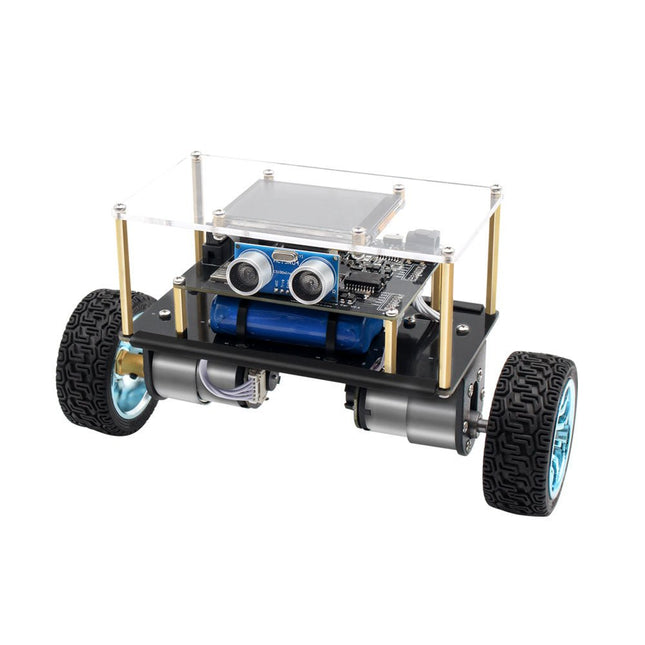
Der Elektor Mini-Wheelie ist eine experimentelle autonome selbstbalancierende Roboterplattform. Der selbstbalancierende Roboter basiert auf einem ESP32-S3-Mikrocontroller und ist mithilfe der Arduino-Umgebung und Open-Source-Bibliotheken vollständig programmierbar. Dank seiner drahtlosen Fähigkeiten kann er über WLAN, Bluetooth oder ESP-NOW ferngesteuert werden oder mit einem Benutzer oder sogar einem anderen Roboter kommunizieren.
Zur Erkennung von Hindernissen steht ein Ultraschallwandler zur Verfügung. Über das Farbdisplay lassen sich niedliche Gesichtsausdrücke oder für den bodenständigeren Nutzer auch kryptische Debug-Meldungen darstellen.
Der Roboter wird als Komplettbausatz mit Teilen geliefert, die Sie selbst zusammenbauen müssen. Alles ist dabei, sogar ein Schraubenzieher.
Hinweis: Der Mini-Wheelie ist eine pädagogische Entwicklungsplattform, die zum Lernen, Experimentieren und zur Entwicklung von Robotern gedacht ist. Er ist nicht als Kinderspielzeug klassifiziert, und seine Funktionen, Dokumentation und Zielgruppe spiegeln diesen Zweck wider. Das Produkt richtet sich an Studenten, Dozenten und Entwickler, die Robotik, Programmierung und Hardware-Integration in einem pädagogischen Umfeld erforschen möchten.
Technische Daten
ESP32-S3 Mikrocontroller mit WLAN und Bluetooth
MPU6050 6-achsige Inertial Measurement Unit (IMU)
Zwei unabhängig gesteuerte 12 V-Elektromotoren mit Drehzahlmesser
Ultraschallwandler
2,9" TFT-Farbdisplay (320 x 240)
MicroSD-Kartensteckplatz
Batterieleistungsmonitor
3S wiederaufladbarer Li-Po-Akku (11,1 V/2200 mAh)
Batterieladegerät im Lieferumfang enthalten
Arduino-basierte Open-Source-Software
Abmessungen (B x L x H): 23 x 8 x 13 cm
Lieferumfang
1x ESP32-S3 Mainboard + MPU6050 Modul
1x LCD-Board (2,9 Zoll)
1x Ultraschallsensor
1x Akku (2200 mAh)
1x Batterieladegerät
1x Motorreifen-Set
1x Gehäuseplatine
1x Acrylplatte
1x Schraubendreher
1x Schutzstreifen
1x Flexkabel B (8 cm)
1x Flexkabel A (12 cm)
1x Flexkabel C
4x Kupfersäule A (25 mm)
4x Kupfersäule B (55 mm)
4x Kupfersäule C (5 mm)
2x Kunststoff-Nylonsäule
8x Schrauben A (10 mm)
24x Schrauben B (M3x5)
8x Nüsse
24x Metallscheiben
2x Kabelbinder
1x MicroSD-Karte (32 GB)
Downloads
Documentation
Über 40 vollständig getestete ESP32-Projekte mit Arduino IDE und der LVGL-Grafikbibliothek
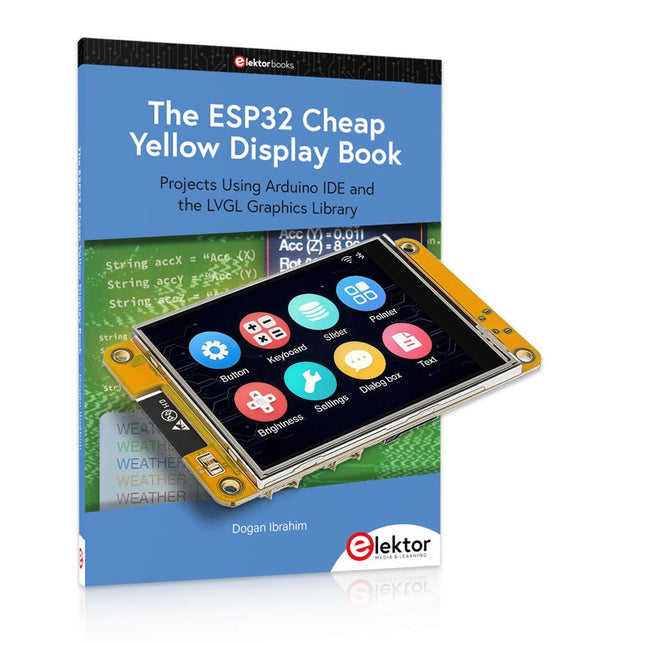
Dieses Bundle enthält das ESP32 Cheap Yellow Display (CYD) – ein kompaktes Entwicklungsboard, das einen Standard-ESP32-Mikrocontroller mit einem 320 x 240 Pixel großen TFT-Farbdisplay kombiniert. Das Board verfügt außerdem über mehrere Anschlüsse für GPIO, serielle Kommunikation (TX/RX), Strom und Masse. Das integrierte Display ist ein großer Vorteil und ermöglicht die Erstellung komplexer, grafikbasierter Projekte ohne externe LCDs oder Displays.
Das Begleitbuch stellt die Hardware und die integrierten Anschlüsse des CYD-Boards detailliert vor. Es bietet eine Reihe von Projekten für Anfänger und Fortgeschrittene, die mit der beliebten Arduino IDE 2.0 entwickelt wurden. Sowohl grundlegende Grafikfunktionen als auch die leistungsstarke LVGL-Grafikbibliothek werden behandelt, und praktische Projekte veranschaulichen jeden Ansatz.
Alle enthaltenen Projekte wurden vollständig getestet und sind sofort einsatzbereit. Das Buch enthält Blockdiagramme, Schaltpläne, vollständige Codelisten und Schritt-für-Schritt-Erklärungen. Mit der LVGL-Bibliothek können Leser moderne, vollfarbige grafische Benutzeroberflächen mit Widgets wie Schaltflächen, Beschriftungen, Schiebereglern, Kalendern, Tastaturen, Diagrammen, Tabellen, Menüs, Animationen und mehr erstellen.
ESP32 Cheap Yellow Display Board
Dieses Entwicklungsboard (auch bekannt als "Cheap Yellow Display") wird vom ESP-WROOM-32 angetrieben, einem Dual-Core-MCU mit integrierten Wi-Fi- und Bluetooth-Funktionen. Es arbeitet mit einer Hauptfrequenz von bis zu 240 MHz, mit 520 KB SRAM, 448 KB ROM und einem 4 MB Flash-Speicher. Das Board verfügt über ein 2,8" Display mit einer Auflösung von 240x320 und Resistive Touch.
Darüber hinaus enthält die Platine einen Steuerkreis für die Hintergrundbeleuchtung, einen Schaltkreis für die Berührungssteuerung, einen Schaltkreis für die Lautsprecheransteuerung, einen lichtempfindlichen Schaltkreis und einen RGB-LED-Steuerschaltkreis. Es bietet außerdem einen TF-Kartensteckplatz, eine serielle Schnittstelle, eine DHT11-Schnittstelle für Temperatur- und Feuchtigkeitssensoren und zusätzliche E/A-Anschlüsse.
Das Modul unterstützt die Entwicklung in Arduino IDE, ESP-IDE, MicroPython und Mixly.
Anwendungen
Bildübertragung für Smart Home-Gerät
Drahtlose Überwachung
Intelligente Landwirtschaft
QR-Funkerkennung
Signal des drahtlosen Positionierungssystems
Und andere IoT-Anwendungen
Technische Daten
Mikrocontroller
ESP-WROOM-32 (Dual-Core-MCU mit integriertem WLAN und Bluetooth)
Frequenz
Bis zu 240 MHz (Rechenleistung bis zu 600 DMIPS)
SRAM
520 KB
ROM
448 KB
Flash
4 MB
Betriebsspannung
5 V
Stromverbrauch
ca. 115 mA
Display
2,8" TFT-Farbbildschirm (240 x 320)
Touch
Resistive Touch
Treiberchip
ILI9341
Abmessungen
50 x 86 mm
Gewicht
50 g
Downloads
GitHub
Dieses Bundle enthält:
The ESP32 Cheap Yellow Display Book (Einzelpreis: 35 €)
ESP32 Cheap Yellow Display Board (Einzelpreis: 25 €)
1x ESP32 Dev-Board mit 2,8" Display und Acrylgehäuse
1x Touch-Stift
1x Verbindungskabel
1x USB-Kabel
Der Joy-Pi Advanced ist ein kompaktes und leistungsstarkes Gerät, welches Ihnen ermöglicht, Ihre Projekte schnell und einfach zu realisieren. Egal, ob Sie bereits viel Erfahrung haben, oder noch so gut wie gar keine – mit dem Joy-Pi Advanced können Sie Ihrer Kreativität freien Lauf lassen. Dank der Kompatibilität mit einer Vielzahl von Plattformen, einschließlich Raspberry Pi, Raspberry Pi Pico, Arduino Nano, BBC micro:bit und NodeMCU ESP32, können Sie einfach und schnell auf Ihre bevorzugte Plattform zugreifen.
Darüber hinaus bietet der Joy-Pi Advanced mehr als 30 Stationen, Lektionen und Module, die Ihnen eine unbegrenzte Vielzahl an Möglichkeiten bieten, um Ihre Projekte zu realisieren. Mit der eigenentwickelten Lernzentrale, können Sie nicht nur Ihre Fähigkeiten verbessern, sondern auch neue Projekte erstellen. Die Lernzentrale bietet eine Fülle an Informationen und Tutorials, die Sie Schritt für Schritt durch Ihre Projekte führen.
Joy-Pi Advanced zeichnet sich insbesondere durch seine intelligenten Schaltereinheiten aus, die eine erweiterte Nutzung der verfügbaren Pins erlauben. Dabei sind insgesamt drei Schaltereinheiten integriert, jede mit 12 einzelnen Schaltern ausgestattet, die für eine präzise Steuerung der verbundenen Sensoren und Module sorgen. Dieses System löst das bekannte Problem der begrenzten Pin-Anzahl, das bei herkömmlichen Mikrocontrollern auftritt. Die Schaltereinheiten ermöglichen es Ihnen, eine Vielzahl von Sensoren und Modulen parallel zu betreiben, indem sie einzeln ein- und ausgeschaltet werden können. Dadurch wird eine Mehrfachbelegung der Pins simuliert, die es Ihnen ermöglicht, die volle Leistungsfähigkeit Ihrer Projekte auszuschöpfen, ohne Kompromisse bei der Funktionalität eingehen zu müssen.
Durch der Kombination von innovativen Adapterplatinen und dem micro:bit-Slot erreicht man eine nahtlose Kompatibilität mit einer Vielzahl von Mikrocontrollern wie Raspberry Pi Pico, NodeMCU ESP32, micro:bit und Arduino Nano. Die speziell entwickelten Adapterplatinen sind so konzipiert, dass sie perfekt auf den jeweiligen Mikrocontroller abgestimmt sind. Durch das Aufstecken des Mikrocontrollers auf die passende Adapterplatine und das anschließende Einstecken in den micro:bit-Slot wird der Joy-Pi Advanced schnell und unkompliziert mit den unterschiedlichen Mikrocontrollern kompatibel. Dies ermöglicht eine nahtlose Integration Ihrer bevorzugten Plattform und die Möglichkeit, die Stärken der verschiedenen Mikrocontroller in Ihren Projekten zu kombinieren. Auf diese Weise können Sie sich voll und ganz auf Ihre kreativen Projekte konzentrieren, ohne sich Gedanken über die Kompatibilität verschiedener Mikrocontroller machen zu müssen. Der Joy-Pi Advanced vereinfacht den Entwicklungsprozess und gibt Ihnen die Möglichkeit, Ihre Projekte flexibel und individuell zu gestalten.
Features
Hochintegrierte Entwicklungsplattform & Lernzentrale
Schnelles, einfaches & kabelloses Kombinieren von verschiedensten Sensoren & Aktoren
Einbaumöglichkeit für Raspberry Pi 4
Kompatibel mit verschiedensten Mikrocontrollern
Eigenentwickelte, didaktische Lernplattform für Raspberry Pi & Windows
Technische Daten
Kompatibel mit
Raspberry Pi 4, Arduino Nano, NodeMCU ESP32, BBC micro:bit, Raspberry Pi Pico
Verbaute Sensoren, Aktoren & Komponenten
39
Lernplattform
Über 40 Einträge in der Wissensdatenbank, 10 Projekte, 10 Lernaufgaben, 14 Visionen
Displays
7-Segment Display, 16x2 Display, 1,8“ TFT Display, 0,96“ OLED Display, 8x8 RGB Matrix
Sensoren
DS18B20, Schock-Sensor, Hall-Sensor, Barometer, Sound-Sensor, Gyroskop, PIR-Sensor, Lichtschranke, NTC, Lichtsensor, 6x Touchsensor, Farb-Sensor, Ultraschall-Abstandssensor, DHT11 Temperatur- & Feuchtigkeitssensor
Steuerung
Joystick, 5x Schalter, Potentiometer, Drehencoder, 4x4 Button-Matrix, Relais, PWM-Lüfter
Motoren
Servo-Schnittstelle, Schrittmotor-Schnittstelle, Vibrationsmotor
Mess- und Wandelmodule
Analog-Digital Converter, Pegelwandler, Voltmeter, Variable Spannungsversorgung
Sonstige Komponenten
RTC Echtzeituhr, Buzzer, EEPROM-Speicher, Infrarot-Empfänger, Breadboard, RFID-Lesegerät
Adapterboards
Adapter für NodeMCU ESP32, Arduino Nano & Raspberry Pi Pico, Boardconnectoren für Raspberry Pi & Externe Boards
Elektronische Komponenten
Infrarot-Fernbedienung, RFID-Chip, RFID-Karte, 6x Krokodilklemmen, microSD-Karten-Lesegerät, Servomotor, Schrittmotor, 32 GB microSD-Karte
Bauteile
40x Widerstände, 3x grüne LEDs, 3x gelbe LEDs, 3x rote LEDs, 1x Transistor, 5x Buttons, 1x Potentiometer, 2x Kondensatoren
Weiteres Zubehör
Schraubensortiment, Schraubendreher, Zubehör-Aufbewahrungstasche, Netzgerät & Netzkabel, Servohalterung
Stromversorgung
Verbautes Netzgerät: 36 W, 12 V, 3 A Gehäuseanschluss: Kleingeräte-Stecker C8
Spannungsausgänge
12 V, 5 V, 3,3 V, Variabler Spannungsausgang (2-11 V)
Ausgeführte Datenbusse & Signalausgänge
I²C, SPI, Analog-Digital-Wandler
Batterie (RTC)
CR2032
Abmessungen
327 x 200 x 52 mm
Inbegriffen
Raspberry Pi 4 (8 GB RAM)
Downloads
Joy-Pi Website
Datenblatt
Anleitung
Dieser komplette Mikrocontroller-Programmierkurs auf Basis des Raspberry Pi Pico umfasst ein Lehrbuch, ein Komponenten-Kit, praxisnahe Projekte sowie einen umfassenden Online-Kurs mit Simulationen. Er eignet sich ideal für das schrittweise Erlernen der Embedded-Programmierung mit Arduino anhand eines praktischen, hands-on Ansatzes.
Eine praxisnahe Einführung in Embedded Systems mit dem Raspberry Pi Pico
Dieser Kurs richtet sich an Personen ohne Vorkenntnisse im Bereich Embedded Systems, die einen strukturierten und beispielbasierten Einstieg suchen.
Ein Kit bestehend aus LEDs und Widerständen, Schaltern, Sensoren und Aktoren, Displays, einem Breadboard und Kabeln sowie weiteren Komponenten ist enthalten. Diese werden im Kurs verwendet, um Beispielanwendungen zu veranschaulichen.
Vorkenntnisse mit Arduino oder Embedded-Entwicklung sind nicht erforderlich. Jeder Abschnitt enthält praktische Beispiele und Mini-Projekte, die wichtige Konzepte festigen und zur weiteren Vertiefung anregen. Am Ende des Kurses werden Sie nicht nur in der Lage sein, die Beispiele nachzuvollziehen, sondern auch eigene Ideen und Anwendungen umzusetzen.
Was werden Sie lernen?
Mikrocontroller-Programmierung in C/C++ mit dem Raspberry Pi Pico unter Verwendung der Arduino IDE
Arbeiten mit digitalen Ein- und Ausgängen, Auslesen von Tastern und Encodern, Steuern von LEDs und Relais
Auslesen analoger Eingänge, Spannungen und analoger Sensoren
Erzeugung analoger Ausgangssignale und PWM
Verwendung serieller Kommunikation wie UART, I²C und SPI zur Steuerung von Displays und zum Auslesen digitaler Sensoren und SD-Karten
Zeitmanagement
Arbeiten mit Interrupts
Echtzeit-Sensordatenerfassung und Steuerung über Taster, LEDs und Displays
Steuerung von Aktoren wie Relais und Servomotoren
Für wen ist dieser Kurs geeignet?
Studierende und Selbstlerner im Bereich Embedded Systems
Makers und IoT-Enthusiasten, die ihre Hardware-Kenntnisse verbessern möchten
Lehrkräfte und Trainer, die sofort einsetzbares Unterrichtsmaterial suchen
Was ist im Lieferumfang enthalten?
Zugang zum vollständigen Kurs auf der Elektor Academy Pro-Lernplattform
Raspberry Pi Pico Mikrocontroller-Board (+ USB-Kabel)
Buch: Programming Microcontrollers in C/C++ Using Arduino
Downloadbare Projektdateien für jedes Modul
Komponenten-Set:
2× LED, rot, 5 mm
LED, grün, 5 mm
3× Widerstand, 470 Ω, 0,25 W
LDR
Potentiometer, 10 kΩ, linear
Taster
Drehencoder-Modul
Relaismodul
DHT22 Feuchtigkeits- und Temperatursensor
TM1637-kompatibles 4-stelliges 7-Segment-Display
MPU-6050 IMU mit Stiftleisten
SSD1306-kompatibles I²C OLED-Display
Micro-SD-Kartenadapter mit Stiftleiste
Buzzer
SG90 Mikro-Servo
ILI9341-kompatibles SPI 240×320 TFT-Display
20× Jumperkabel
Breadboard
Alle Programmierkurse (und Unterschiede im Inhalt)
Kurs
Arduino
Raspberry Pi Pico with Arduino C/C++
ESP32 with Arduino C/C++
Raspberry Pi Pico with MicroPython
ESP32 with MicroPython
Online-Kurs
Access to Arduino Course
Access to Pico with Arduino C/C++ Course
Access to ESP32 with Arduino C/C++ Course
Access to Pico with MicroPython Course
Access to ESP32 with MicroPython Course
Board
Uno R3
Raspberry Pi Pico
ESP32
Raspberry Pi Pico
ESP32
Buch
Programming Microcontrollers in C/C++ Using Arduino
Programming Microcontrollers in C/C++ Using Arduino
Programming Microcontrollers in C/C++ Using Arduino
Programming Microcontrollers in MicroPython
Programming Microcontrollers in MicroPython
Kit
40-teiliges Komponenten-Set
40-teiliges Komponenten-Set
40-teiliges Komponenten-Set
40-teiliges Komponenten-Set
40-teiliges Komponenten-Set
,
von Clemens Valens
Zwei neue Arduino UNO R4 Boards: Minima und Wi-Fi
Der leistungsstarke Arduino UNO R4 ist das neueste Mitglied der kultigen Arduino UNO Familie. Es gibt ihn sogar in zwei Versionen. Werfen wir einen Blick...
,
von Lobna Belarbi
Unverzichtbare Boards, Kits & Werkzeuge von Elektor für deinen Arduino-Einstieg
Egal ob du als Einsteiger die Welt der Mikrocontroller entdecken oder als erfahrener Maker dein Werkzeugarsenal erweitern möchtest – Elektor bietet eine sorgfältig zusammengestellte Auswahl...