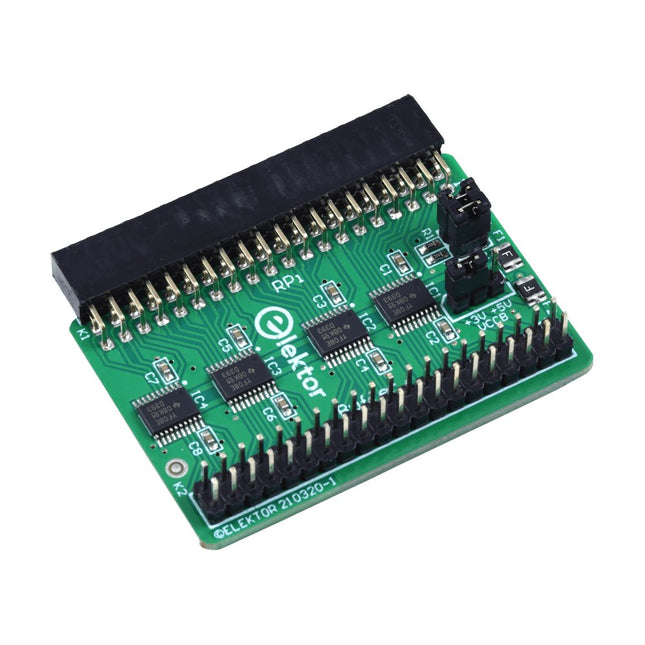
Wenn Sie regelmäßig mit dem Raspberry Pi experimentieren und eine Vielzahl von externer Hardware über die Stiftleiste an den GPIO-Port anschließen, haben Sie in der Vergangenheit vielleicht schon einige Schäden verursacht. Das Elektor Raspberry Pi Buffer Board ist dazu da, dies zu verhindern! Das Board ist kompatibel mit Raspberry Pi Zero, Zero 2 (W), 3, 4, 5, 400 und 500.
Alle 26 GPIOs sind mit bidirektionalen Spannungswandlern gepuffert, um den Raspberry Pi beim Experimentieren mit neuen Schaltungen zu schützen. Die Platine ist dafür vorgesehen, auf der Rückseite des Raspberry Pi 400/500 eingesetzt zu werden. Der Stecker zum Anschluss an den Raspberry Pi ist eine rechtwinklige 40-polige Buchse (2x20). Die Platine ist nur ein wenig breiter. An die Pufferausgangsbuchse kann ein 40-poliges Flachbandkabel mit entsprechenden 2x20-Steckern angeschlossen werden, um z. B. mit einer Schaltung auf einem Breadboard oder einer Platine zu experimentieren.
Die Schaltung verwendet 4x TXS0108E ICs von Texas Instruments. Die Platine lässt sich auch auf einem Raspberry Pi aufstellen.
Downloads
Schematics
Layout
Program, build, and master over 50 projects with MicroPython and the RP2040 microprocessor The Raspberry Pi Pico is a high-performance microcontroller module designed especially for physical computing. Microcontrollers differ from single-board computers, like the Raspberry Pi 4, in not having an operating system. The Raspberry Pi Pico can be programmed to run a single task very efficiently within real-time control and monitoring applications requiring speed. The ‘Pico’ as we call it, is based on the fast, efficient, and low-cost dual-core ARM Cortex-M0+ RP2040 microcontroller chip running at up to 133 MHz and sporting 264 KB of SRAM, and 2 MB of Flash memory. Besides its large memory, the Pico has even more attractive features including a vast number of GPIO pins, and popular interface modules like ADC, SPI, I²C, UART, and PWM. To cap it all, the chip offers fast and accurate timing modules, a hardware debug interface, and an internal temperature sensor. The Raspberry Pi Pico is easily programmed using popular high-level languages such as MicroPython and or C/C++. This book is an introduction to using the Raspberry Pi Pico microcontroller in conjunction with the MicroPython programming language. The Thonny development environment (IDE) is used in all the projects described. There are over 50 working and tested projects in the book, covering the following topics: Installing the MicroPython on Raspberry Pi Pico using a Raspberry Pi or a PC Timer interrupts and external interrupts Analogue-to-digital converter (ADC) projects Using the internal temperature sensor and external temperature sensor chips Datalogging projects PWM, UART, I²C, and SPI projects Using Wi-Fi and apps to communicate with smartphones Using Bluetooth and apps to communicate with smartphones Digital-to-analogue converter (DAC) projects All projects given in the book have been fully tested and are working. Only basic programming and electronics experience is required to follow the projects. Brief descriptions, block diagrams, detailed circuit diagrams, and full MicroPython program listings are given for all projects described. Readers can find the program listings on the Elektor web page created to support the book.
Der vollständige Download dieser Nummer ist für unsere GOLD- und GREEN-Mitglieder auf der Elektor Magazine- Site verfügbar!
Nicht noch einmal Mitglied? Klicken Sie hier .
Raspberry Pi Pico als Spektrumanalysator der FFT mit gut handelbarem Material
linearer Spannungsregler ±40 V eine hochwertige Stromversorgung für den Leistungsverstärker Fortissimo-100 … und andere!
Die Kommunikation ohne Mikrocontroller wird flexibel Das EEPROM bietet Möglichkeiten zur Netzwerkinstallation für Mikrocontroller ohne Kabel
5000 ? zu gewinnen! Nehmen Sie am STM32 Wireless Innovation Design Contest teil
2023: Die Odyssee der IA Starten Sie mit dem ChatGPT-Codeinterpreter
LoRa, ein Schweizer Messer (1) das LoRa-Protokoll und seine Vorteile
einstellbare Stromstärke mit integriertem Uhrengenerator Testen Sie Ihre Stromversorgung, Spannungswandler und Batterien
die neuen Arduino UNO R4 Minima- und WiFi-Karten
von logarithmischen Potentiometern das sind Exponentiale!
Schnittstellenkarte für Motorsteuerung Ein BoB für einen 5 A Dauerläufermotor mit einer Größe von 3×3 mm
über die Lebensgefahr der Elektronik
Bietet eine Mobilfunkarchitektur ihnen den geringsten Nutzen für das Objekt-Internet (IdO)? Energieeffizienzmerkmale der LTE-M- und NB-IoT-Technologien für den Einsatz von Niedrigenergienetzen (LPWAN)
Drahtlose Kommunikation in IoT-Systemen mithilfe von Arduino MKR-Modulen Kommunikationsnormen für Arduino-Module für IoT
bereit für alternativen Strom in den magnetischen Komponenten Vermeiden Sie die Überhitzung der Induktivitäten!
Optimieren Sie die Cloud-Bereitstellung mit maßgefertigten Geräten
Matter-Implementierung: Was muss ich tun, um Matter-Geräte bereitzustellen?
der YARD Stick One ein drahtloses Testwerkzeug für Frequenzen bis zu 1 GHz
verriegeltes Relais Drôle de Composant, die Serie
Bild Uhr? nimm die Pouls der Zeit Konzeption eines SDR-Sendezeitempfängers
Sorgfaltspflichtrichtlinie „Weiter so“ ist nicht genug
Starten mit elektronischem Spannungsverstärker
Infrarot-Sensoren mit Arduino Pro Mini ein Projektauszug aus dem Buch „Arduino & Co.“ von Elektor
Cloudbasierter Energierechner mit einem ESP32-Modul und einem Spannungs-/Stromsensor PZEM-004T
Anleitung zur Bare-Metal-Programmierung (2) Präzisions-Timer, UART und Debugging
Hexadoku
Elektor GREEN and GOLD members can download their digital edition here.
Not a member yet? Click here.
Small Thermal Imaging CameraAn Arduino UNO-Based DIY Solution
Project Update #3: ESP32-Based Energy MeterIntegration and Testing with Home Assistant
2024: An AI OdysseyEnhancing Object Detection: Integrating Refined Techniques
Raspberry Pi Goes AINew Kit Incorporates M.2 HAT+ With AI Accelerator
Weather Station SensorsWhich One Should You Choose?
AI-Based Water Meter Reading (1)Get Your Old Meter Onto the IoT!
A GSM AlarmHarnessing GSM Technology for Remote Garage Safety
Low-Power Thread Devices Optimized and ScrutinizedLow Power … Low Effort?
From Life’s ExperienceThe Gender Gap
DIY Cloud ChamberMaking Invisible Radiation Visible
SparkFun Thing Plus MatterA Versatile Matter-Based IoT Development Board
IoT RetrofittingMaking RS-232 Devices Fit for Industry 4.0
Enabling IoT with 8-Bit MCUs
Technology Drives SustainabilityAdvances Lead to More Efficient Use of Energy in Many Applications
AWS for Arduino and Co. (1)Using AWS IoT ExpressLink in Real Life
Airflow Detector Using Arduino OnlyNo External Sensors Needed!
Water Leak DetectorConnected to Arduino Cloud
CrystalsPeculiar Parts, the Series
Universal Garden LoggerA Step Towards AI Gardening
Analog 1 kHz GeneratorSine Waves with Low Distortion
Miletus: Using Web Apps OfflineSystem and Device Access Included!
From 4G to 5GIs It Such an Easy Step?
Starting Out in Electronics……Balances Out
Praxisnahe Projekte, Profi-Tricks und eigene Anwendungen
Dieses Buch führt Sie Schritt für Schritt in die faszinierende Welt der State Machines ein und zeigt, wie Sie Hardware direkt und effizient ansteuern können – jenseits klassischer CPU-gesteuerter Ansätze.
In diesem Buch lernen Sie:
LEDs und NeoPixel kreativ steuern: Blinken, Dimmen, Farbwechsel und komplexe Animationen
Taster und Encoder zuverlässig auslesen und in Echtzeit in Ihre Projekte integrieren
Analoge Eingänge (ADC) nutzen und Signale digital steuern
Servos präzise ansteuern und Bewegungsabläufe automatisieren
SPI mit PIO umsetzen, um Displays, Sensoren und Module anzusteuern
Menüsysteme und Submenüs auf SPI-Displays realisieren, inklusive Navigation über mehrere Taster
PWM, Signalgenerierung und Frequenzsteuerung für akustische oder visuelle Effekte
Debugging-Strategien und Tipps, um Ihre PIO-Programme effizient zu entwickeln
Alle Beispiele sind praxisnah, sofort umsetzbar und zuverlässig. Mit klaren Anleitungen, Hintergrundwissen und fertigen Codebeispielen lernen Sie, die PIO-Fähigkeiten des Pico maximal zu nutzen – egal ob für Maker-Projekte, Prototypen oder professionelle Anwendungen.
Erleben Sie, wie Sie komplexe Hardwaresteuerung elegant mit dem Pico realisieren können – schneller, flexibler und leistungsfähiger als je zuvor.
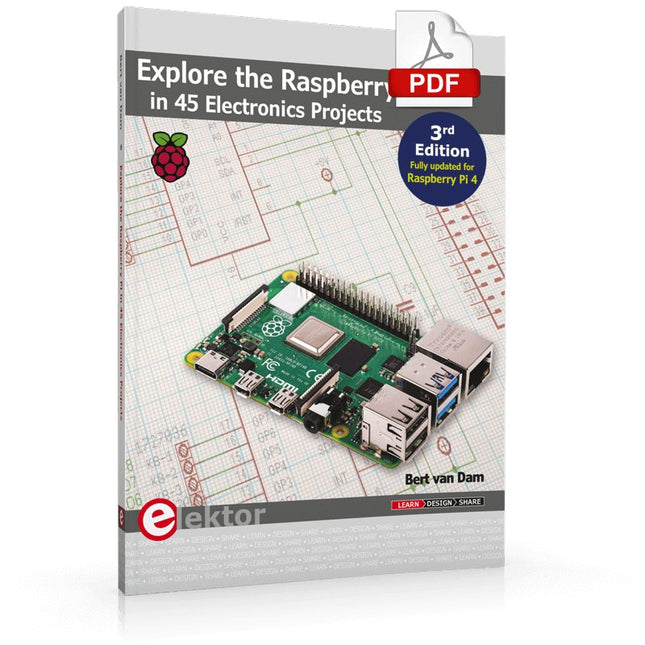
3rd Edition – Fully updated for Raspberry Pi 4
The Raspberry Pi is a very cheap but complete computer system that allows all sorts of electronics parts and extensions to be connected. This book addresses one of the strongest aspects of the Raspberry Pi: the ability to combine hands-on electronics and programming.
Combine hands-on electronics and programming
After a short introduction to the Raspberry Pi you proceed with installing the required software. The SD card that can be purchased in conjunction with this book contains everything to get started with the Raspberry Pi. At the side of the (optional) Windows PC, software is used which is free for downloading. The book continues with a concise introduction to the Linux operating system, after which you start programming in Bash, Python 3 and Javascript. Although the emphasis is on Python, the coverage is brief and to the point in all cases – just enabling you to grasp the essence of all projects and start adapting them to your requirements. All set, you can carry on with fun projects.
The book is ideal for self-study
No fewer than 45 exciting and compelling projects are discussed and elaborated in detail. From a flashing lights to driving an electromotor; from processing and generating analog signals to a lux meter and a temperature control. We also move to more complex projects like a motor speed controller, a web server with CGI, client-server applications and Xwindows programs.
Each project has details of the way it got designed that way
The process of reading, building, and programming not only provides insight into the Raspberry Pi, Python, and the electronic parts used, but also enables you to modify or extend the projects any way you like. Also, feel free to combine several projects into a larger design.
Maîtrise de la puce RP2040 avec plus de 60 projets à réaliser et à programmer
Les cartes Raspberry Pi Pico et Pico W sont animées par un microcontrôleur ARM Cortex M0+ RP2040 à double coeur, rapide, efficace et peu coûteux, qui fonctionne jusqu'à 133 MHz et dispose de 264 Ko de SRAM et de 2 Mo de mémoire Flash. Outre une vaste mémoire, le Pico et le Pico W disposent de nombreuses broches GPIO et d'interfaces telles que CA/N, SPI, I²C, UART, MLI, de fonctions de temporisation, d'une interface de débogage matériel et d'un capteur de température interne.
La carte Raspberry Pi Pico W comporte en plus une puce CYW43439 Bluetooth et Wi-Fi d'Infineon. Au moment de la rédaction de ce livre, le micrologiciel Bluetooth pour le Pico W n'était pas encore disponible. Le Wi-Fi à 2,4 GHz est toutefois entièrement pris en charge avec les protocoles 802.11b/g/n.
Ce livre est une introduction à l'utilisation du Raspberry Pi Pico W avec le langage de programmation MicroPython. Les quelque soixante projets testés et opérationnels sont présentés à l'aide de l'environnement de développement intégré (EDI) Thonny. Les sujets abordés sont nombreux :
Installation de MicroPython sur le Raspberry Pi Pico depuis un PC
Interruptions de l'horloge et interruptions externes
Convertisseur analogique-numérique (CA/N)
Capteurs de température interne et externe
Capteurs externes (pression, humidité, pouls, à ultrasons)
Enregistrement de données
MLI, UART, I²C et SPI
Bluetooth, Wi-Fi et applis sur smarphone
Convertisseur numérique-analogique (CN/A)
Tous les projets ont été testés et éprouvés. Ils peuvent être mis en oeuvre sur le Raspberry Pi Pico ainsi que sur le Raspberry Pi Pico W. Toutefois les projets avec une liaison Wi-Fi ne fonctionnent que sur le Pico W. Une petite expérience en programmation et en électronique est nécessaire pour suivre les projets. De brèves descriptions, des schémas fonctionnels, des schémas détaillés du câblage des montages et des listings MicroPython complets sont fournis pour tous les projets.
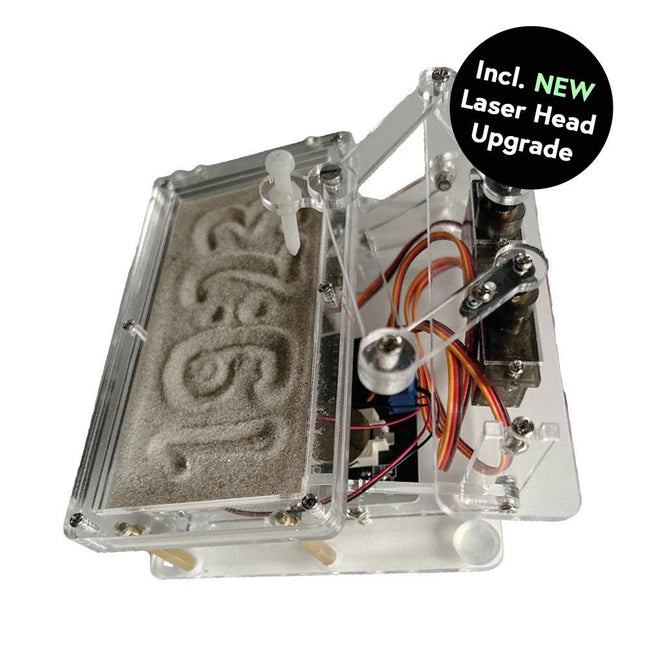
Dieses Bundle enthält die beliebte Elektor Sanduhr für Raspberry Pi Pico und das neue Elektor Laserkopf-Upgrade und bietet damit noch mehr Möglichkeiten zur Zeitanzeige. Sie können die aktuelle Uhrzeit nicht nur in Sand "gravieren", sondern sie jetzt auch alternativ auf eine im Dunkeln leuchtende Folie schreiben oder grüne Zeichnungen erstellen.
Inhalt des Bundles
Elektor Sanduhr für Raspberry Pi Pico (Einzelpreis: 50 €)
Elektor Laserkopf-Upgrade für Sanduhr (Einzelpreis: 35 €)
Elektor Sanduhr für Raspberry Pi Pico (Raspberry Pi-basierter Eyecatcher)
Eine handelsübliche Sanduhr zeigt nur, wie die Zeit verrinnt. Dagegen zeigt diese Raspberry Pi Pico-gesteuerte Sanduhr die genaue Uhrzeit an, indem die vier Ziffern für Stunde und Minute in die Sandschicht "eingraviert" werden. Nach einer einstellbaren Verzögerung wird der Sand durch zwei Vibrationsmotoren flachgedrückt und der Zyklus beginnt von vorne.
Das Herzstück der Sanduhr sind zwei Servomotoren, die über einen Pantographenmechanismus einen Schreibstift antreiben. Ein dritter Servomotor hebt den Stift auf und ab. Der Sandbehälter ist mit zwei Vibrationsmotoren ausgestattet, um den Sand zu glätten. Der elektronische Teil der Sanduhr besteht aus einem Raspberry Pi Pico und einer RTC/Treiberplatine mit Echtzeituhr, plus Treiberschaltungen für die Servomotoren.
Eine ausführliche Bauanleitung steht zum Download bereit.
Features
Abmessungen: 135 x 110 x 80 mm
Bauzeit: ca. 1,5 bis 2 Stunden
Lieferumfang
3x vorgeschnittene Acrylplatten mit allen mechanischen Teilen
3x Mini-Servomotoren
2x Vibrationsmotoren
1x Raspberry Pi Pico
1x RTC/Treiberplatine mit montierten Teilen
Muttern, Bolzen, Abstandshalter und Drähte für die Baugruppe
Feinkörniger weißer Sand
Elektor Laserkopf-Upgrade für Sanduhr
Der neue Elektor-Laserkopf verwandelt die Elektor Sanduhr in eine Uhr, die die Zeit auf eine im Dunkeln leuchtende Folie statt auf Sand schreibt. Neben der Anzeige der Zeit können damit auch flüchtige Zeichnungen erstellt werden. Der 5-mW-Laserpointer mit einer Wellenlänge von 405 nm erzeugt leuchtend grüne Zeichnungen auf der im Dunkeln leuchtenden Folie. Um optimale Ergebnisse zu erzielen, verwenden Sie das Kit in einem schwach beleuchteten Raum. Achtung: Schauen Sie niemals direkt in den Laserstrahl!
Der Bausatz enthält alle notwendigen Komponenten, es ist jedoch das Anlöten von drei Drähten erforderlich.
Hinweis: Dieses Kit ist auch mit der originalen Arduino-basierten Sanduhr aus dem Jahr 2017 kompatibel. Weitere Einzelheiten finden Sie unter Elektor 1-2/2017 und Elektor 1-2/2018.
Diese Ausgabe steht allen GOLD- und GREEN-Mitgliedern auf der ElektorMagazine-Website zum Download bereit!
Sie sind noch kein Mitglied? Hier klicken!
PIO-Programmierung des Raspberry Pi PicoNeun Befehle, viele Möglichkeiten
KI aus dem Browser befreienSo nutzen Sie KI-CLIs zum Programmieren, Kompilieren und Validieren von Embedded-Projekten
Der Scrutiny DebuggerDebuggen, Visualisieren und Testen von Embedded-C/C++ Code
Sigfox-Breakout-Board (Teil 1)Ein selbst gebautes Funk-BoB
Rauscharmes Labor-Netzteil (Teil 2)Konstruktion, Montage und praktische Implementierung
Einfacher Signalgenerator mit dem RP2040Analoge und digitale Signale für rund 10 Euro
Matter und Edge-KI für die Smart Homes der ZukunftBieten die neuesten Updates von Matter und der Aufstieg der Edge-KI Entwicklern endlich die Werkzeuge, um das versprochene intelligente und vernetzte Smart Home zu schaffen?
Die SMU für alleSiglent bringt die SMM3000X-Serie auf den Markt
DifferenzdrucksensorenVorausschauende Wartung in HLK-Systemen
Security by DesignSchadensbegrenzung durch Entwicklungsprinzipien
Embedded Security ist nicht mehr optional
CRA und PQC setzen neue Prioritäten für Embedded-SicherheitWarum auch kleine IoT- und Industrie-Unternehmen einen Upgrade-Plan benötigen
embedded world 2026Interview mit Benedikt Weyerer, Executive Director der embedded world
I3C in der PraxisMit Hardware von ST und Microchip
Das BLEnky-ProjektSchnelles Prototyping für Bluetooth-Low-Energy-Anwendungen
PulsbreitensteuerungVom einfachen Thermostat bis zum geglätteten Analogsignal
AudiotronicsKlangvolle Elektronik zum Selberbauen
ESP32-Audio-Transceiver-Board (Teil 4)Taktsynchronisation – und eine kabelgebundene Option
2026: Eine KI-OdysseeDer Vibe-Coding-Kater von 2025
Symmetrische DC-LastGleichstromlast, statisch oder dynamisch und symmetrisch
Gesichter zählen mit MaixCAMEine einfache Methode zur Erfassung von Publikumsgrößen
Entièrement mise à jour pour le Raspberry Pi 5
Raspberry Pi 5 est un petit ordinateur intelligent, de construction britannique qui regorge de potentiel. Fabriqué à l'aide d'un processeur économe en énergie, le Raspberry Pi est conçu pour vous aider à apprendre le codage, découvrir comment fonctionne un ordinateur et construire vos propres projets uniques et incroyables. Ce guide est conçu pour vous montrer à quel point il est facile de démarrer.
Apprendre à :
Configurez votre Raspberry Pi, installez son système d'exploitation, et commencez à utiliser cet ordinateur entièrement fonctionnel.
Commencez à coder des projets, avec des guides étape par étape utilisant les langages de programmation Scratch 3, Python et MicroPython.
Expérimentez en connectant des composants électroniques, et amusez-vous à créer des projets incroyables.
Nouveauté de la 5ème édition :
Mise à jour pour les derniers ordinateurs Raspberry Pi : Raspberry Pi 5 et Raspberry Pi Zèro 2 W.
Couvre le dernier système d'exploitation Raspberry Pi.
Comprend un nouveau chapitre sur le Raspberry Pi Pico !
Téléchargements
GitHub
In 35 Projects with the Raspberry Pi and Arduino
The Internet of Things (IoT) is a trend with a strong technological impulse. At home, we want to do everything on our tablets, from browsing Facebook to watching TV, from operating lights to keeping an eye on the temperature.
In 35 fun projects, this book will show you how to build your own Internet of Things system. We'll cover the hardware (primarily the Raspberry Pi and Arduino) and the software that makes control via Internet possible. We employ Wi-Fi and radio links so no requirement any longer to install cabling crisscross through your home.
Assuming the projects in the book are finished, you have a complete Internet of Things system that allows you to control and view of everything in your home. For example, if there's something in the mail box or the car is securely in the garage. Also, you can switch on the lights and the alarm from your couch. The crisp explanations allow the projects to be customized with ease, for example, to turn on your coffee machine or TV remotely. The index gives easy access to creative projects that can serve as an example, enabling you to do all the connecting to the IoT independently. All project software can be downloaded free of charge from the Elektor website.
In this unique book, Raspberry Pi, Arduino and HTML webpages with stylesheets and JavaScript come together in clearly-described, easy-to-build projects. This special book is an essential part of your collection!
The Arduino Uno is an open-source microcontroller development system encompassing hardware, an Integrated Development Environment (IDE), and a vast number of libraries. It is supported by an enormous community of programmers, electronic engineers, enthusiasts, and academics. The libraries in particular really smooth Arduino programming and reduce programming time. What’s more, the libraries greatly facilitate testing your programs since most come fully tested and working.
The Raspberry Pi 4 can be used in many applications such as audio and video media devices. It also works in industrial controllers, robotics, games, and in many domestic and commercial applications. The Raspberry Pi 4 also offers Wi-Fi and Bluetooth capability which makes it great for remote and Internet-based control and monitoring applications.
This book is about using both the Raspberry Pi 4 and the Arduino Uno in PID-based automatic control applications. The book starts with basic theory of the control systems and feedback control. Working and tested projects are given for controlling real-life systems using PID controllers. The open-loop step time response, tuning the PID parameters, and the closed-loop time response of the developed systems are discussed together with the block diagrams, circuit diagrams, PID controller algorithms, and the full program listings for both the Raspberry Pi and the Arduino Uno.
The projects given in the book aim to teach the theory and applications of PID controllers and can be modified easily as desired for other applications. The projects given for the Raspberry Pi 4 should work with all other models of Raspberry Pi family.
The book covers the following topics:
Open-loop and closed-loop control systems
Analog and digital sensors
Transfer functions and continuous-time systems
First-order and second-order system time responses
Discrete-time digital systems
Continuous-time PID controllers
Discrete-time PID controllers
ON-OFF temperature control with Raspberry Pi and Arduino Uno
PID-based temperature control with Raspberry Pi and Arduino Uno
PID-based DC motor control with Raspberry Pi and Arduino Uno
PID-based water level control with Raspberry Pi and Arduino Uno
PID-based LED-LDR brightness control with Raspberry Pi and Arduino Uno