
Suchergebnisse für "e or book or eagle or getting or started or guide"
-

Elektor Digital Ultimate Arduino Uno Hardware Manual (E-book)
A Reference and User Guide for the Arduino Uno Hardware and Firmware A manual providing up-to-date hardware information for the popular Arduino Uno, the easy to use open-source electronics platform used by hobbyists, makers, hackers, experimenters, educators and professionals. Get all the information that you need on the hardware and firmware found on Arduino Uno boards in this handy reference and user guide. ldeal for the workbench or desktop Contains all of the Arduino Uno hardware information in one place Covers Arduino / Genuino Uno revision 3 and earlier boards Easily find hardware technical specifications with explanations Pin reference chapter with interfacing examples Diagrams and illustrations for easy reference to alternate pin functions and hardware connections Learn to back up and restore firmware on the board, or load new firmware Basic fault finding and repair procedures for Arduino Uno boards Power supply circuits simplified and explained Mechanical dimensions split into five easy to reference diagrams Contains circuit diagrams, parts list and board layout reference to easily locate components
€ 29,95
Mitglieder: € 26,96
-

Elektor Digital Elektor September/October 2025 (PDF) EN
Elektor GREEN and GOLD members can download their digital edition here. Not a member yet? Click here. ESP32 Audio Transceiver Board (Part 2)Wireless Audio Transmission Inductive AM TransmitterUses Pico’s PIO in an Arduino Sketch Navigating Wireless ProtocolsA Technical Guide Satellite Tracking Using LoRaThe TinyGS Network Bringing Space Data to Earth 4G-Compatible SMS Remote ControlRemotely Control Your Equipment High-Speed ProbeHigh-Impedance Inputs for Signals up to 200 MHz From Life’s ExperienceKafka KrakenSDR Performance Tests with the RP2350Is an Upgrade from Raspberry Pi Pico 1 to Pico 2 Worthwhile? Contact-Free E-Field Measurements (2)A Laser Vibrometer for Assessing the Membrane's Vibrations Crystals and OscillatorsImproving Crystal Accuracy Through Capacitor Selection Starting Out in ElectronicsSpecial Audio ICs Getting Started with Coding a DIY Project SPECTRAN® V6 MobileModular, Configurable Real-Time Spectrum Analyzer for Reliable Measurements Across All Frequency Ranges The Future of AI Is Forged in SiliconAn Interview with Anastasiia Nosova Autonomous Sensor Node v2.0 (System Architecture)Solar-Powered Sensing Platform with Integrated GPS, LoRaWAN, and More Precise PositioningBluetooth Channel Sounding Tested Powering the Future of Wireless CommunicationBTRY’s Ultra-Thin Solid-State Batteries Test-Driven Development in Firmware Writing Phone-Controlled Model CarWi-Fi + ESP32 + Smartphone = Remote Control 2025: An AI OdysseyAI Reasoning Models: The Chain-of-Thought Revolution Solar Charge Controller with MPP Tracking (3)Software and Commissioning Raspberry Pi Zero Web Streaming CameraUsing the ZeroTier VPN
€ 9,50
-

Elektor Publishing KiCad Like A Pro – Fundamentals and Projects
Getting started with the world’s best open-source PCB tool The latest iteration of KiCad, the world’s best free-to-use Printed Circuit Board tool, is packed with features usually found only in expensive commercial CAD tools. This modern, cross-platform application suite built around schematic and design editors, with auxiliary applications is a stable and mature PCB tool. KiCad 8 is a perfect fit for electronic engineers and makers. Here are the most significant improvements and features in KiCad 8, both over and under the hood: Modern user interface, completely redesigned from earlier versions Improved and customizable electrical and design rule checkers Theme editor allowing you to customize KiCad on your screen Ability to import projects from Eagle, CADSTART, and more Python scripting API Improved integrated SPICE circuit simulator Multi-sheet schematics Filters define selectable elements Enhanced interactive router helps you draw single tracks and differential pairs with precision New or enhanced tools to draw tracks, measure distances, tune track lengths, etc. Advanced interactive router Built-in bill of materials generator Realistic ray-tracing capable 3D viewer Customizable teardrops Plug-in manager for quick installation of themes, libraries and functionalities such as autorouters and BOM generators This book will teach you to use KiCad through a practical approach. It will help you become productive quickly and start designing your own boards. Example projects illustrate the basic features of KiCad, even if you have no prior knowledge of PCB design. The author describes the entire workflow from schematic entry to the intricacies of finalizing the files for PCB production and offers sound guidance on the process. Further full-fledged projects, of incremental difficulty, will be presented in a second book, together with a variety of advanced recipes.
-
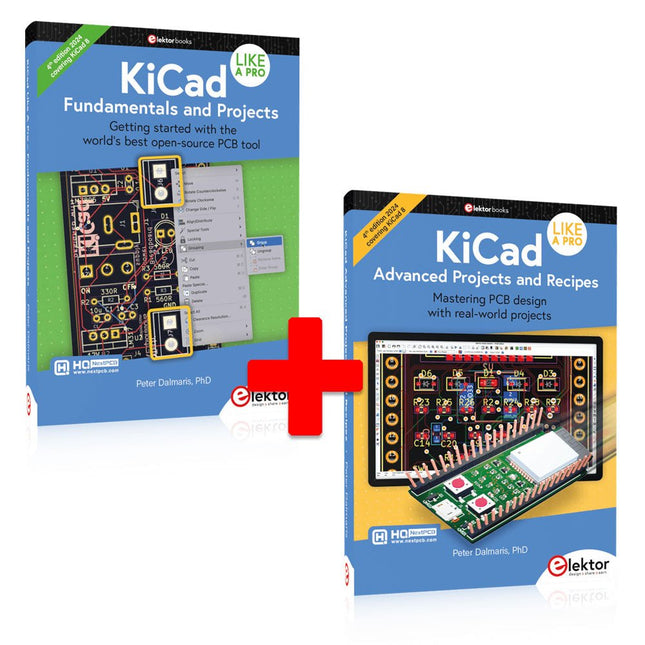
Elektor Bundles KiCad Like A Pro (Bundle)
Dieses Bundle enthält beide Bände von "KiCad Like a Pro" (4. Ausgabe 2024). In Fundamentals and Projects (Einzelpreis: 49,95 €) lernen Sie den praktischen Umgang mit KiCad kennen, sodass Sie schnell produktiv werden und mit dem Entwurf Ihrer eigenen Boards beginnen können. Mit Advanced Projects and Recipes (Einzelpreis: 44,95 €) können Sie Ihre neuen KiCad-Kenntnisse üben, indem Sie sich selbst mit einer Reihe realer Projekte herausfordern. Die neueste Version von KiCad, dem weltweit besten kostenlosen PCB-Tool, ist vollgepackt mit Funktionen, die normalerweise nur in teuren kommerziellen CAD-Tools zu finden sind. Diese moderne, plattformübergreifende Anwendungssuite, die auf Schaltplan- und Designeditoren mit Zusatzanwendungen basiert, ist ein stabiles und ausgereiftes PCB-Tool. KiCad 8 ist perfekt für Elektronikingenieure und -hersteller geeignet. Hier sind die wichtigsten Verbesserungen und Funktionen in KiCad 8, sowohl über als auch unter der Haube: Moderne Benutzeroberfläche, im Vergleich zu früheren Versionen komplett neu gestaltet Verbesserte und anpassbare Prüffunktionen für elektrische und Designregeln Designeditor, mit dem Sie KiCad auf Ihrem Bildschirm anpassen können Möglichkeit zum Importieren von Projekten aus Eagle, CADSTART und mehr Python-Skripting-API Verbesserter integrierter SPICE-Schaltkreissimulator Mehrblatt-Schaltpläne Filter definieren auswählbare Elemente Verbesserter interaktiver Router hilft Ihnen, einzelne Spuren und Differenzialpaare präzise zu zeichnen Neue oder verbesserte Tools zum Zeichnen von Spuren, Messen von Entfernungen, Anpassen von Spurlängen usw. Erweiterte interaktive Router Integrierter Stücklistengenerator Realistischer Raytracing-fähiger 3D-Viewer Anpassbare Teardrops Plug-in-Manager für die schnelle Installation von Designs, Bibliotheken und Funktionen wie Autoroutern und Stücklistengeneratoren Das erste Buch KiCad Like A Pro – Fundamentals and Projects bringt Ihnen den Umgang mit KiCad durch einen praktischen Ansatz bei. Es wird Ihnen helfen, schnell produktiv zu werden und mit dem Entwurf Ihrer eigenen Platinen zu beginnen. Beispielprojekte veranschaulichen die grundlegenden Funktionen von KiCad, auch wenn Sie keine Vorkenntnisse im PCB-Design haben. Der Autor beschreibt den gesamten Arbeitsablauf von der Schaltplaneingabe bis zu den Feinheiten der Fertigstellung der Dateien für die PCB-Produktion und bietet fundierte Anleitungen für den Prozess. Das zweite Buch KiCad Like A Pro – Advanced Projects and Recipes hilft Ihnen, Ihre neuen KiCad-Kenntnisse zu üben, indem es Sie in einer Reihe realer Projekte herausfordert. Die Projekte werden durch einen umfassenden Satz von Rezepten mit detaillierten Anweisungen zur Erledigung einer Vielzahl einfacher und komplexer Aufgaben unterstützt. Entwerfen Sie die Platine für eine Solarstromversorgung, ein LED-Matrix-Array, einen Arduino-betriebenen Datenlogger und eine benutzerdefinierte ESP32-Platine. Lernen Sie die Feinheiten des interaktiven Routers kennen, erfahren Sie, wie Sie KiCad-Projektteams mit Git verwalten, wie Sie einen Autorouter auf 2- und 4-lagigen Platinen verwenden und vieles mehr.


