
Suchergebnisse für "raspberry or pi or camera or module or 3 or noir"
-

Elektor Bundles Logic Analyzers in Practice (Bundle)
Book: Logic Analyzers in Practice Step-by-step instructions guide you through the analysis of modern protocols such as I²C, SPI, UART, RS-232, NeoPixel, WS28xx, HD44780 and 1-Wire. With the help of numerous experimental circuits based on the Raspberry Pi Pico, Arduino Uno and the Bus Pirate, you will learn the practical application of popular USB logic analyzers. All the experimental circuits presented in this book have been fully tested and are fully functional. The necessary program listings are included – no special programming or electronics knowledge is required for these circuits. The programming languages used are MicroPython and C along with the development environments Thonny and Arduino IDE. This book uses several models of flexible and widely available USB logic analyzers and shows the strengths and weaknesses of each price range. You will learn about the criteria that matter for your work and be able to find the right device for you. Whether Arduino, Raspberry Pi or Raspberry Pi Pico, the example circuits shown allow you to get started quickly with protocol analysis and can also serve as a basis for your own experiments. After reading this book, you will be familiar with all the important terms and contexts, conduct your own experiments, analyze protocols independently, culminating in a comprehensive knowledge set of digital signals and protocols. USB Logic Analyzer (8-ch, 24 MHz) This USB Logic Analyzer is an 8-channel logic analyzer with each input dual purposed for analog data recording. It is perfect for debugging and analyzing signals like I²C, UART, SPI, CAN and 1-Wire. It operates by sampling a digital input connected to a device under test (DUT) at a high sample rate. The connection to the PC is via USB. Specifications Channels 8 digital channels Maximum sampling rate 24 MHz Maximum input voltage 0 V ~ 5 V Operating temperature 0°C ~ 70°C Input impedance 1 MΩ || 10 pF Supported protocols I²C, SPI, UART, CAN, 1-Wire, etc. PC connection USB Dimensions 55 x 28 x 14 mm Downloads Software This bundle contains: Book 'Logic Analyzers in Practice' (normal price: €35) USB Logic Analyzer (8-ch, 24 MHz) (normal price: €20) USB Cable Jumper Wire Ribbon Cable
€ 54,95€ 44,95Bestpreis
-

Elektor Digital Raspberry Pi 3 – Basic to Advanced Projects (E-book)
This book is about the Raspberry Pi 3 computer and its use in various control and monitoring applications. The book explains in simple terms and with tested and working example projects, how to configure the Raspberry Pi 3 computer, how to install and use the Linux operating system, and how to write hardware based applications programs using the Python programming language. The nice feature of this book is that it covers many Raspberry Pi 3 based hardware projects using the latest hardware modules such as the Sense HAT, Swiss Pi, MotoPi, Camera module, and many other state of the art analog and digital sensors. An important feature of the Raspberry Pi 3 is that it contains on-board Bluetooth and Wi-Fi modules. Example projects are given in the book on using the Wi-Fi and the Bluetooth modules to show how real-data can be sent to the Cloud using the Wi-Fi module, and also how to communicate with an Android based mobile phone using the Bluetooth module. The book is ideal for self-study, and is intended for electronic/electrical engineering students, practising engineers, research students, and for hobbyists. It is recommended that the book should be followed in the given Chapter order. Over 30 projects are given in the book. All the projects in the book are based on the Python programming language and they have been fully tested. Full program listings of every project are given in the book with comments and full descriptions. Experienced programmers should find it easy to modify and update the programs to suit their needs. The following sub-headings are given for each project to make it as easy as possible for the readers to follow the projects: Project title Description Aim of the project Raspberry Pi type Block diagram Circuit diagram Program listing
€ 29,95
Mitglieder: € 26,96
-

Elektor Publishing Logic Analyzers in Practice
PC USB Logic Analyzers with Arduino, Raspberry Pi, and Co. Step-by-step instructions guide you through the analysis of modern protocols such as I²C, SPI, UART, RS-232, NeoPixel, WS28xx, HD44780 and 1-Wire. With the help of numerous experimental circuits based on the Raspberry Pi Pico, Arduino Uno and the Bus Pirate, you will learn the practical application of popular USB logic analyzers. All the experimental circuits presented in this book have been fully tested and are fully functional. The necessary program listings are included – no special programming or electronics knowledge is required for these circuits. The programming languages used are MicroPython and C along with the development environments Thonny and Arduino IDE. This book uses several models of flexible and widely available USB logic analyzers and shows the strengths and weaknesses of each price range. You will learn about the criteria that matter for your work and be able to find the right device for you. Whether Arduino, Raspberry Pi or Raspberry Pi Pico, the example circuits shown allow you to get started quickly with protocol analysis and can also serve as a basis for your own experiments. After reading this book, you will be familiar with all the important terms and contexts, conduct your own experiments, analyze protocols independently, culminating in a comprehensive knowledge set of digital signals and protocols.
€ 34,95
Mitglieder: € 31,46
-
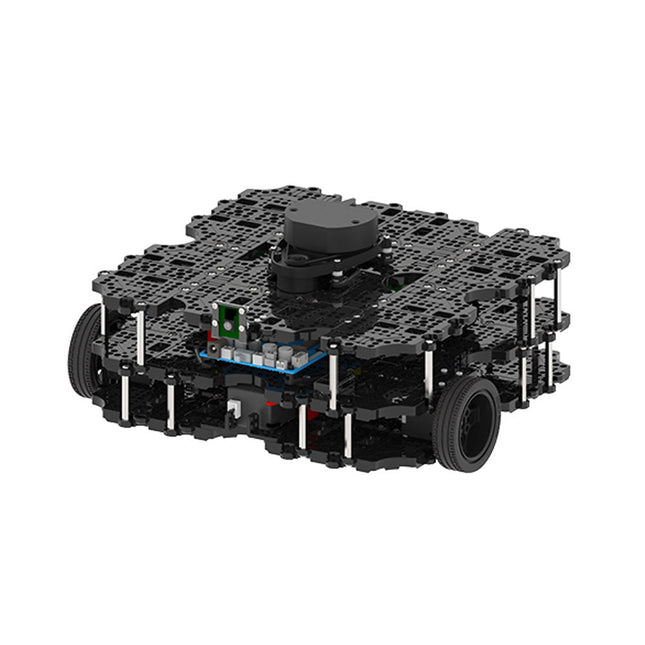
Robotis Robotis TurtleBot3 Waffle Pi (inkl. Raspberry Pi 4)
Weltweit beliebteste ROS-Plattform TurtleBot ist der beliebteste Open-Source-Roboter für Bildung und Forschung. Die neue Generation TurtleBot3 ist ein kleiner, kostengünstiger, voll programmierbarer, ROS-basierter mobiler Roboter. Er ist für Bildung, Forschung, Hobby und Produktprototyping gedacht. Erschwingliche Kosten TurtleBot wurde entwickelt, um die kostenbewussten Bedürfnisse von Schulen, Laboren und Unternehmen zu erfüllen. TurtleBot3 ist der erschwinglichste Roboter unter den SLAM-fähigen mobilen Robotern, die mit einem 360°-Laser-Distanzsensor LDS-01 ausgestattet sind. ROS Standard Die Marke TurtleBot wird von Open Robotics verwaltet, das ROS entwickelt und pflegt. Heutzutage ist ROS die bevorzugte Plattform für alle Robotiker auf der ganzen Welt geworden. TurtleBot kann mit bestehenden ROS-basierten Roboterkomponenten integriert werden, aber TurtleBot3 kann eine erschwingliche Plattform für diejenigen sein, die mit dem Erlernen von ROS beginnen möchten. Erweiterbarkeit TurtleBot3 ermutigt Benutzer, seine mechanische Struktur mit einigen alternativen Optionen anzupassen: Open Source Embedded Board (als Steuerplatine), Computer und Sensoren. Der TurtleBot3 Waffle Pi ist eine zweirädrige Plattform mit Differentialantrieb, kann aber strukturell und mechanisch in vielerlei Hinsicht angepasst werden: Autos, Fahrräder, Anhänger und so weiter. Erweitern Sie Ihre Ideen jenseits der Vorstellungskraft mit verschiedenen SBC, Sensoren und Motoren auf einer skalierbaren Struktur. Modularer Aktuator für mobilen Roboter TurtleBot3 ist in der Lage, durch den Einsatz von 2 DYNAMIXEL's in den Radgelenken präzise räumliche Daten zu erhalten. Die DYNAMIXEL der XM-Serie können in einem von 6 Betriebsmodi betrieben werden (XL-Serie: 4 Betriebsmodi): Geschwindigkeitsregelung für die Räder, Drehmomentregelung oder Positionsregelung für die Gelenke, usw. DYNAMIXEL kann auch für die Herstellung eines mobilen Manipulators verwendet werden, der leicht ist, aber mit Geschwindigkeits-, Drehmoment- und Positionssteuerung präzise gesteuert werden kann. DYNAMIXEL ist eine Kernkomponente, die den TurtleBot3 perfekt macht. Er ist einfach zu montieren, zu warten, zu ersetzen und neu zu konfigurieren. Offene Steuerplatine für ROS Die Steuerplatine ist sowohl hardware- als auch softwareseitig für die ROS-Kommunikation offengelegt. Die Open-Source-Steuerungsplatine OpenCR1.0 ist leistungsfähig genug, um nicht nur DYNAMIXELs, sondern auch ROBOTIS-Sensoren zu steuern, die häufig für grundlegende Erkennungsaufgaben auf kostengünstige Weise verwendet werden. Verschiedene Sensoren wie z. B. Berührungssensor, Infrarotsensor, Farbsensor und eine Handvoll weiterer sind verfügbar. Das OpenCR1.0 verfügt über einen IMU-Sensor im Inneren des Boards, so dass es die präzise Steuerung für unzählige Anwendungen verbessern kann. Das Board verfügt über 3,3 V, 5 V und 12 V Stromversorgungen, um die verfügbaren Computergeräte zu verstärken. Open Source Die Hardware, Firmware und Software von TurtleBot3 sind Open Source, was bedeutet, dass die Benutzer willkommen sind, die Quellcodes herunterzuladen, zu ändern und zu teilen. Alle Komponenten des TurtleBot3 werden aus kostengünstigem Kunststoff im Spritzgussverfahren hergestellt, die 3D-CAD-Daten sind jedoch auch für den 3D-Druck verfügbar. Technische Daten Maximale Translationsgeschwindigkeit 0,26 m/s Maximale Rotationsgeschwindigkeit 1,82 rad/s (104.27 deg/s) Maximale Nutzlast 30 kg Abmessungen (L x B x H) 281 x 306 x 141 mm Gewicht (+ SBC + Batterie + Sensoren) 1,8 kg Schwelle des Kletterns 10 mm oder niedriger Voraussichtliche Betriebsdauer 2h Voraussichtliche Ladezeit 2h 30m SBC (Single Board Computer) Raspberry Pi 4 (2 GB RAM) MCU 32-bit ARM Cortex-M7 mit FPU (216 MHz, 462 DMIPS) Fernbedienung RC-100B + BT-410 Set (Bluetooth 4, BLE) Aktuator XL430-W210 LDS (Laser-Abstandssensor) 360 Laser-Abstandssensor LDS-01 or LDS-02 Kamera Raspberry Pi Camera Module v2.1 IMU Gyroskop 3 AchsenBeschleunigungsmesser 3 Achsen Stromanschlüsse 3,3 V/800 mA5 V/4 A12 V/1 A Erweiterungspins GPIO 18 PinsArduino 32 Pin Peripherie 3x UART, 1x CAN, 1x SPI, 1x I²C, 5x ADC, 4x 5-pin OLLO DYNAMIXEL Ports 3x RS485, 3x TTL Audio Several programmable beep sequences Programmierbare LEDs 4x User LED Status-LEDs 1x Board Status LED1x Arduino-LED1x Power-LED Tasten und Schalter 2x Drucktasten, 1x Reset-Taste, 2x Dip-Schalter Akku Lithium Polymer 11,1 V 1800 mAh / 19,98 Wh 5C PC-Verbindung USB Firmware-Upgrade via USB / via JTAG Netzadapter (SMPS) Eingang: 100-240 VAC 50/60 Hz, 1,5 A @maxAusgang: 12 VDC, 5 A Downloads ROS Robot Programming GitHub E-Manual Community
€ 1.879,00
Bestpreis
-
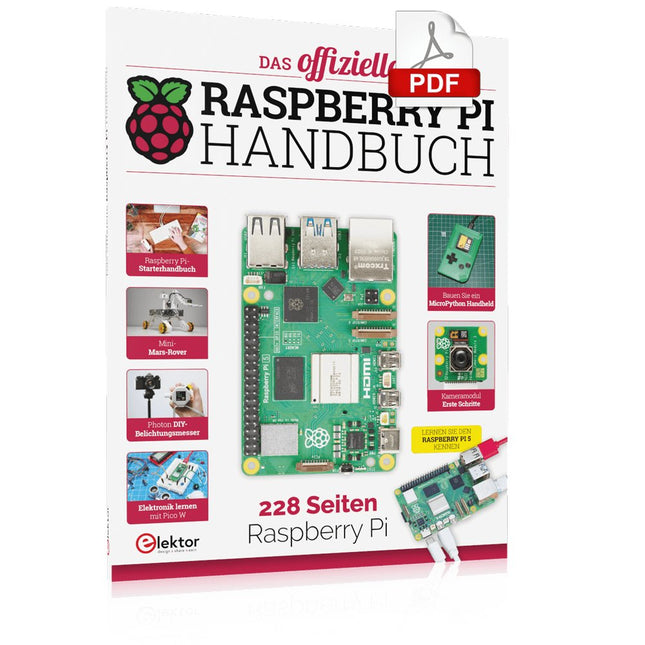
Elektor Digital Das offizielle Raspberry Pi Handbuch (PDF)
Von den Machern von MagPi, dem offiziellen Raspberry Pi Magazin Starten Sie jetzt mit dem Raspberry Pi 5, dem neuesten und besten Minicomputer von Raspberry Pi – und lernen Sie, mit diesem unglaublichen Computer zu programmieren und Projekte zu erstellen. In diesem Buch finden Sie außerdem jede Menge kreative Ideen und Tipps, die Sie mit dem Raspberry Pi 4, dem Raspberry Pi Zero 2 W und dem Raspberry Pi Pico W umsetzen können. Mit den neuesten Reviews, Tutorials, Projekten, Anleitungen und mehr ist dies Ihre ultimative Ressource für den Raspberry Pi! 228 Seiten über Raspberry Pi Alles, was Sie über den Raspberry Pi 5 wissen müssen Erste Schritte für jeden Raspberry Pi Viel Spaß mit Elektronik und dem Pico W Inspirierende Projekte für Ihre nächste Bauidee Lernen Sie MicroPython, indem Sie ein Handheld bauen Erste Schritte mit dem Raspberry Pi Kamera Modul Künstliche Intelligenz: Bauen Sie Ihren eigenen GPT Chatbot
€ 29,80
Mitglieder: € 26,82
-
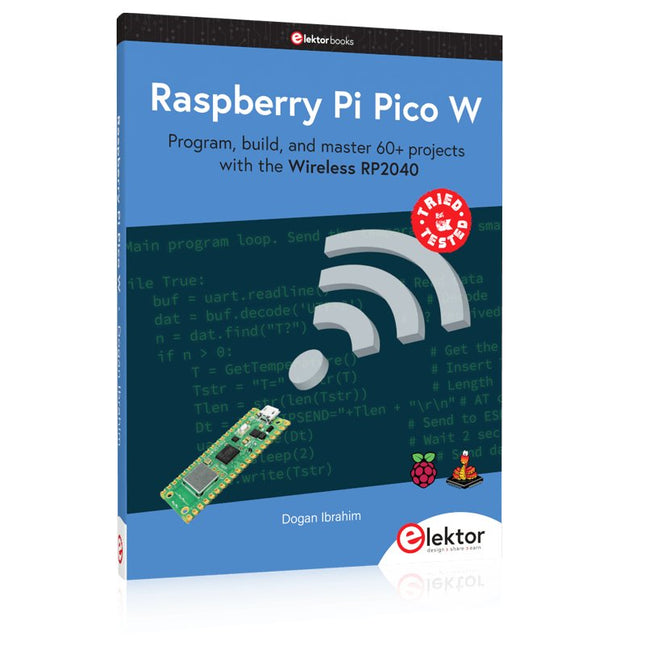
Elektor Publishing Raspberry Pi Pico W (Book)
Program, build, and master 60+ projects with the Wireless RP2040 The Raspberry Pi Pico and Pico W are based on the fast, efficient, and low-cost dual-core ARM Cortex M0+ RP2040 microcontroller chip running at up to 133 MHz and sporting 264 KB of SRAM and 2 MB of Flash memory. Besides spacious memory, the Pico and Pico W offer many GPIO pins, and popular peripheral interface modules like ADC, SPI, I²C, UART, PWM, timing modules, a hardware debug interface, and an internal temperature sensor. The Raspberry Pi Pico W additionally includes an on-board Infineon CYW43439 Bluetooth and Wi-Fi chipset. At the time of writing this book, the Bluetooth firmware was not yet available. Wi-Fi is however fully supported at 2.4 GHz using the 802.11b/g/n protocols. This book is an introduction to using the Raspberry Pi Pico W in conjunction with the MicroPython programming language. The Thonny development environment (IDE) is used in all of the 60+ working and tested projects covering the following topics: Installing the MicroPython on Raspberry Pi Pico using a Raspberry Pi or a PC Timer interrupts and external interrupts Analogue-to-digital converter (ADC) projects Using the internal temperature sensor and external sensor chips Using the internal temperature sensor and external temperature sensor chips Datalogging projects PWM, UART, I²C, and SPI projects Using Bluetooth, WiFi, and apps to communicate with smartphones Digital-to-analogue converter (DAC) projects All projects are tried & tested. They can be implemented on both the Raspberry Pi Pico and Raspberry Pi Pico W, although the Wi-Fi-based subjects will run on the Pico W only. Basic programming and electronics experience are required to follow the projects. Brief descriptions, block diagrams, detailed circuit diagrams, and full MicroPython program listings are given for all projects.
€ 44,95
Bestpreis
-

Elektor Publishing Edge AI Made Practical
AI Projects for the Raspberry Pi with the AI HAT+ Edge AI is transforming everyday devices by putting intelligence where it matters most: directly inside the hardware. With on-device inference, a camera can recognize a visitor instantly, a phone can translate speech without streaming audio to the cloud, and a wearable can detect anomalies in real time—fast, private, and reliable even when the network disappears. This book is your practical guide to building exactly those kinds of systems with the Raspberry Pi AI HAT+ and the Hailo-8L accelerator. You’ll start with clear foundations: core AI and machine-learning concepts, how neural networks work, and what truly distinguishes Edge AI from cloud AI—plus an honest look at ethical considerations and future impacts. Then it’s straight to hands-on physical computing. Step by step, you’ll set up Raspberry Pi OS, power and cooling, and develop in Python using the Thonny IDE. You’ll learn GPIO basics with lights and servos, mount the AI HAT+ hardware, install and verify the Hailo software stack, and connect the right camera—official modules or USB webcams, even multiple cameras. From your first pipeline to real projects, you’ll run person detection, pose estimation, segmentation, and depth estimation, then level up with YOLO object detection: smart alerts, guest counters, and custom extensions. You’ll even connect vision to motion by combining gesture recognition with servo-driven mechanisms, including a robotic arm. With troubleshooting tips, hardware essentials, and a practical Python refresher, this book turns Edge AI from buzzword into buildable reality.
€ 34,95
Mitglieder: € 31,46
-

Elektor Digital Edge AI Made Practical (E-book)
AI Projects for the Raspberry Pi with the AI HAT+ Edge AI is transforming everyday devices by putting intelligence where it matters most: directly inside the hardware. With on-device inference, a camera can recognize a visitor instantly, a phone can translate speech without streaming audio to the cloud, and a wearable can detect anomalies in real time—fast, private, and reliable even when the network disappears. This book is your practical guide to building exactly those kinds of systems with the Raspberry Pi AI HAT+ and the Hailo-8L accelerator. You’ll start with clear foundations: core AI and machine-learning concepts, how neural networks work, and what truly distinguishes Edge AI from cloud AI—plus an honest look at ethical considerations and future impacts. Then it’s straight to hands-on physical computing. Step by step, you’ll set up Raspberry Pi OS, power and cooling, and develop in Python using the Thonny IDE. You’ll learn GPIO basics with lights and servos, mount the AI HAT+ hardware, install and verify the Hailo software stack, and connect the right camera—official modules or USB webcams, even multiple cameras. From your first pipeline to real projects, you’ll run person detection, pose estimation, segmentation, and depth estimation, then level up with YOLO object detection: smart alerts, guest counters, and custom extensions. You’ll even connect vision to motion by combining gesture recognition with servo-driven mechanisms, including a robotic arm. With troubleshooting tips, hardware essentials, and a practical Python refresher, this book turns Edge AI from buzzword into buildable reality.
€ 29,95
Mitglieder: € 26,96
-
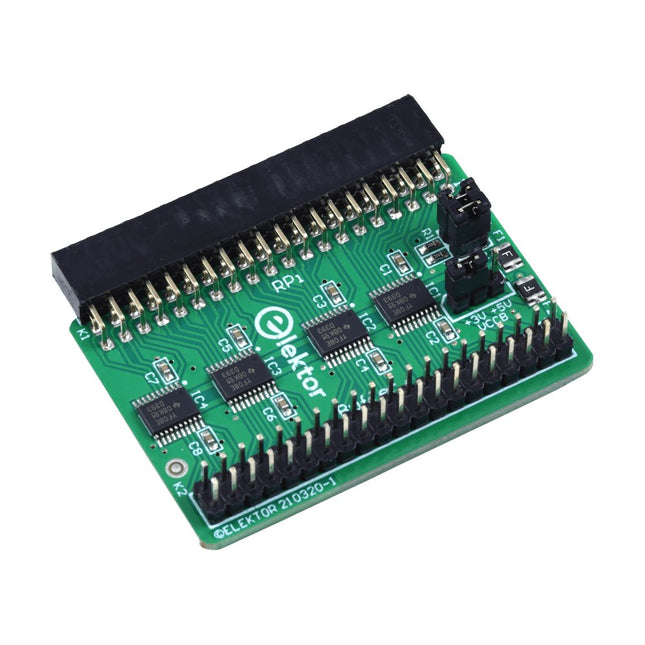
Elektor Labs Elektor Raspberry Pi Buffer Board
Wenn Sie regelmäßig mit dem Raspberry Pi experimentieren und eine Vielzahl von externer Hardware über die Stiftleiste an den GPIO-Port anschließen, haben Sie in der Vergangenheit vielleicht schon einige Schäden verursacht. Das Elektor Raspberry Pi Buffer Board ist dazu da, dies zu verhindern! Das Board ist kompatibel mit Raspberry Pi Zero, Zero 2 (W), 3, 4, 5, 400 und 500. Alle 26 GPIOs sind mit bidirektionalen Spannungswandlern gepuffert, um den Raspberry Pi beim Experimentieren mit neuen Schaltungen zu schützen. Die Platine ist dafür vorgesehen, auf der Rückseite des Raspberry Pi 400/500 eingesetzt zu werden. Der Stecker zum Anschluss an den Raspberry Pi ist eine rechtwinklige 40-polige Buchse (2x20). Die Platine ist nur ein wenig breiter. An die Pufferausgangsbuchse kann ein 40-poliges Flachbandkabel mit entsprechenden 2x20-Steckern angeschlossen werden, um z. B. mit einer Schaltung auf einem Breadboard oder einer Platine zu experimentieren. Die Schaltung verwendet 4x TXS0108E ICs von Texas Instruments. Die Platine lässt sich auch auf einem Raspberry Pi aufstellen. Downloads Schematics Layout
€ 34,95
Mitglieder: € 31,46
-

Elektor Digital Elektor Septembre/Octobre 2026 (PDF) FR
Le téléchargement intégral de ce numéro est disponible pour nos membres GOLD et GREEN sur le site Elektor Magazine ! Pas encore membre ? Cliquez ici. l'ESP-BLASTUn mini drone-fusée ESP32 qui vole à plus de 100 km/h atelier sans fil (1)Modules radio déverrouillés : émetteur-récepteur sub-GHz CC1101 433 MHz émetteur AMAvec le générateur d'ondes carrées/sinusoïdales sur Raspberry Pi Pico STM32Cube Innovation ChallengeParticipez avec votre meilleur projet STM32C5 CoffeeCallerComment une pause café a inspiré un PCB sur mesure audiotroniquesDistorsion harmonique totale Elektor à 65 ansProjets de septembre et octobre au fil des ans Bluetooth Channel Sounding pour le suivi des équipementsMesure de distance avec une précision centimétrique pour l’IoT de nouvelle génération 2026 : une Odyssée de l'IAL'informatique quantique n'est pas le prochain GPU protéger le cloud exige de sécuriser la périphérie premières expériences avec le HackRF ProTests pratiques avec le nouveau matériel SDR mise à niveau du modem de GPRS/2G vers LTE/4GExemple d'un panneau de contrôle d'alarme sans fil antenne en bouclePartie 1 : Une antenne ondes courtes à directivité réglable, à réaliser soi-même convertisseur de radio Internet en AMUn ESP32-S3 comme émetteur projet 2.0 mioty : aperçu généralL'approche de Fraunhofer pour les LPWAN sagesse d'atelierConseils pratiques d'experts Walter, le module IoT compactPartie 2 : Accéder aux services météorologiques et aux services de données
€ 10,95
-

Elektor Publishing The CAN Bus Companion
This book details the use of the Arduino Uno and the Raspberry Pi 4 in practical CAN bus based projects. Using either the Arduino Uno or the Raspberry Pi with off-the-shelf CAN bus interface modules considerably ease developing, debugging, and testing CAN bus based projects. This book is written for students, practicing engineers, enthusiasts, and for everyone else wanting to learn more about the CAN bus and its applications. The book assumes that the reader has some knowledge of basic electronics. Knowledge of the C and Python programming languages and programming the Arduino Uno using its IDE and Raspberry Pi will be useful, especially if the reader intends to develop microcontroller-based projects using the CAN bus. The book should be a useful source of reference material for anyone interested in finding answers to questions such as: What bus systems are available for the automotive industry? What are the principles of the CAN bus? How can I create a physical CAN bus? What types of frames (or data packets) are available in a CAN bus system? How can errors be detected in a CAN bus system and how dependable is a CAN bus system? What types of CAN bus controllers exist? How do I use the MCP2515 CAN bus controller? How do I create 2-node Arduino Uno-based CAN bus projects? How do I create 3-node Arduino Uno-based CAN bus projects? How do I set the acceptance masks and acceptance filters? How do I analyze data on the CAN bus? How do I create 2-node Raspberry Pi-based CAN bus projects? How do I create 3-node Raspberry Pi-based CAN bus projects?
€ 39,95
Mitglieder: € 35,96
-

Elektor Digital The CAN Bus Companion (E-book)
Projects with Arduino Uno & Raspberry Pi with Examples for the MCP2515 CAN Bus Interface Module This book details the use of the Arduino Uno and the Raspberry Pi 4 in practical CAN bus based projects. Using either the Arduino Uno or the Raspberry Pi with off-the-shelf CAN bus interface modules considerably ease developing, debugging, and testing CAN bus based projects. This book is written for students, practicing engineers, enthusiasts, and for everyone else wanting to learn more about the CAN bus and its applications. The book assumes that the reader has some knowledge of basic electronics. Knowledge of the C and Python programming languages and programming the Arduino Uno using its IDE and Raspberry Pi will be useful, especially if the reader intends to develop microcontroller-based projects using the CAN bus. The book should be a useful source of reference material for anyone interested in finding answers to questions such as: What bus systems are available for the automotive industry? What are the principles of the CAN bus? How can I create a physical CAN bus? What types of frames (or data packets) are available in a CAN bus system? How can errors be detected in a CAN bus system and how dependable is a CAN bus system? What types of CAN bus controllers exist? How do I use the MCP2515 CAN bus controller? How do I create 2-node Arduino Uno-based CAN bus projects? How do I create 3-node Arduino Uno-based CAN bus projects? How do I set the acceptance masks and acceptance filters? How do I analyze data on the CAN bus? How do I create 2-node Raspberry Pi-based CAN bus projects? How do I create 3-node Raspberry Pi-based CAN bus projects?
€ 32,95
Mitglieder: € 29,66


