Elektor GREEN- und GOLD-Mitglieder können diese Ausgabe hier herunterladen.
Noch kein Mitglied? Klicken Sie hier , um eine Mitgliedschaft abzuschließen.
Der Raspberry Pi 5 viel besser als sein Vorgänger
KI im Elektroniklabor Entwerfen, Komponenten finden und programmieren
Arduino Nano-Wellenformgenerator Nano + Code = Funktionsgenerator
Solarbetriebene Weihnachtsgirlande umweltfreundliche Lösung für den Balkon
USB-Killerdetektor Vorbeugung ist besser
CNC ein einfaches Gehäuse mit Autodesk Fusion 360 für den persönlichen Gebrauch
Herstellung von Drucken in geringer Stückzahl mit und ohne Montage
Vereinfachte IoT-Simulation mit Wokwi Entwickler Uri Shaked über Design, Software und mehr
Ein Leitfaden zur puristischen Programmierung (Teil 3) CMSIS-Header, automatisierte Tests und ein Webserver
LoRa, ein Schweizer Taschenmesser Teil 2: die Hardware und Software
MEMS-Mikrofon Gestaltung und Konstruktion
Erst probieren, dann löten kostenlose Simulations- und 3D-Designtools
Neue Tools von Microchip! PICkit 5 und MPLAB ICD 5 jetzt verfügbar!
Schnelles Prototyping flexibler, dehnbarer Elektronik wie der Voltera NOVA die Innovation bei Wearables beschleunigt
Galvanische Isolierung Fototransistor-Optokoppler erfolgreich einsetzen
Der Komplex oder die Anybus-Lösung? Embedded Industrial Ethernet in zwei Tagen statt Monaten
Die wesentliche DFM-Checkliste Entwerfen für die Produktion – wie macht man das?
Filamente für den 3D-Druck Arten, Eigenschaften und Verwendungsmöglichkeiten im Prototyping
Spezialisten für effektive Signalanalyse vom ELF- bis zum EHF-Band die neuesten Echtzeit-Spektrumanalysatoren der SPECTRAN® V6-Serie von Aaronia
Herausforderungen der DFM-Analyse für Flex- und Starr-Flex-Designs
Installation einer SMT-Produktionslinie
Elektor-Infografiken Prototyping und Produktion
Eine Revolution für die Branche der Aufstieg autonomer mobiler Roboter
Gemacht für große Herausforderungen Rohde & Schwarz erweitert Oszilloskope der nächsten Generation um den achtkanaligen R&S MXO 5
Aller Anfang... ...verstärkt Unterschiede
Mini-Reflow-Platte zur Montage oder Reparatur kleiner SMD-Schaltungen
Beginnen Sie nicht mit einem Prototyp – beginnen Sie mit einem Vorbild! Prüfen Sie, ob es einen Markt für Ihr Produkt gibt, bevor Sie den Lötkolben anheizen
2023: eine KI-Odyssee Hilfe bei der Gestaltung eines konkreten Projekts
Brüssel ist innovativ Unterstützung für Deep Tech
Der Unitree Go2 D1 Servo-Roboterarm ist ein leistungsstarker 6-DOF-Roboterarm, der speziell für die nahtlose Integration mit dem Unitree Go2 Vierbeiner entwickelt wurde. Er ist auf Flexibilität und Präzision ausgelegt und somit ein ideales Werkzeug für Bildung, Forschung, Automatisierung und fortschrittliche Robotikentwicklung.
Mit sechs vollbeweglichen Gelenken und einem integrierten Greifer bietet der D1 echte Sechs-Achsen-Bewegung und außergewöhnliche Bewegungsfreiheit. Dank der Unterstützung von Positions-, Geschwindigkeits- und Kraftregelung ermöglicht er präzises Arbeiten in einem breiten Aufgabenspektrum – vom realen Einsatz bis hin zu experimentellen Lernumgebungen.
Der aus einer leichten Aluminiumlegierung gefertigte Arm wiegt nur 2,37 kg und verfügt über eine Reichweite von 670 mm. Diese Kombination aus Robustheit und Agilität macht ihn ideal für mobile Anwendungen, ohne Kompromisse bei Stabilität oder Reichweite einzugehen.
Dank seiner zweistufigen Schnittstellenarchitektur unterstützt der D1 sowohl einfache Motorbefehle als auch komplexe Verhaltensprogrammierung. So haben Entwickler, Lehrkräfte und Forscher volle Kontrolle – egal, ob sie Bewegungsabläufe optimieren oder komplexe Roboter-Workflows erstellen.
Der Unitree D1 ist mit externen Komponenten wie Kameras oder mobilen Roboterchassis kompatibel und eröffnet so vielfältige, erweiterte Anwendungsfälle. Ob autonome Objektmanipulation, KI-Training oder praxisnahe Robotik-Ausbildung – der D1 verwandelt jede Umgebung in eine dynamische und interaktive Innovationsplattform.
Technische Daten
DoF
6 Achsen + 1 Greifer
Nutzlast
500 g
Armreichweite
550 mm (ohne Greifer)670 mm (mit Greifer)
Schnittstellen
DC5.5-2.1 (Stromversorgung)RJ45 (Kommunikation)USB-C (Debugging über serielle Schnittstelle)
Motortyp
Bus-Servo
Leistung
60 W
Gewicht
2,37 kg
Gelenk-Rotationsbereich
J1: ±135°J2: ±90°J3: ±90°J4: ±135°J5: ±90°J6: ±135°
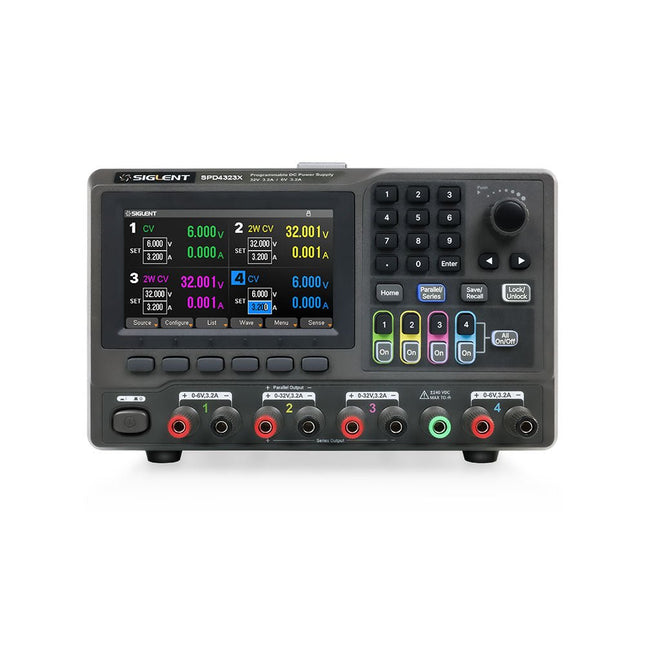
The Siglent SPD4323X is a 4-channel DC Linear Programmable Power Supply equipped with a 4.3-inch TFT-LCD display, friendly human-machine interface, and excellent performance indicators. Real-time waveform display provides engineers with an informative user interface.
SPD4323X offers a total output power of 240 W with a resolution of 1 mV/1 mA. The maximum voltage and current for each channel are as follows:
CH1: 6 V/3.2 A
CH2: 32 V/3.2 A
CH3: 32 V/3.2 A
CH4: 6 V/3.2 A
Features
Rated output power: 240 W
Rated voltage: 32 V, 12 V, 30 V
Up to four high-precision power supplies with independent controllable outputs, supporting CH2 and CH3 series and parallel connections
Clear graphical interface with waveform and timer display modes
5-digit voltage and current display with minimum resolution of 1 mV, 1 mA
Fast output response time: <50us
The high current channel support remote voltage compensation sense function. The maximum compensation voltage is 0.6 V
Overvoltage protection and overcurrent protection or safe and accurate operation
Equipped with a 4.3-inch TFT-LCD display (480 x 272 resolution)
USB and LAN standard communication
USB-GPIB module is optional
Excellent channel density with up to 4 channels in a 3U half rack package
Internal data storage for setups and parameters
Embedded Web Server with instrument communication that doesn’t require software installation
Fully SCPI programming command set support as well as a LabView driver for remote control and system automation
Technische Daten
SPD4323X
SPD4121X
SPD4306X
Channel Output
CH1: Voltage 0 to 6 V Current 0 to 3.2 ACH2: Voltage 0 to 32 V Current 0 to 3.2 ACH3: Voltage 0 to 32 V Current 0 to 3.2 ACH4: Voltage 0 to 6 V Current 0 to 3.2 A
CH1: Voltage 0 to 15 V Current 0 to 1.5 ACH2: Voltage 0 to 12 V Current 0 to 10 ACH3: Voltage 0 to 12 V Current 0 to 10 ACH4: Voltage 0 to 15 V Current 0 to 1.5 A
CH1: Voltage 0 to 15 V Current 0 to 1.5 ACH2: Voltage 0 to 30 V Current 0 to 6 ACH3: Voltage 0 to 30 V Current 0 to 6 ACH4: Voltage 0 to 15 V Current 0 to 1 A
Resolution
1 mV, 1 mA
1 mV, 1 mA
1 mV, 1 mA
Setting Accuracy
Voltage: ±(0.03% of reading+10) mV, Current: ±(0.3% of reading+10) mA
Voltage: ±(0.03% of reading+10) mV, Current: ±(0.3% of reading+10) mA
Voltage: ±(0.03% of reading+10) mV, Current: ±(0.3% of reading+10) mA
Readback Accuracy
Voltage: ±(0.03% of reading+10) mV, Current: ±(0.3% of reading+10) mA
Voltage: ±(0.03% of reading+10) mV, Current: ±(0.3% of reading+10) mA
Voltage: ±(0.03% of reading+10) mV, Current: ±(0.3% of reading+10) mA
Display
4.3" TFT-LCD 5-digit voltage and current display
4.3" TFT-LCD 5-digit voltage and current display
4.3" TFT-LCD 5-digit voltage and current display
Output power
240 W
285 W
400 W
Lieferumfang
1x Siglent SPD4323X Power Supply
1x Power cord (EU)
1x Output test cord (3 A)
1x USB cable
1x Quick start guide
Downloads
Datasheet
Manual
Quick start
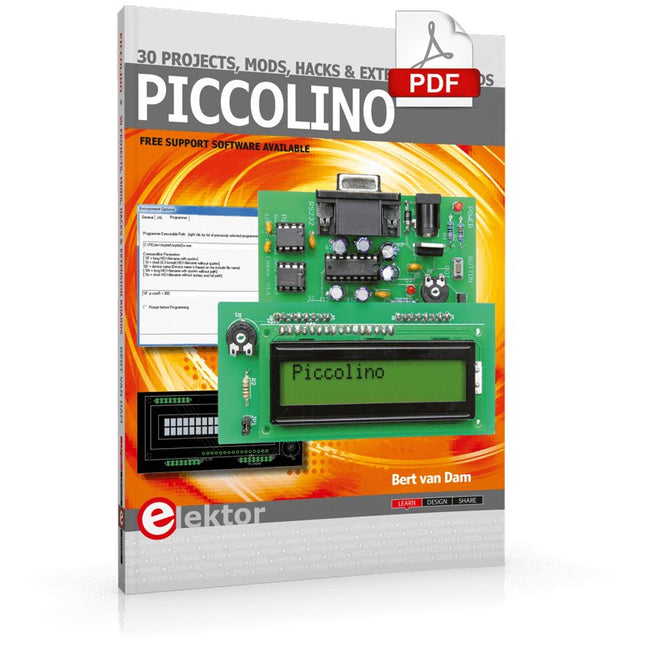
The Piccolino rapid development board can be used to design microcontroller circuits quickly. The Piccolino has a fast 16f887 PIC microcontroller, voltage regulator, and communications module, and can be easily extended using its four headers.
This e-book contains 30 projects based on the Piccolino. We'll use its unique communications facilities and get the Piccolino to communicate with programs on a PC. On the PC, we use the free programming language Small Basic. You can use this to create Windows programs with buttons and graphs quickly. You will learn how to analyze components such as inductors, capacitors, and OPAMPs, and how to display the measurement results in a graphical format. This will help you to design your circuits easily.
We will then start to adapt to the Piccolino. We'll add components to it to make it more powerful, with extra features such as flow control and digital to analog conversion. The clear instructions will enable you to design and build your adaptations. This way you can make your custom designed Piccolino.
We'll end up making an extension: a PCB that that can be mounted on the Piccolino headers. As an example, we'll design and build an extension for an LCD. You can use the included board layout to make your PCB or have it made for you. At the same time, you will learn how to make your extensions. The only limitation is your imagination!
The clear descriptions along with circuit diagrams and photos, will make the building of these projects an enjoyable experience. Each project has a clear explanation of the reasons why it was designed in a particular way. This helps you learn a lot about the Piccolino, as well as Small Basic, and the components that are used in this e-book. You can adapt the projects to suit your requirements or combine several projects.
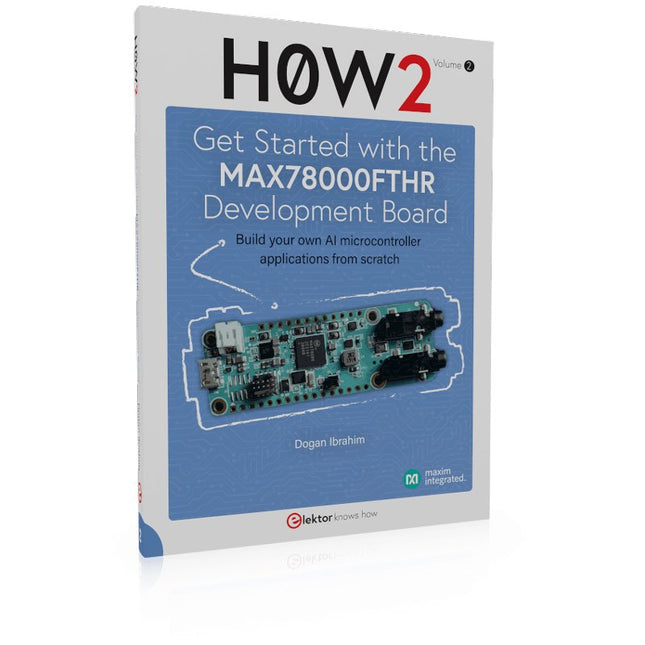
Build your own AI microcontroller applications from scratch
The MAX78000FTHR from Maxim Integrated is a small development board based on the MAX78000 MCU. The main usage of this board is in artificial intelligence applications (AI) which generally require large amounts of processing power and memory. It marries an Arm Cortex-M4 processor with a floating-point unit (FPU), convolutional neural network (CNN) accelerator, and RISC-V core into a single device. It is designed for ultra-low power consumption, making it ideal for many portable AI-based applications.
This book is project-based and aims to teach the basic features of the MAX78000FTHR. It demonstrates how it can be used in various classical and AI-based projects. Each project is described in detail and complete program listings are provided. Readers should be able to use the projects as they are, or modify them to suit their applications. This book covers the following features of the MAX78000FTHR microcontroller development board:
Onboard LEDs and buttons
External LEDs and buttons
Using analog-to-digital converters
I²C projects
SPI projects
UART projects
External interrupts and timer interrupts
Using the onboard microphone
Using the onboard camera
Convolutional Neural Network
Elektor GREEN en GOLD leden kunnen deze uitgave hier downloaden.
Nog geen lid? Klik hier om een lidmaatschap af te sluiten.
OBD2-sensordashboardOude meters vormden het startpunt van een zoektocht naar echte gegevens
OBD2: voeg een toerenteller en schakelindicator toe aan je autoRetro, maar uiterst nuttig
LiDAR- en Visiesensoren voor Robotica
Sensor+Test 2025 en PCIM 2025
Contactloze E-Veldmetingen (1)Een Trillende Membraan voor het Detecteren van Gelijkspanningen of Statische Elektrische Velden
Draadloze brievenbusmeldervan optische sensoren tot radar: enkele mogelijkheden
Elektor Mini-Wheelieeen zelfbalancerende robot
ZonnecellenVreemde onderdelen, de serie
Aan de slag met een moderne radarsensorStaat een nauwkeurige meting op uw radar?
Uit het leven gegrepenpapierfabriek
CybersecurityZware tijden voor hackers
Infographics: IoT en sensoren 2025
Bluetooth 6.0 brengt verbeterde toepassingen voor afstandsbepalingNieuwe versie biedt betere apparaatpositionerings- en -locatieservices
Draadloze communicatie verkennen met BeagleY-AI
Err-lectronicsCorrecties, updates en lezerspost
Alle begin......sluit het thema opamps af
Een krachtige AI-codeerassistentsneller ontwikkelen met Continue en Visual Studio Code
Zonne-laadregelaar met MPPT (2)Het schema
Ultrasone obstakeldetectoreen eenvoudig project om slechtzienden te helpen
2025: Een AI-odysseeHalfjaaroverzicht
Raspberry Pi Standalone MIDI-synthesizer (3)Het slimmer maken en een gebruikersinterface toevoegen
Meshtastic: een demonstratieprojectEen slim netwerk van LoRa-radio's
Analoge audio-frequentiegeneratorHoogwaardige sinusgenerator met instelbare frequentie
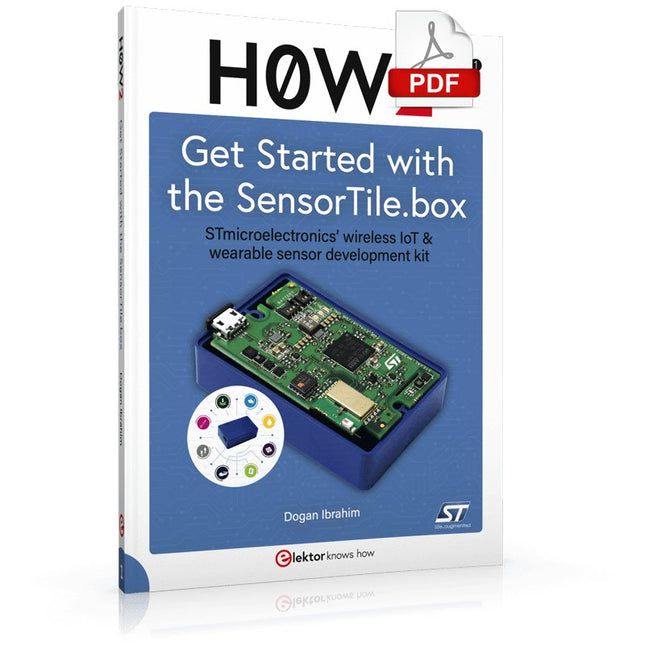
STmicroelectronics’ wireless IoT & wearable sensor development kit
‘SensorTile.box’ is a portable multi-sensor circuit board housed in a plastic box and developed by STMicroelectronics. It is equipped with a high-performance 32-bit ARM Cortex-M4 processor with DSP and FPU, and various sensor modules, such as accelerometer, gyroscope, temperature sensor, humidity sensor, atmospheric pressure sensor, microphone, and so on. SensorTile.box is ready to use with wireless IoT and Bluetooth connectivity that can easily be used with an iOS or Android compatible smartphone, regardless of the level of expertise of the users. SensorTile.box is shipped with a long-life battery and all the user has to do is connect the battery to the circuit to start using the box.
The SensorTile.box can be operated in three modes: Basic mode, Expert mode, and Pro mode. Basic mode is the easiest way of using the box since it is pre-loaded with demo apps and all the user has to do is choose the required apps and display or plot the measured data on a smartphone using an app called STE BLE Sensor. In Expert mode users can develop simple apps using a graphical wizard provided with the STE BLE Sensor. Pro mode is the most complex mode allowing users to develop programs and upload them to the SensorTile.box.
This book is an introduction to the SensorTile.box and includes the following:
Brief specifications of the SensorTile.box; description of how to install the STE BLE Sensor app on an iOS or Android compatible smartphone required to communicate with the box.
Operation of the SensorTile.box in Basic mode is described in detail by going through all of the pre-loaded demo apps, explaining how to run these apps through a smartphone.
An introduction to the Expert mode with many example apps developed and explained in detail enabling users to develop their own apps in this mode. Again, the STE BLE Sensor app is used on the smartphone to communicate with the SensorTile.box and to run the developed apps.
The book then describes in detail how to upload the sensor data to the cloud. This is an important topic since it allows the sensor measurements to be accessed from anywhere with an Internet connection, at any time.
Finally, Pro mode is described in detail where more experienced people can use the SensorTile.box to develop, debug, and test their own apps using the STM32 open development environment (STM32 ODE). The Chapter explains how to upload the developed firmware to the SensorTile.box using several methods. Additionally, the installation and use of the Unicleo-GUI package is described with reference to the SensorTile.box. This PC software package enables all of the SensorTile.box sensor measurements to be displayed or plotted in real time on the PC.
Le téléchargement intégral de ce numéro est disponible pour nos membres GOLD et GREEN sur le site Elektor Magazine !
Pas encore membre ? Cliquez ici.
L'architecture de processeur open-source RISC-V16 cartes et MCU à connaître
un lecteur audio avec égaliseur basé sur un FPGAMixage audio numérique avec un Arduino MKR Vidor 4000
tête laser pour l’horloge de sable basé sur Raspberry Pi PicoDessiner avec la lumière
participez au concours STM32 Edge AI
système de contrôle environnemental multi-capteurs pour les plantesMesure sans fil de l'approvisionnement en eau et de la luminosité
porte automatique contrôlée par l'IA et MaixduinoReconnaissance faciale avec une caméra
l’électronique embarquée en 2024L’IA va redéfinir l’industrie
Calcul en mémoire basé sur la charge chez EnCharge AI
des opérations d'IA avec 10 fois moins d'énergie et des coûts divisés par 20
Une carte pour le développement et l’entraînement des modèles ML d’analyse des vibrations
Elektor Mini-WheelieKit robot gyropode (robot autostabilisé)
MCUViewerMCUViewer outil de débogage open source multiplateforme
isolateur USB 2.0Isolation éléctrique pour les périphériques USB
anticipation et actionApplication pratique de la maintenance prédictive
SPoE – compatibilité électromagnétiquePaire unique avec Power-over-Ethernet à travers les yeux d'EMC
rétro-techCréer un monde nouveau avec la télévision couleur
surveillance ECGavec des modules Hexabitz et STM32CubeMonitor
la bataille pour l’IA en périphérie
HaLow atteint une distance Wifi record de 16 km à 900 MHz
première puce embarquée CHERI RISC-V et programme d'accès anticipé
la détection des incendies de forêt de troisième génération utilise des liaisons satellites
sur le vifDélices et supplices du choix
démarrer en électronique......Filtrage et contrôle de la tonalité
Kit d'horloge quasi-analogiqueNouvelle version d'un classique d'Elektor
une approche modulaire de test des capteursCarte de test de capteurs basée sur l'ESP32-S3
2025 : une odyssée de l'IAL'essor des modèles de fondation et leur impact sur l'accessibilité de l'IA
Synthétiseur MIDI autonome Raspberry Pi (1)Préparation d'une plateforme pour des expériences d’IA en périphérie
projet 2.0Corrections, mises à jour et courrier des lecteurs
Le RISC-V AI, un processeur à tout faire : CPU, GPU, DSP, FPGA
paroles de PDG : fraîcheur, silence et finesse
programmation Dual-Core avec le Raspberry Pi PicoLe monde de la programmation parallèle
Elektor GREEN and GOLD members can download their digital edition here.
Not a member yet? Click here.
Cloc 2.0The Alarm Clock You've Always Wanted
RP2040 PIO in PracticeExperiments Using the RP2040’s Programmable I/O
Poor Man's ChipTweakerWe Have (Low-Budget) Ways of Making You Talk
USB True Random Number GeneratorTwo PICs for the Price of One AVR
Pimp My MicSelf-Designed Level Booster
FFT with a MaixduinoFrequency spectrum display
From Life’s ExperienceDesign Logic (or Non-Logic)
UCN5804 Stepper Motor DriverPeculiar Parts, the Series
Circuit Simulation With Micro-CapFirst Steps in a Complicated World
PAUL Award 2022Young Technical Talents and Their Creative Solutions
My First Software-Defined RadioBuilt in Less Than 15 Minutes
Microcontroller Documentation Explained (Part 1)Datasheet structure
What’s Next for AI and Embedded Systems?Tools, Platforms, and Writer Replacements
Digitizing Vertical Farming
Infographics: Embedded and AI Today and Tomorrow
An Introduction to TinyML
JetCarrier96A Versatile NVIDIA Jetson Development System
Case Study: Taking EV Charging Global with a Universal RFID Solution
High-Performance in Every ClassComputer-on-Module Standards
Starting Out in ElectronicsLet’s Get Active!
I²C Communication Using Node.js and a Raspberry PiSee Your Sensor Data in a Browser
Video Output with Microcontrollers (2)VGA and DVI Output
The Metronom Real-Time Operating SystemAn RTOS for AVR Processors
DVI on the RP2040An Interview with Luke Wren, Chip Developer at Raspberry Pi
Display HAT MiniShow the Weather Forecast on Raspberry Pi!
WEEF 2022 Awards: Celebrate the Good
Hexadoku
Der vollständige Download dieser Nummer ist für unsere GOLD- und GREEN-Mitglieder auf der Elektor Magazine- Site verfügbar!
Nicht noch einmal Mitglied? Klicken Sie hier .
Cloc 2.0 der Morgentraum deiner Träume
PIO des RP2040 in der Praxis Experimentieren mit E/S-programmierbaren RP2040
ChipTweaker für Arme Wir haben die Mittel (erschwinglichen) Möglichkeiten, mit Ihnen zu sprechen
Generator für reale Zufallszahlengeneratoren mit USB-Schnittstelle zwei PICs zum Preis eines AVR
Audio-Vitamine für Micro Ramollo Wie man nur die Lautstärke eines Mikrofons senkt
FFT mit Maixduino Erfassung von Frequenzspektren
auf der Lebe ohne ersichtlichen Grund
Nicht-Passend-Motorsteuerung UCN5804 Drôle de Composant, die Serie
Schaltungssimulation mit Micro-Cap Erstmals in einer komplizierten Welt
PAUL-Preis 2022 die jungen Talente der Technologie und ihre kreativen Lösungen
meine erste Radiodefinition per Software in mindestens 15 Minuten durchgeführt
die Dokumentation der Mikrocontroller ohne Stift (1) die Struktur einer technischen Karte
Was ist der Plan für die IA und die blockierten Systeme? Werkzeuge, Plattformen und Ersatz für Redakteure
einen vertikalen Zaun nummerieren
Infografik: Was ist heute und heute passiert?
Präsentation von TinyML
Fallstudie KwickPOS
Höchstleistungen für alle Normen für Computer-on-Module
elektronisch starten Wirkstoffe
I²C-Kommunikation mit Node.js und Raspberry Pi Zeigen Sie die Daten Ihrer Captures in einem Browser an
Videoaufzeichnung auf den Mikrocontrollern (2) VGA- und DVI-Ausgänge
das aktuelle Betriebssystem Metronom ein RTOS für AVR-Prozessoren
DVI auf dem RP2040 Unterhaltung mit Luke Wren, Komponentenentwickler für Raspberry Pi
L?afficheur HAT Mini Zeigen Sie die Wettervorhersagen auf Raspberry Pi an!
WEEF 2022 Awards: Feiern Sie die besten Auszeichnungen
Hexadoku
Diese Ausgabe steht allen GOLD- und GREEN-Mitgliedern auf der ElektorMagazine-Website zum Download bereit!
Sind Sie noch kein Mitglied? Hier klicken!
Super-Servo-Tester Bis zu vier Servos einzeln oder eingebaut testen
Analoge Signale und der Mikrocontroller ADCs, DACs, Strommessung und mehr
Messe München 2023
Sub-Nyquist-Sampling in der Praxis Höhere Frequenzen mittels Unterabtastung sicher erfassen
Hier Android-Smartphone, dort ESP32? Praxisprojekt mit der Android WiFi-API
Aktives 1-kHz-Filter für Verzerrungsmessungen Bessere Messungen durch Optimierung des Messsignals
Aller Anfang... muss nicht schwer sein: Wir multivibrieren weiter!
Projekt 2.0 Korrekturen, Updates und Leserbriefe
Das neue I3C-Protokoll Würdiger I2C-Nachfolger oder viel Rauch ums Nichts?
BlueRC: IR-Fernsteuerung mit Smartphone und ESP32 Anpassungsfähig und universell
Mikrocontroller-Dokumentationen verstehen Teil 2: Register und Blockschaltbilder
Automatisierung der Prüf- und Messtechnik Programmieren von Prüfgeräten, damit Sie tun, was Sie wollen
Infografik: Messen und Testen
Überspannungsschutz für sicheren Betrieb Transientenschutz für nicht-isolierte DC/DC-Leistungsmodule
Mess- und Prüfgeräte von Wiha Installationstester und Messgeräte, auf die Sie sich verlassen können
Automatisierung von Tests und Zusammenarbeit bei Testergebnissen
Aus dem Leben gegriffen Elektronik auf hohem Niveau
Energielogger Energie messen und aufzeichnen
Aufgebaut: Das 4tronix MARS Rover Kit
Parkscheibe mit E-Paper Display Ein innovativer digitaler Ersatz
eCO2-Telegram-Bot Luftqualitätsmessung mit Telegram-Anbindung
Hinter den Kulissen von High-End-Audio im Eigenbau Elektor-Ingenieur Ton Giesberts im Interview über die hohe Kunst des Analogdesigns
Das besondere Projekt Es gibt noch viel zu tun!
RFID-Tag lesen und RFID-Türschloss Projektbeispiele aus dem Arduino-Experimentierpaket von Elektor
Oszilloskop-Stromsonde für HF Hochfrequenz-Strommessung leicht gemacht
Nichts für Anfänger – Makerfabs 6 DOF Roboterarm Mit Raspberry Pi Pico und MicroPython
Generative KI Wer hat das eigentlich gemacht?
Hexadoku
Open-netwerk weerstation mk2deel 1: inleiding en hardware-elementen
AI voor beginners (1)objectherkenning met het Maixduino-board
Universele triac-stuurmodule met ATmegaschakelen en dimmen van verschillende belastingen
Hoe... iets van GitHub downloadenGitHub Voor Dummies
My IoT-Button: de knop voor het netdeel 2: prototyping met board en cloud
TMS0280 spraaksynthesizervreemde onderdelen
Interactiefcorrecties & updates | vragen & antwoorden
BASIC voor ESP32/ESP8266 (2)zandloper met ESP8266 en Annex WiFi RDS
Developer’s Zonetips & trucs, vakkunstigheden en andere nuttige informatie
BalBot: een zelfbalancerende robotmoderne versnellingssensoren vergemakkelijken de bouw
Alle begin......hoeft niet zo moeilijk te zijn
Wie het kleine niet eertuit de ideeënbus van Elektor
Verzendbox met manipulatie-indicatiegegevens veilig met de post verzenden
Nieuwe Nauwkeurige Nixie-klok: verbeteringentechnisch nieuwsbulletin voor nieuwe en bestaande enthousiaste gebruikers
Multitasking met de ESP32 (3)software-timers
Met de vos in het IoT (4)inrichten van het dashboard
Start-up update: het Elektor Investment Program
Review: Elektronische USB-belasting Joy-IT HD35test de belastbaarheid van USB-poorten
CAN-bus + Arduino houden zonnepanelen in de gatenlokaliseer panelen in grote arrays die onderhoud nodig hebben
Analoge elektronica ontwerpencase-study #1 – deel 3: optimalisatie van de responsie van de voorversterker en compromissen
Sound Blinkdraagbare zelfbouwspeaker met LED-lichtshow
USB-stroombewakingintelligente bescherming voor USB-poorten
Oost West Lab Besteen blik in het allerheiligste, waar onbevoegden geen toegang hebben...
Review: Labvoeding PeakTech 6080 Aveel voeding voor weinig geld
Een grote uitdagingveilige producten in het IoT-tijdperk
Elektor 1,2-GHz-universeelteller (1992/93)voorbij de magische 1GHz-grens
Hexadoku