Über 180 Projekte mit Raspberry Pi, Pico W, Arduino und ESP32
Dieses Bundle enthält das Universal Maker Sensor Kit mit zahlreichen Sensoren, Aktoren, Displays und Motoren. Es eignet sich perfekt für Umweltüberwachung, Smart-Home-Projekte, Robotik und Gamecontroller.
Das neue Elektor-Buch beschreibt die Entwicklung zahlreicher Projekte mit dem Kit und den beliebten Entwicklungsboards Raspberry Pi, Raspberry Pi Pico W, Arduino Uno und der ESP32-Familie. Sie können jedes dieser Entwicklungsboards für Ihre Projekte auswählen und die bereitgestellten Programme entweder unverändert verwenden oder an Ihre Anwendungen anpassen.
Dieses Bundle enthält:
Buch: Universal Maker Sensor Kit (Einzelpreis: 45 €)
Universal Maker Sensor Kit für Raspberry Pi, Pico W, Arduino, ESP32 (Einzelpreis: 70 €)
Buch: Universal Maker Sensor Kit
Lernen Sie, mehr als 35 Sensoren und Aktoren mit C++, Python und MicroPython zu verwenden
Dieses Buch enthält über 180 Projekte für alle vier wichtigen Entwicklungsboards (Arduino, Raspberry Pi, Pico W und ESP32). Je nach Entwicklungsboard sind Projekte in den Programmiersprachen C, Python oder MicroPython verfügbar.
Die Projekttitel, Kurzbeschreibungen, Schaltpläne und vollständigen Programmlisten sind zusammen mit ihren detaillierten Beschreibungen im Buch aufgeführt.
Universal Maker Sensor Kit (für Raspberry Pi, Pico W, Arduino, ESP32)
Entdecken Sie grenzenlose Kreativität mit dem Universal Maker Sensor Kit, das für Raspberry Pi, Pico W, Arduino und ESP32 entwickelt wurde. Dieses vielseitige Kit ist mit gängigen Entwicklungsplattformen kompatibel, darunter Arduino Uno R4 Minima/WiFi, Uno R3, Mega 2560, Raspberry Pi 5, 4, 3B+, 3B, Zero, Pico W und ESP32.
Mit über 35 Sensoren, Aktoren und Displays eignet es sich perfekt für Projekte von Umweltüberwachung und Smart-Home-Automatisierung bis hin zu Robotik und interaktivem Gaming. Schritt-für-Schritt-Tutorials in C/C++, Python und MicroPython führen Anfänger und erfahrene Maker gleichermaßen durch 169 spannende Projekte.
Features
Umfassende Kompatibilität: Vollständige Unterstützung für Arduino (Uno R3, Uno R4 Minima/WiFi, Mega 2560), Raspberry Pi (5, 4, 3B+, 3B, Zero, Pico W) und ESP32. Dies ermöglicht umfassende Flexibilität auf zahlreichen Entwicklungsplattformen. Enthält Anleitungen für 169 Projekte.
Umfassende Komponenten: Mehr als 35 Sensoren, Aktoren und Anzeigemodule für vielfältige Projekte wie Umweltüberwachung, Smart Home-Automatisierung, Robotik und interaktive Spielesteuerungen.
Ausführliche Tutorials: Klare Schritt-für-Schritt-Anleitungen für Arduino, Raspberry Pi, Pico W, ESP32 und alle enthaltenen Komponenten. Es stehen Tutorials in C/C++, Python und MicroPython zur Verfügung, die sowohl für Anfänger als auch für erfahrene Maker geeignet sind.
Für alle Kenntnisstufen geeignet: Bietet strukturierte Projekte, die Benutzer nahtlos vom Anfänger zum Fortgeschrittenen in Elektronik und Programmierung führen und so Kreativität und technisches Know-how fördern.
Lieferumfang des Kits
Breadboard
Tastenmodul
Kapazitives Bodenfeuchtemodul
Flammensensormodul
Gas-/Rauchsensormodul (MQ2)
Gyroskop & Beschleunigungssensormodul (MPU6050)
Hall-Sensormodul
Infrarot-Geschwindigkeitssensormodul
IR-Hindernisvermeidungssensormodul
Joystickmodul
PCF8591 ADC/DAC-Wandlermodul
Fotowiderstandsmodul
PIR-Bewegungssensormodul (HC-SR501)
Potentiometermodul
Pulsoximeter- und Herzfrequenzsensormodul (MAX30102)
Regentropfenerkennungsmodul
Echtzeituhrmodul (DS1302)
Drehgebermodul
Temperatursensormodul (DS18B20)
Temperatur- und Feuchtigkeitssensormodul (DHT11)
Temperatur, Luftfeuchtigkeit und Drucksensor (BMP280)
Time-of-Flight-Mikro-LIDAR-Distanzsensor (VL53L0X)
Berührungssensormodul
Ultraschallsensormodul (HC-SR04)
Vibrationssensormodul (SW-420)
Wasserstandssensormodul
I²C LCD 1602
OLED-Displaymodul (SSD1306)
RGB-LED-Modul
Ampelmodul
5-V-Relaismodul
Kreiselpumpe
L9110-Motortreibermodul
Passives Summermodul
Servomotor (SG90)
TT-Motor
ESP8266 Modul
JDY-31 Bluetooth-Modul
Stromversorgungsmodul
Dokumentation
Online-Tutorial
Getting started with the world’s best open-source PCB tool
The latest iteration of KiCad, the world’s best free-to-use Printed Circuit Board tool, is packed with features usually found only in expensive commercial CAD tools. This modern, cross-platform application suite built around schematic and design editors, with auxiliary applications is a stable and mature PCB tool. KiCad 8 is a perfect fit for electronic engineers and makers.
Here are the most significant improvements and features in KiCad 8, both over and under the hood:
Modern user interface, completely redesigned from earlier versions
Improved and customizable electrical and design rule checkers
Theme editor allowing you to customize KiCad on your screen
Ability to import projects from Eagle, CADSTART, and more
Python scripting API
Improved integrated SPICE circuit simulator
Multi-sheet schematics
Filters define selectable elements
Enhanced interactive router helps you draw single tracks and differential pairs with precision
New or enhanced tools to draw tracks, measure distances, tune track lengths, etc.
Advanced interactive router
Built-in bill of materials generator
Realistic ray-tracing capable 3D viewer
Customizable teardrops
Plug-in manager for quick installation of themes, libraries and functionalities such as autorouters and BOM generators
This book will teach you to use KiCad through a practical approach. It will help you become productive quickly and start designing your own boards. Example projects illustrate the basic features of KiCad, even if you have no prior knowledge of PCB design.
The author describes the entire workflow from schematic entry to the intricacies of finalizing the files for PCB production and offers sound guidance on the process. Further full-fledged projects, of incremental difficulty, will be presented in a second book, together with a variety of advanced recipes.
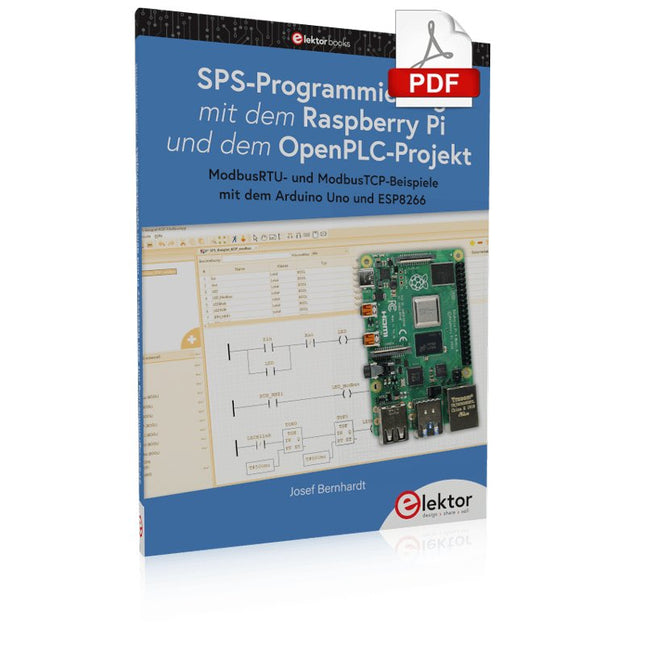
Einführung in die SPS-Programmierung mit dem Open-Source-Projekt auf dem Raspberry Pi und Modbus-Beispiele mit dem Arduino Uno und ESP8266
Die SPS-Programmierung ist heute in der Industrie und in der Hausautomation sehr weit verbreitet. In diesem Buch beschreibt der Autor, wie der Raspberry Pi 4 als SPS eingesetzt werden kann. Angefangen mit der Softwareinstallation auf dem Raspberry Pi und dem SPS-Editor auf dem PC geht es nach einer Beschreibung der Hardware an das Programmieren.
Es folgen interessante Beispiele nach IEC 61131-3 in den verschiedenen Programmiersprachen. Ausführlich wird auch erklärt, wie der SPS-Editor benutzt wird und wie die Programme auf den Raspberry Pi geladen und ausgeführt werden. Angefangen mit der Programmierung mit KOP (Kontaktplan) über ST (Structured Control Language) bis zu AS (Special Function Chart) werden alle IEC-Sprachen mit Beispielen behandelt. Diese können auf der Website des Autors heruntergeladen werden.
Auch die Vernetzung kommt nicht zu kurz. Der Arduino Uno und der ESP8266 werden als ModbusRTU- bzw. ModbusTCP-Module programmiert, um Zugriff auf externe Peripherie zu erhalten. Damit ist es möglich, Sensoren einzulesen und Verbraucher zu schalten. Interessant dürften auch E/A-Schaltungen sein, die dem 24V-Industriestandard entsprechen.
Befehlsübersichten für ST und KOP runden das Buch ab.
Nach dem Durcharbeiten des Buches ist der Leser in der Lage, eigene SPS-Steuerungen mit dem Raspberry Pi zu verwirklichen.
Plot, Cut, Drill, Mill and Laser with the Z99
This book covers the construction, hardware, software, and operation of the Z99 – CNC machine. This is a multifunctional 4-axis machine for home construction.
The capabilities of the Z99 machine include:
large-format schematic plotting
PCB plotting with etch-resist pens
schematic plotting with conductive-ink pens
letter cutting out of vinyl
paper cutting
PCB/substrate drilling
PCB/substrate milling
text milling
laser engraving
laser cutting of solder paste masks
By making the support software available as freeware, readers of the book are challenged and encouraged to develop new applications for the Z99.
The machine would not be of much use if the user has no option to create suitable files for the designs in mind. A large part of this book is dedicated to creating source files in a variety of freeware software packages, including Inkscape, DesignSpark PCB, KiCad, and FlatCAM.
The book is also useful for readers keen to comprehend and then master the basic structure of HPGL, Gerber, Drill, and G-code files, as well as to have a go at deciphering them using software.
Mastering PCB design with real-world projects
This book builts on KiCad Like a Pro – Fundamentals and Projects and aims to help you practice your new KiCad skills by challenging you in a series of real-world projects. The projects are supported by a comprehensive set of recipes with detailed instructions on how to achieve a variety of simple and complex tasks. Design the PCBs for a solar power supply, an LED matrix array, an Arduino-powered datalogger, and a custom ESP32 board. Understand the finer details of the interactive router, how to manage KiCad project teams with Git, how to use an autorouter on 2 and 4-layer PCBs, and much more.
KiCad 8 is a modern, cross-platform application suite built around schematic and design editors. This stable and mature PCB tool is a perfect fit for electronic engineers and makers. With KiCad 8, you can create PCBs of any complexity and size without the constraints associated with the commercial packages.
Here are the most significant improvements and features in KiCad 8, both over and under the hood:
Modern user interface, completely redesigned from earlier versions
Improved and customizable electrical and design rule checkers
Theme editor allowing you to fully customize the look of KiCad on your screen
Ability to import projects from Eagle, CADSTART, and more
An improved and tightly integrated SPICE circuit simulator
Autorouting with the Freerouting plugin
Filters define which elements of a layout are selectable
Enhanced interactive router helps you draw single tracks and differential pairs with precision
New or enhanced tools to draw tracks, measure distances, tune track lengths, etc.
Enhanced tool for creating filled zones
A customizable coordinate system facilitates data exchange with other CAD applications
Realistic ray-tracing capable 3D viewer
Differential pair routing
Rich repositories of symbol, footprint, and 3D shape libraries
Python scripting API for programmatic customization and extensions
Improved footprint wizard for fast custom footprints
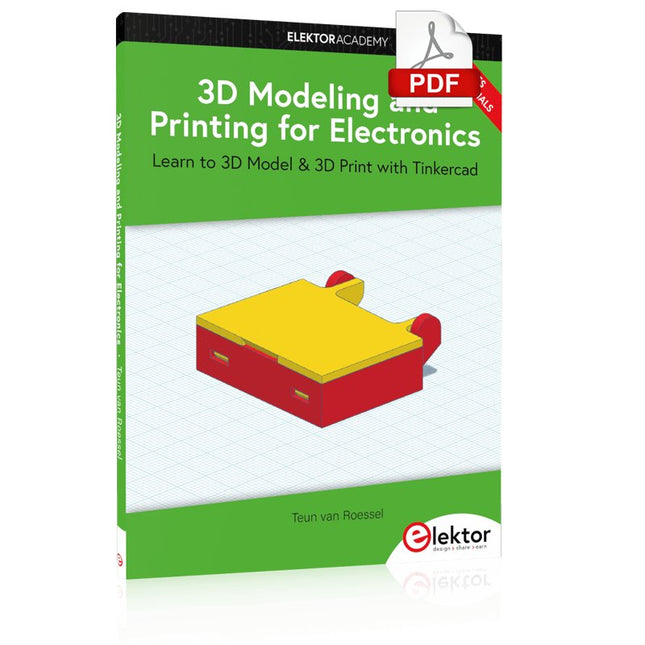
Learn to 3D Model & 3D Print with Tinkercad
With this book and the complementary videos, you’ll be 3D printing in no time at all. This course is meant to have you make casings for electronic components but also goes into optimizing your print technique as well as adding a little flair to your 3D creations. The course is perfect for you if you just bought your (first) 3D printer and want to print your own designs as soon as possible while also being able to get more background information.
You’ll get to know the workings of a 3D printer and what software to use to model your object, not forgetting to make it print perfectly. We’ll even use the magic of 3D printing to create things that appear impossible to make (this fast and simple) with any other rapid-prototyping technique.
At the end of this course, it’ll be second nature for you to design an object for 3D printing and fine-tune your print-setting to get the perfect print!
The book includes the following 7 video tutorials:
Introduction
Basic 3D modeling for 3D printing
Modeling a casing
Post-processing
Pushing the limits
Movable parts
Snap fits
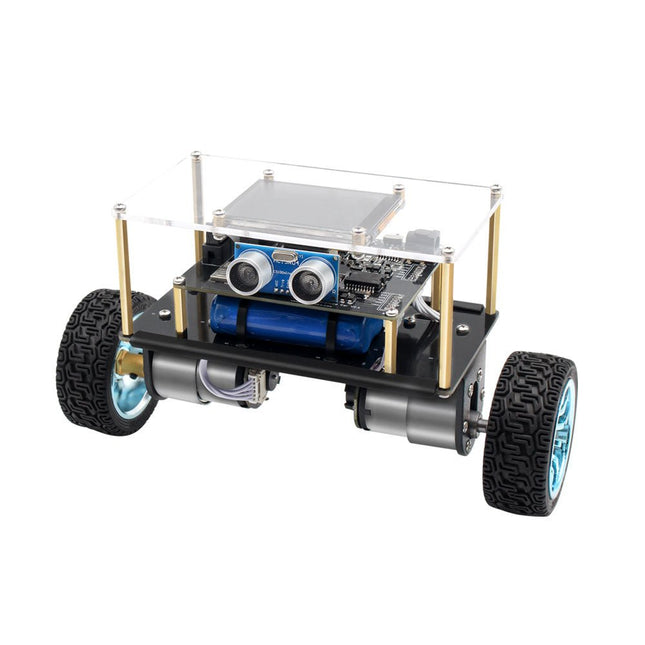
Der Elektor Mini-Wheelie ist eine experimentelle autonome selbstbalancierende Roboterplattform. Der selbstbalancierende Roboter basiert auf einem ESP32-S3-Mikrocontroller und ist mithilfe der Arduino-Umgebung und Open-Source-Bibliotheken vollständig programmierbar. Dank seiner drahtlosen Fähigkeiten kann er über WLAN, Bluetooth oder ESP-NOW ferngesteuert werden oder mit einem Benutzer oder sogar einem anderen Roboter kommunizieren.
Zur Erkennung von Hindernissen steht ein Ultraschallwandler zur Verfügung. Über das Farbdisplay lassen sich niedliche Gesichtsausdrücke oder für den bodenständigeren Nutzer auch kryptische Debug-Meldungen darstellen.
Der Roboter wird als Komplettbausatz mit Teilen geliefert, die Sie selbst zusammenbauen müssen. Alles ist dabei, sogar ein Schraubenzieher.
Hinweis: Der Mini-Wheelie ist eine pädagogische Entwicklungsplattform, die zum Lernen, Experimentieren und zur Entwicklung von Robotern gedacht ist. Er ist nicht als Kinderspielzeug klassifiziert, und seine Funktionen, Dokumentation und Zielgruppe spiegeln diesen Zweck wider. Das Produkt richtet sich an Studenten, Dozenten und Entwickler, die Robotik, Programmierung und Hardware-Integration in einem pädagogischen Umfeld erforschen möchten.
Technische Daten
ESP32-S3 Mikrocontroller mit WLAN und Bluetooth
MPU6050 6-achsige Inertial Measurement Unit (IMU)
Zwei unabhängig gesteuerte 12 V-Elektromotoren mit Drehzahlmesser
Ultraschallwandler
2,9" TFT-Farbdisplay (320 x 240)
MicroSD-Kartensteckplatz
Batterieleistungsmonitor
3S wiederaufladbarer Li-Po-Akku (11,1 V/2200 mAh)
Batterieladegerät im Lieferumfang enthalten
Arduino-basierte Open-Source-Software
Abmessungen (B x L x H): 23 x 8 x 13 cm
Lieferumfang
1x ESP32-S3 Mainboard + MPU6050 Modul
1x LCD-Board (2,9 Zoll)
1x Ultraschallsensor
1x Akku (2200 mAh)
1x Batterieladegerät
1x Motorreifen-Set
1x Gehäuseplatine
1x Acrylplatte
1x Schraubendreher
1x Schutzstreifen
1x Flexkabel B (8 cm)
1x Flexkabel A (12 cm)
1x Flexkabel C
4x Kupfersäule A (25 mm)
4x Kupfersäule B (55 mm)
4x Kupfersäule C (5 mm)
2x Kunststoff-Nylonsäule
8x Schrauben A (10 mm)
24x Schrauben B (M3x5)
8x Nüsse
24x Metallscheiben
2x Kabelbinder
1x MicroSD-Karte (32 GB)
Downloads
Documentation
ModbusRTU and ModbusTCP examples with the Arduino Uno and ESP8266
Introduction to PLC programming with OpenPLC, the first fully open source Programmable Logic Controller on the Raspberry Pi, and Modbus examples with Arduino Uno and ESP8266
PLC programming is very common in industry and home automation. This book describes how the Raspberry Pi 4 can be used as a Programmable Logic Controller. Before taking you into the programming, the author starts with the software installation on the Raspberry Pi and the PLC editor on the PC, followed by a description of the hardware.
You'll then find interesting examples in the different programming languages complying with the IEC 61131-3 standard. This manual also explains in detail how to use the PLC editor and how to load and execute the programs on the Raspberry Pi. All IEC languages are explained with examples, starting with LD (Ladder Diagram) over ST (Structured Control Language) to SFC (Special Function Chart). All examples can be downloaded from the author's website.
Networking gets thorough attention too. The Arduino Uno and the ESP8266 are programmed as ModbusRTU or ModbusTCP modules to get access to external peripherals, reading sensors and switching electrical loads. I/O circuits complying with the 24 V industry standard may also be of interest for the reader.
The book ends with an overview of commands for ST and LD. After reading the book, the reader will be able to create his own controllers with the Raspberry Pi.
ModbusRTU and ModbusTCP examples with the Arduino Uno and ESP8266
Introduction to PLC programming with OpenPLC, the first fully open source Programmable Logic Controller on the Raspberry Pi, and Modbus examples with Arduino Uno and ESP8266
PLC programming is very common in industry and home automation. This book describes how the Raspberry Pi 4 can be used as a Programmable Logic Controller. Before taking you into the programming, the author starts with the software installation on the Raspberry Pi and the PLC editor on the PC, followed by a description of the hardware.
You'll then find interesting examples in the different programming languages complying with the IEC 61131-3 standard. This manual also explains in detail how to use the PLC editor and how to load and execute the programs on the Raspberry Pi. All IEC languages are explained with examples, starting with LD (Ladder Diagram) over ST (Structured Control Language) to SFC (Special Function Chart). All examples can be downloaded from the author's website.
Networking gets thorough attention too. The Arduino Uno and the ESP8266 are programmed as ModbusRTU or ModbusTCP modules to get access to external peripherals, reading sensors and switching electrical loads. I/O circuits complying with the 24 V industry standard may also be of interest for the reader.
The book ends with an overview of commands for ST and LD. After reading the book, the reader will be able to create his own controllers with the Raspberry Pi.
Praktischer Einstieg mit Arduino, GnuRadio und FPGA
Das Thema „Software Defined Radio“ ist facettenreich: Neben der Schaltungstechnik ist auch eine Einarbeitung in die Programmierung von Hardware und PC wichtig. Ein schrittweises Vorgehen erleichtert Ihnen den Einstieg. Mit dem im Buch vorgestellten modularen „RF Bricks“-Konzept werden Sie zum Architekten Ihrer Signalkette. Auf einem Chassis angeordnet gewährleisten die Module einen soliden und gut abgeschirmten Aufbau, den Sie einfach verändern und mit eigenen Ideen anreichern können.
Der skalierbare Aufbau bildet Ihr Blockschaltbild auch mechanisch ab – die so gewonnene Übersicht kann in der Aus- und Weiterbildung nützlich sein. Ein Arduino in Ihrem Chassis kommuniziert nach einigen Anpassungen mit üblichen SDR-Programmen, z. B. SDRCPP, GQRX und CubicSDR auf einer Linux-Plattform. Damit können Sie Ihren Empfänger direkt per Mausklick abstimmen.
Wenn Sie Blockschaltbilder mögen, ist GnuRadio ein natürlicher Partner der „RF Bricks“. Mit einem selbst programmierten Python-Block gelingt Ihnen in GnuRadio die Fernsteuerung Ihres Empfängers. Im GnuRadio-Universum können Sie Ihre GUI stufenweise ausbauen, behalten dabei aber immer volle Kontrolle über die inneren Abläufe des Programms.
Mit einem FPGA können zeitaufwändige Operationen auch direkt in die Hardware verlagert werden. Sie bauen stufenweise einen Doppelsuperhet auf und entwickeln die Filterkoeffizienten für FIR-Filter mit Scilab. Das in VHDL realisierte Weaver-Schema rundet diesen Empfänger ab, der mit hoher Empfindlichkeit und Dynamik aufwarten kann.
Mit dem gewonnen Überblick und Ihrer neuen Hardware können Sie die einzelnen Aspekte des Themenkomplexes SDR beliebig weiter vertiefen.
Downloads
Software
Die digitalen Speicheroszilloskope der SDS2000X Plus-Serie von Siglent sind in Bandbreiten von 100 MHz, 200 MHz und 350 MHz erhältlich, haben eine maximale Abtastrate von 2 GSa/s, eine maximale Aufzeichnungslänge von 200 Mpts/Kanal und bis zu 4 analoge Kanäle + 16 digitale Kanäle, Mixed-Signal-Analysefähigkeit.
Die SDS2000X Plus-Serie nutzt die SPO-Technologie von Siglent mit einer maximalen Wellenformerfassungsrate von bis zu 120.000 wfm/s (Normalmodus, bis zu 500.000 wfm/s im Sequenzmodus), einer Anzeigefunktion mit 256 Intensitätsstufen sowie einer Farbtemperatur Anzeigemodus. Es verwendet außerdem ein innovatives digitales Triggersystem mit hoher Empfindlichkeit und geringem Jitter. Das Triggersystem unterstützt mehrere leistungsstarke Triggermodi, einschließlich serieller Bus-Triggerung. Verlaufsaufzeichnung von Wellenformen, Sequenzerfassung sowie Such- und Navigationsfunktionen ermöglichen die Erfassung, Speicherung und Analyse erweiterter Wellenformaufzeichnungen. Eine beeindruckende Auswahl an Mess- und Mathematikfunktionen, Optionen für einen 50-MHz-Wellenformgenerator sowie serielle Dekodierung, Maskentest, Bode-Plot und Leistungsanalyse sind weitere Merkmale des SDS2000X Plus. Ein 10-Bit-Erfassungsmodus hilft dabei, Anwendungen zu erfüllen, die eine Auflösung von mehr als 8 Bit erfordern.
Der große kapazitive 10,1"-Touchscreen unterstützt Multi-Touch-Gesten, während die Remote-Websteuerung sowie die Unterstützung für Maus und externe Tastatur die Bedieneffizienz des SDS2000X Plus erheblich verbessern.
Features
Erhältlich mit 100 MHz, 200 MHz, 350 MHz Bandbreite (aufrüstbar auf 500 MHz)
Echtzeit-Abtastrate bis zu 2 GSa/s
Aufzeichnungslänge bis zu 200 Mpts
Serieller Bus-Trigger und Decoder, unterstützt I²C, SPI, UART, CAN, LIN, CAN FD, FlexRay, I²S und MIL-STD-1553B
Bietet 10-Bit-Modus, vertikalen und horizontalen Zoom
Der kapazitive Touchscreen unterstützt Multi-Touch-Gesten
Siglent SDS2000X Plus Oszilloskope
SDS2102X Plus
SDS2104X Plus
SDS2204X Plus
SDS2354X Plus
Bandbreite
100 MHz
100 MHz
200 MHz
350 MHz
Kanäle
2
4
4
4
Echtzeit-Abtastrate
2 GSa/s
2 GSa/s
2 GSa/s
2 GSa/s
Erfassungsrate
120,000 wfm/s
120,000 wfm/s
120,000 wfm/s
120,000 wfm/s
Speichertiefe
200 Mpts/ch
200 Mpts/ch
200 Mpts/ch
200 Mpts/ch
Lieferumfang
Siglent SDS2102X Plus Oszilloskop
Passive Sonden
Netzkabel
USB-Kabel
Manual
Downloads
Datasheet
Manual
Quick guide
User manual
Firmware