
Suchergebnisse für "iot or buch"
-

Elektor Publishing Raspberry Pi programmeren met C
Dit boek gaat over de Raspberry Pi, en over het programmeren in C. De programmeertaal C en het besturingssysteem Linux (Raspbian) passen uitstekend bij elkaar. Alles wat we nodig hebben om in C te programmeren wordt meegeleverd met het besturingssysteem van de Raspberry Pi. In dit boek leert u hoe C gebruikt wordt met de Raspberry Pi, en krijgt u een overzicht van de taal. WiringPi is een softwarebibliotheek voor de Raspberry Pi waarmee C hardware-uitbreidingen kan benaderen. Die bibliotheek wordt gebruikt om sensoren uit te lezen en om extra hardware aan te sturen. U gaat experimenteren met LED’s en schakelaars, met motoren, met geluid en met sensoren voor temperatuur, luchtdruk, en luchtvochtigheid. Met een Linux-systeem kunt u een webserver maken, inclusief interactieve websites met PHP en WiringPi. Daarom is ook een beknopt overzicht van HTML en PHP in het boek opgenomen. In de voorbeelden worden sensoren via het web uitgelezen en worden apparaten bestuurd. In het laatste voorbeeld wordt een temperatuurlogger gemaakt. Die meet elk kwartier de temperatuur. Een tabel met de meetwaarden kan via het web worden uitgelezen. Alle voorbeeldprogramma’s kunnen worden gedownload van de website van Elektor.
€ 34,95
Mitglieder: € 31,46
-

Elektor Publishing Grundlagen und Schaltungen der Stromversorgungstechnik
Aus der Reihe "Stromversorgung ohne Stress" (Band 1) 2., überarbeitete und erweiterte Auflage Eines haben alle elektronischen Schaltungen und Geräte gemeinsam: Ihre Funktion hängt von der Stromversorgung ab. Deshalb muss dieser Baugruppe besondere Aufmerksamkeit gewidmet werden. Dieses Buch beinhaltet Grundlagen und Schaltungen der Stromversorgungstechnik für elektronische Geräte aus der Praxis. Dem aktuellen Trend folgend behandelt der Autor insbesondere die mobile Stromversorgungstechnik sowie die Schaltnetzteiltechnik. Dabei wird berücksichtigt, dass Stromkonstanter gegenüber Spannungskonstantern zunehmend an Bedeutung gewinnen. Im Buch finden sich die notwendigen Grundlagen zum Bau eigener Stromversorgungsgeräte und -baugruppen. Außerdem enthält es ganz praktische Anwendungsbeispiele, z. B. für den Ersatz defekter Netztransformatoren, für die mobile Stromversorgung auf Fahrradtouren oder für den Betrieb von LEDs. Diese zweite Auflage wurde gründlich überarbeitet, Fehler wurden behoben und einige Ergänzungen vorgenommen. Der Autor Franz Peter Zantis ist Energieanlagenelektroniker und Ingenieur der Nachrichtentechnik. In einem Forschungsprojekt hat er sich ausführlich mit der Stromversorgung eigensicherer Geräte auseinandergesetzt und zahlreiche Beiträge zum Thema Schaltnetzteile veröffentlicht.
€ 39,80
Bestpreis
-

Elektor Bundles Microcontrollers Hands-on Course for Arduino Starters (Bundle)
Realize your own projects with the Elektor Arduino Nano MCCAB Training Board The microcontroller is probably the most fascinating subfield of electronics. Due to the multitude of functions, it combines on its chip, it is a universal multi-tool for developers to realize their projects. Practically every device of daily use today is controlled by a microcontroller. However, for an electronic layman, realizing his own ideas with a microcontroller has so far remained a pipe dream due to its complexity. The Arduino concept has largely simplified the use of microcontrollers, so that now even laymen can realize their own electronics ideas with a microcontroller. Book & Hardware in the Bundle: 'Learning by Doing' This book, which is included in the bundle, shows how you can realize your own projects with a microcontroller even without much experience in electronics and programming languages. It is a microcontrollers hands-on course for starters, because after an overview of the internals of the microcontroller and an introduction to the programming language C, the focus of the course is on the practical exercises. The reader acquires the necessary knowledge by 'learning by doing': in the extensive practical section with 12 projects and 46 exercises, what is learned in the front part of the book is underpinned with many examples. The exercises are structured in such a way that the user is given a task to solve using the knowledge built up in the theoretical part of the book. Each exercise is followed by a sample solution that is explained and commented on in detail, which helps the user to solve problems and compare it with his own solution. Arduino IDE The Arduino IDE is a software development environment that can be downloaded for free to your own PC and that contains the entire software package needed for your own microcontroller projects. You write your programs ('apps') with the IDE’s editor in the C programming language. You translate them into the bits and bytes that the microcontroller understands using the Arduino IDE's built-in compiler, and then load them into the microcontroller's memory on the Elektor Arduino MCCAB Nano Training Board via a USB cable. Query or control external sensors, motors or assemblies In addition to an Arduino Nano microcontroller module, the Elektor Arduino Nano MCCAB Training Board contains all the components required for the exercises, such as light-emitting diodes, switches, pushbuttons, acoustic signal transmitters, etc. External sensors, motors or assemblies can also be queried or controlled with this microcontroller training system. Specifications (Arduino Nano MCCAB Training Board) Power Supply Via the USB connection of the connected PC or an external power supply unit (not included) Operating Voltage +5 Vcc Input Voltage All inputs 0 V to +5 V VX1 and VX2 +8 V to +12 V (only when using an external power supply) Hardware periphery LCD 2x16 characters Potentiometer P1 & P2 JP3: selection of operating voltage of P1 & P2 Distributor SV4: Distributor for the operating voltagesSV5, SV6: Distributor for the inputs/outputs of the microcontroller Switches and buttons RESET button on the Arduino Nano module 6x pushbutton switches K1 ... K6 6x slide switches S1 ... S6 JP2: Connection of the switches with the inputs of the microcontroller Buzzer Piezo buzzer Buzzer1 with jumper on JP6 Indicator lights 11 x LED: Status indicator for the inputs/outputs LED L on the Arduino Nano module, connected to GPIO D13 JP6: Connection of LEDs LD10 ... LD20 with GPIOs D2 ... D12 Serial interfacesSPI & I²C JP4: Selection of the signal at pin X of the SPI connector SV12 SV9 to SV12: SPI interface (3.3 V/5 V) or I²C interface Switching output for external devices SV1, SV7: Switching output (maximum +24 V/160 mA, externally supplied) SV2: 2x13 pins for connection of external modules 3x3 LED matrix(9 red LEDs) SV3: Columns of the 3x3 LED matrix (outputs D6 ... D8) JP1: Connection of the rows with the GPIOs D3 ... D5 Software Library MCCABLib Control of hardware components (switches, buttons, LEDs, 3x3 LED matrix, buzzer) on the MCCAB Training Board Operating Temperature Up to +40 °C Dimensions 100 x 100 x 20 mm Specifications (Arduino Nano) Microcontroller ATmega328P Architecture AVR Operating Voltage 5 V Flash Memory 32 KB, of which 2 KB used by bootloader SRAM 2 KB Clock Speed 16 MHz Analog IN Pins 8 EEPROM 1 KB DC Current per I/O Pins 40 mA on one I/O pin, total maximum 200 mA on all pins together Input Voltage 7-12 V Digital I/O Pins 22 (6 of which are PWM) PWM Output 6 Power Consumption 19 mA Dimensions 18 x 45 mm Weight 7 g Included Elektor Arduino Nano MCCAB Training Board Arduino Nano Book: Microcontrollers Hands-on Course for Arduino Starters
€ 139,95€ 119,95Bestpreis
-

Elektor Digital Elektor Special: Sensoren für Wetter und Umwelt (PDF)
Bauen Sie Ihre perfekte Wetterstation oder forschen Sie zusammen mit der ganzen Welt an Umweltdaten. Mit vielen praktischen Projekten für Arduino, Raspberry Pi, NodeMCU, ESP32 und weiteren Developmentboards. Wetterstationen erfreuen sich seit Jahrzehnten großer Beliebtheit. Ob in aktuellen oder längst eingestellten Elektronik-Magazinen – regelmäßig finden sich Beiträge zum Eigenbau einer Wetterstation. Im Laufe der Jahre wurden diese Systeme immer ausgefeilter und können heute nahtlos in das Smart Home integriert werden. Allerdings erfordert dies oft die Bindung an einen (teuren) Markenhersteller, der sämtliche Komponenten abdeckt. Mit Ihrer eigenen Wetterstation können Sie jedoch mühelos mithalten – und sogar Messwerte erfassen, die kommerzielle Geräte nicht bieten. Dabei kommt der Spaß nicht zu kurz: Sie erweitern spielerisch Ihr Wissen über Elektronik, moderne Mikrocontroller-Developmentboards und Programmiersprachen. Schon für weniger als zehn Euro können Sie erste Umweltdaten erfassen und Ihr System Schritt für Schritt mit wachsendem Interesse weiter ausbauen. Aus dem Inhalt: Wind und Wetter auf der Spur Wetterdisplay mit OpenWeatherMap und Vakuum-Fluoreszenzanzeige Flüchtige organische Verbindungen in der Atemluft Mit MQ-Sensoren arbeiten: Kohlenmonoxid messen – geruchlos aber extrem giftig CO2-Ampel mit ThingSpeak-IoT-Anbindung Ein Gießautomat für Ihre Pflanzen Gutes Raumklima: Temperatur und Luftfeuchtigkeit sind wichtige Kriterien Schickes Thermometer mit alter Röhrentechnik Nostalgisches Wetterhäuschen für die ganze Familie Luftdruck und Temperatur genau messen Sonnenbrand-Warngerät DIY-Sensor für die Sonnenscheindauer Das Smartphone zeigt’s an: Nebel oder klare Sicht? Erdbeben erkennen Pegelstände von Gewässern und Behältern pH-Wert von Gewässern bestimmen Radioaktive Strahlung erkennen Mit GPS wissen Sie weltweit, wo ihr Sensor ist Logdateien mit Zeitstempel auf SD-Karten speichern LoRaWAN, The Things Network und ThingSpeak LoRaWAN-Gateway für TTN betreiben Mega-Display mit Wettervorhersage
€ 11,90
Mitglieder: € 10,71
-
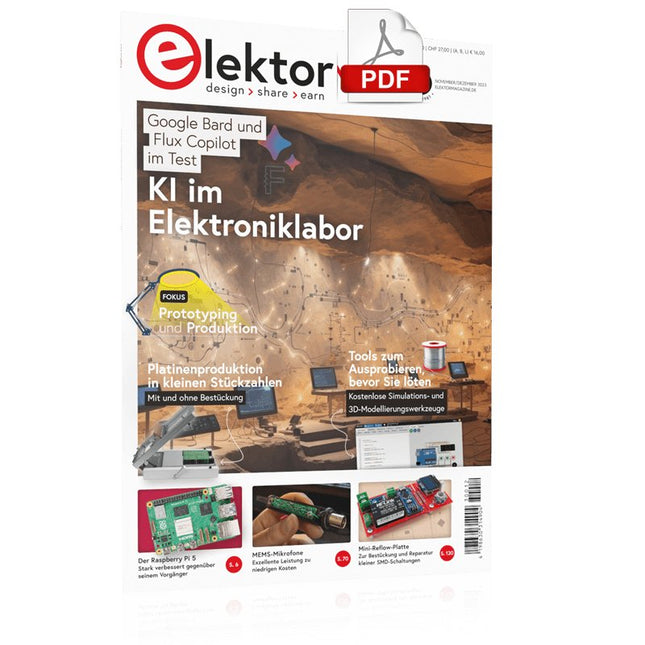
Elektor Digital Elektor 11-12/2023 (PDF)
Diese Ausgabe steht allen GOLD- und GREEN-Mitgliedern auf der ElektorMagazine-Website zum Download bereit! Sind Sie noch kein Mitglied? Hier klicken! Der Raspberry Pi 5 Gegenüber diesem Vorgänger enormer Rückstand KI im Elektroniklabor Schaltungsdesign, Bauteil-Suche, Software Funktionsgenerator mit dem Arduino Nano Nano + Code = Funktionsgenerator Solarbetriebene Weihnachtsgirlande Eine umweltfreundliche Lösung für die Dekoration Ihres Balkons USB-Killer-Detektor Besser sicher als traurig Ein einfaches CNC-Gehäuse Schritt für Schritt mit Autodesk Fusion 360 Platinenproduktion in kleinen Stückzahlen Mit und ohne Bestückung IoT-Simulation vereinfacht mit Wokwi Entwickler Uri Shaked über Entwicklung, Software und mehr Eine Anleitung zur Bare-Metal-Programmierung Teil 3: CMSIS-Header, automatische Tests und ein Webserver LoRa, ein Schweizer Taschenmesser Teil 2: Hard- und Software MEMS-Mikrofon Entwurf und Konstruktion eines Messmikrofons Werkzeuge zum Ausprobieren, bevor Sie löten Simulations- und 3D-Modellierungstools, die kostenlos genutzt werden können Neue Tools von Microchip! Version 5 von PICkit und ICD jetzt erhältlich Rapid Prototyping von flexibler, dehnbarer Elektronik Wie Voltera NOVA Innovationen bei tragbaren elektronischen Systemen beschleunigen Galvanische Trennung Fototransistor-Optokoppler erfolgreich einsetzen Die komplexe Lösung oder die Lösung von Anybus? Embedded Industrial Ethernet als Kurzstrecke statt als Marathon Ihre essentielle DFM-Checkliste Wie Sie mit dem Entwurf für die Fertigung beginnen Filamente für den 3D-Druck Arten, Eigenschaften und Verwendung im Prototyping Spezialisten für eine grundlegende Signalauswertung von ELF bis EHF-Band Aaronias neuester Echtzeit-Spektrumanalyzer der SPECTRAN® V6-Serie Herausforderungen der DFM-Analyse für Flex- und Rigid-Flex-Design Einrichten einer SMT-Fertigungsstrecke Die richtige Kombination für die zuverlässige Baugruppe Revolution in der Industrie Der Aufstieg der Autonomen Mobilen Roboter (AMR) Für höchste Anforderungen weiterentwickelt R&S MXO 5 mit acht Kanälen ergänzt Oszilloskope der nächsten Generation Aller Anfang... ... muss nicht schwer sein: Verstärkung von Unterschieden Mini-Reflow-Platte Für die Bestückung und die Reparatur kleiner SMD-Schaltungen Starte nicht mit einem Prototyp – starte mit einem Pretotyp! Prüfe zunächst, ob es einen Markt für dein Produkt gibt, bevor du deinen Lötkolben vorwärmst 2023: Odyssee in die KI Hilfe beim Entwerfen eines physikalischen Projekts erhalten Innovationen aus Brüssel Unterstützung für die Spitzentechnologie
€ 11,90
-

Elektor Digital The CAN Bus Companion (E-book)
Projects with Arduino Uno & Raspberry Pi with Examples for the MCP2515 CAN Bus Interface Module This book details the use of the Arduino Uno and the Raspberry Pi 4 in practical CAN bus based projects. Using either the Arduino Uno or the Raspberry Pi with off-the-shelf CAN bus interface modules considerably ease developing, debugging, and testing CAN bus based projects. This book is written for students, practicing engineers, enthusiasts, and for everyone else wanting to learn more about the CAN bus and its applications. The book assumes that the reader has some knowledge of basic electronics. Knowledge of the C and Python programming languages and programming the Arduino Uno using its IDE and Raspberry Pi will be useful, especially if the reader intends to develop microcontroller-based projects using the CAN bus. The book should be a useful source of reference material for anyone interested in finding answers to questions such as: What bus systems are available for the automotive industry? What are the principles of the CAN bus? How can I create a physical CAN bus? What types of frames (or data packets) are available in a CAN bus system? How can errors be detected in a CAN bus system and how dependable is a CAN bus system? What types of CAN bus controllers exist? How do I use the MCP2515 CAN bus controller? How do I create 2-node Arduino Uno-based CAN bus projects? How do I create 3-node Arduino Uno-based CAN bus projects? How do I set the acceptance masks and acceptance filters? How do I analyze data on the CAN bus? How do I create 2-node Raspberry Pi-based CAN bus projects? How do I create 3-node Raspberry Pi-based CAN bus projects?
€ 32,95
Mitglieder: € 29,66
-

Elektor Digital Raspberry Pi 4 OR 5 AND Pico (E-book)
Cool Projects for Test, Measurement, and Control The Raspberry Pi has dominated the maker scene for many years. Freely accessible I/O pins have made it one of the most popular processor boards of all time. However, the classic Raspberry Pi has no analog inputs. Direct measurement of analog values is therefore not possible. Consequently, photodiodes, NTCs, Hall sensors, etc. cannot be read directly. In addition, the pins are connected directly to the exposed contacts, i.e. without a driver or protection circuit. This can quickly destroy the central controller and thus the entire Raspberry Pi. These problems can be elegantly solved with the Pico. As a front-end, it can easily handle a wide range of measurement tasks. In addition, the Pico is much cheaper than a classic Raspberry Pi 4 or 5. If a faulty circuit leads to the destruction of the Pico, this is relatively easy to handle. This makes the combination of a classic Raspberry Pi 4 or 5 and the Pico an ideal pair. The book introduces the broad and highly topical field of modern controller technology using the combined force of a Raspberry Pi 4 or 5 and a Raspberry Pi Pico. In addition to a detailed introduction to the operation and functionality of the controller boards themselves, the book also focuses on data acquisition and processing with digital processors. Especially the combination of both systems offers a wide range of interesting possibilities. Some practical projects from the contents: USB between Raspberry Pi 4 or 5 and Pico I²C Communication and Pico as an I²C device Voltmeter and Computer Thermometer Pico W as a Web Server and WLAN Scanner Frequency Meters and Generators OLED Displays on Raspberry Pi 4 or 5 and Pico Energy Saving Monitor Which Astronauts are in Orbit? Mini Monitor for Current Bitcoin Exchange Rate
€ 32,95
Mitglieder: € 29,66
-

Elektor Digital Develop your own Bluetooth Low Energy Applications (E-book)
For Raspberry Pi, ESP32 and nRF52 with Python, Arduino and Zephyr Bluetooth Low Energy (BLE) radio chips are ubiquitous from Raspberry Pi to light bulbs. BLE is an elaborate technology with a comprehensive specification, but the basics are quite accessible. A progressive and systematic approach will lead you far in mastering this wireless communication technique, which is essential for working in low power scenarios. In this book, you’ll learn how to: Discover BLE devices in the neighborhood by listening to their advertisements. Create your own BLE devices advertising data. Connect to BLE devices such as heart rate monitors and proximity reporters. Create secure connections to BLE devices with encryption and authentication. Understand BLE service and profile specifications and implement them. Reverse engineer a BLE device with a proprietary implementation and control it with your own software. Make your BLE devices use as little power as possible. This book shows you the ropes of BLE programming with Python and the Bleak library on a Raspberry Pi or PC, with C++ and NimBLE-Arduino on Espressif’s ESP32 development boards, and with C on one of the development boards supported by the Zephyr real-time operating system, such as Nordic Semiconductor's nRF52 boards. Starting with a very little amount of theory, you’ll develop code right from the beginning. After you’ve completed this book, you’ll know enough to create your own BLE applications.
€ 32,95
Mitglieder: € 29,66
-

Elektor Digital Elektor Green Mitgliedschaft
Elektronik lernen, entwickeln und verstehen – mit Elektor Projekte, Fachwissen, Archiv-Zugriff und exklusive Rabatte – alles in einer Mitgliedschaft Möchten Sie Elektronik lernen, eigene Schaltungen entwickeln und moderne Technologien besser verstehen? Das Elektor Magazin gehört seit 65 Jahren zu den führenden Informationsquellen für Elektronikingenieure, Entwickler, Start-ups und Unternehmen. Mit einer Elektor Green Mitgliedschaft sichern Sie sich: ✅ Jährlich 8 Ausgaben der internationalen Elektronik-Fachzeitschrift Elektor (PDF) ✅ Zugang zum Elektor-Archiv mit 65 Jahren Elektronik-Know-how ✅ Selbstbauprojekte, getestete Schaltungen, In-depth-Reviews und Tutorials ✅ Exklusive Mitgliederrabatte auf Elektor.de Warum Elektor? Seit 65 Jahren steht Elektor für fundiertes Elektronik-Wissen, praxisnahe Projekte und innovative Technologien. Von Mikrocontrollern und Embedded Systems über Raspberry Pi, Arduino und ESP32 bis hin zu IoT, KI, Messtechnik, Audio, HF und Robotik deckt Elektor die wichtigsten Plattformen und Anwendungsfelder moderner Elektronik ab. Egal, ob Sie Einsteiger, Maker oder Profi sind – mit Elektor bringen Sie Ihre Fähigkeiten auf das nächste Level. Für wen ist die Mitgliedschaft? Einsteiger – Starten Sie mit verständlichen Grundlagen und ersten Projekten in die Welt der Elektronik Maker – Entdecken Sie neue Projekte, Ideen und Inspiration für Ihre eigenen Entwicklungen Profis & Ingenieure – Bleiben Sie auf dem neuesten Stand moderner Technologien und vertiefen Sie Ihr Fachwissen Ihre Vorteile auf einen Blick Magazin (Digital) – Erhalten Sie jede Ausgabe digital direkt in Ihr Postfach 65 Jahre Elektronik-Wissen – Greifen Sie jederzeit auf das umfangreiche Elektor-Archiv zu Praxis & Projekte – Setzen Sie eigene Ideen um, mit Anleitungen, Schaltungen und Tutorials Exklusive Rabatte – Sparen Sie bei jedem Einkauf auf Elektor.de Jetzt alle Elektor-Vorteile freischalten! Free Mitgliedschaft Green Mitgliedschaft ❌ 8× Elektor (Digitalausgabe) als PDF ✅ 8× Elektor (Digitalausgabe) als PDF ❌ 12 Monate Zugriff auf das gesamte Elektor-Archiv ✅ 12 Monate Zugriff auf das gesamte Elektor-Archiv ❌ Zugriff auf über 5.000 Gerber-Dateien ✅ Zugriff auf über 5.000 Gerber-Dateien ❌ 10% Mitgliederrabatt auf Elektor.de ✅ 10% Mitgliederrabatt auf Elektor.de ✅ Elektor jeden Freitagmorgen wöchentlich lesen ✅ Elektor jeden Freitagmorgen wöchentlich lesen ℹ️ Lesen Sie Elektor lieber gedruckt? Hier erfahren Sie alles über die Elektor Gold-Mitgliedschaft (Print).
€ 89,95 - € 169,95
-
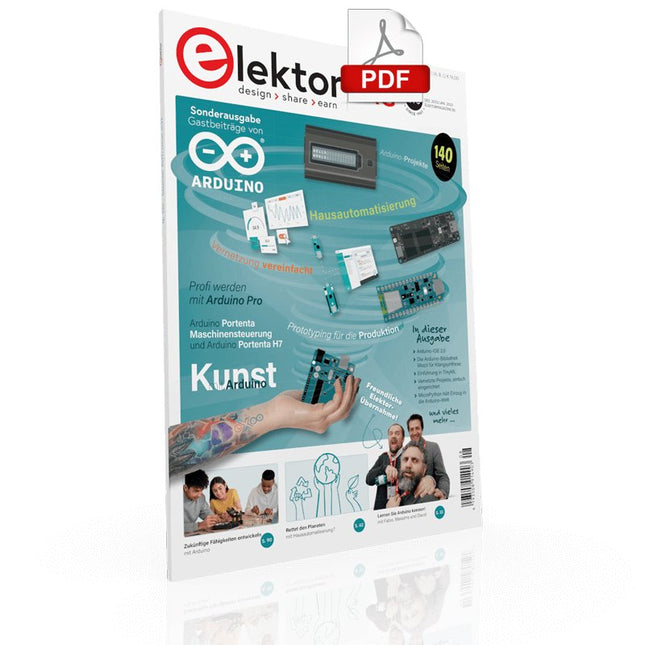
Elektor Digital Elektor-Special: Gastausgabe von Arduino 2022 (PDF)
Diese Ausgabe steht allen GOLD- und GREEN-Mitgliedern auf der ElektorMagazine-Website zum Download bereit! Sind Sie noch kein Mitglied? Hier klicken! Arduino Portenta Machine Control und Arduino Potenta H7 Ein CAN-zu-MQTT Gateway Demo Projekt Ausgepackt: Der Elektor-LCR-Meter-Bausatz von Elektor MicroPython hält Einzug in die Arduino-Welt Vernetzte Projekte, einfach eingerichtet Ihr Weg in die Arduino-Cloud Einführung in TinyML Groß ist nicht immer besser Arduino K-Weg Komfortableres Schreiben von Arduino-Sketches Lernen Sie Arduino kennen! Erste Schritte mit Portenta X8 Sichere Softwareverwaltung mit Containern Skalierbare, sichere Anwendungen erstellen, in Betrieb nehmen und pflegen Arduino Portenta X8 mit dem i.MX 8M Mini-Anwendungsprozessor von NXP und dem EdgeLock Secure Element SE050 Wie ich mein Haus automatisiert habe Arduino-CEO Fabio Violante entwickelt und teilt Lösungen Altair-8800-Emulator Hardware-Simulation eines alten Computers MS-DOS auf dem Portenta-H7-Board Alte Software auf moderner Hardware ausführen Bauen Sie es selbst an Eine digital gesteuerte Anzuchtbox für Indoor-Farming Kann Hausautomatisierung den Planeten retten? MQTT auf dem Arduino Nano RP2040 Connect Professionelle Anwendungen mit Arduino Pro Intelligente Backöfen der nächsten Generation Tagvance sorgt mit Arduino für sicherere Baustellen Santagostino ist da! mit einer Fernüberwachung, die KI für vorausschauende Wartung nutzt Höchste Sicherheit mit der MKR-basierten Lösung von RIoT Secure Eine neue Generation des Wassermanagements mit Open-Source Senso Abholzung mit Schallanalyse aufspüren Die Arduino-Bibliothek Mozzi für Klangsynthese Einblicke von Tim Barrass Das neue Portenta-X8-Board (mit Linux!) und Max Carrier machen es möglich! Wie Arduino Schülern hilft, zukünftige Fähigkeiten zu entwickeln Must-Haves für Ihren Elektronik-Arbeitsplatz Die Bedeutung der Robotik in der Ausbildung Ein zuverlässiges IoT auf Basis von LoRa Ausgepackt: die Portenta-Maschinensteuerung 8-Bit-Gaming mit Arduboy Reduzierung des Wasserverbrauchs auf der Pferderennbahn Ein IoT zur ständigen Überwachung von Bodenfeuchtigkeit und Temperatur Das Panettone-Projekt Ein Robotsystem zur Verwaltung von Sauerteigstartern Unterstützung durch Arduino-Reseller Space Invaders mit Arduino Kunst mit Arduino Inspirierende Einblicke von Künstlern und Designern Arduino-Produktkatalog Die Zukunft von Arduino David und Fabio orakeln
€ 11,90
-

Elektor Digital Home Automation and Electronics for Starters (E-book)
Projects with Arduino, ESPHome, Home Assistant, and Raspberry Pi & Co. This e-book contains various example projects, beginning with an introduction to electronics. It also explains how to install Home Assistant on a Raspberry Pi, how to use indoor climate sensors for temperature and humidity, how to implement the MQTT protocol and other interfaces, and how to use ESPHome to integrate sensors and actuators into Home Assistant. Numerous video tutorials complement the book. Fundamentals of electrical engineering The book begins with an introduction to electrical engineering. You will learn the basics of voltage, current, resistors, diodes and transistors. Arduino and microcontrollers A complete section is dedicated to the Arduino Uno. You will get to know the structure, write your first programs and work on practical examples. Home Assistant and automation You will learn how to set up Home Assistant on a Raspberry Pi and how to use automations, scenes and devices. In addition, Zigbee, MQTT and ESP-NOW – important technologies for home automation – will be discussed. ESP8266, ESP32 and ESP32-CAM The popular ESP microcontrollers are covered in detail. A theoretical introduction is followed by practical projects that show you how to get the most out of these devices. Sensors and actuators The book explains the functionality and application of numerous sensors such as temperature and humidity sensors, motion detectors and RFID readers. For actuators, stepper motors, e-ink displays, servo motors and much more are covered. There are practical application examples for all devices. ESPHome This chapter shows you how to integrate sensors and actuators into Home Assistant without any programming effort. You will be guided step by step through the setup with ESPHome. LEDs and lighting technology In this chapter, you will learn about different types of LEDs and how they can be used. The basics of lighting technology are also explained. Node-RED A whole chapter is dedicated to Node-RED. You will learn the basics of this powerful tool and be guided step by step through its setup and use. Integrated Circuits (ICs) In electronics, there are numerous ICs that make our lives easier. You will get to know the most important ones and apply your knowledge in practical projects. Professional programming Advanced topics such as the correct use of buttons, the use of interrupts and the use of an NTP server for time synchronisation are covered in detail in this chapter. Downloads GitHub
€ 59,95
Bestpreis
-

Elektor Digital Elektor Juillet/Août 2025 (PDF) FR
Le téléchargement intégral de ce numéro est disponible pour nos membres GOLD et GREEN sur le site Elektor Magazine ! Pas encore membre ? Cliquez ici. tableau de bord OBD2Des cadrans anciens aux données en temps réel OBD2 : ajoutez un compte-tours et un indicateur de changement de vitesse à votre voitureRétro, mais extrêmement utile capteurs de vision et LiDAR pour la robotique Sensor+Test 2025 et PCIM 2025 mesures sans contact du champ électrique (1)Membrane vibrante pour mesurer des tensions continues ou des champs électriques statiques détecteur de courrier sans filCapteurs optiques, radars… quelques options à explorer Elektor Mini-WheelieUn robot auto-équilibré cellules solairesDrôles de composants, la série premiers pas avec un capteur radar moderneUn capteur précis qui ne passe pas inaperçu sur le vifUsine de papier CybersécuritéDes temps difficiles pour les hackers Infographie : IdO et capteurs le Bluetooth 6.0 pour des applications de télémétrie amélioréesCette nouvelle version offre des fonctions de localisation améliorées découvrez la communication sans fil avec BeagleY-AI Projet 2.0Corrections, mises à jour et courrier des lecteurs démarrer en électronique……Conclusion sur les ampli-op un puissant assistant de codage de l'IAAccélérez votre développement avec Continue et Visual Studio Code contrôleur de charge solaire avec MPPT (2)Le circuit détecteur d'obstacles à ultrasonsUn projet simple pour aider les malvoyants une odyssée de l'IABilan du premier semestre synthétiseur MIDI autonome Raspberry Pi (3)plus intelligent avec une interface utilisateur Meshtastic : un projet de démoUn réseau intelligent de noeuds LoRa générateur analogique de fréquences audioGénérateur de signaux sinusoïdaux de haute qualité à fréquence réglable
€ 10,95


