
Suchergebnisse für "the OR state OR of OR hollow OR state OR audio"
-

Elektor Digital Elektor Special: Arduino Shields (PDF) EN
Make your project dreams come true: an odometer for the hamster wheel, a fully automatic control of your ant farm with web interface, or the Sandwich-O-Mat – a machine that toasts and grills sandwiches of your choice. With the Arduino and the DIY or Maker movement, not only did entry into microcontroller programming become child's play, but a second development also took place: Resourceful developers brought small boards – so-called shields or modules – to the market, which greatly simplified the use of additional hardware. The small modules contain all the important electronic parts to be connected to the microcontroller with a few plug-in cables, eliminating the need for a fiddly and time-consuming assembly on the plug-in board. In addition, it is also possible to handle tiny components that do not have any connecting legs (so-called SMDs). Projects Discussed Arduino seeks connection BMP and introduction to libraries, I²C Learn I/O basics with the multi-purpose shield I²C LCD adapter and DOT matrix displays LCD keypad shield Level converter W5100: Internet connection I/O expansion shield Relays and solid-state relays The multi-function shield: A universal control unit Connecting an SD card reader via SPI Keys and 7-segment displays 16-bit ADC MCP4725 DAC 16-way PWM servo driver MP3 player GPS data logger using an SD card Touch sensor Joystick SHT31: Temperature and humidity VEML6070 UV-A sensor VL53L0X time-of-flight Ultrasonic distance meter MAX7219-based LED DOT matrix display DS3231 RTC Port expander MCP23017 433 MHz radio MPU-650 gyroscope ADXL345 accelerometer WS2812 RGB LEDs Power supply MQ-xx gas sensors CO2 gas sensor ACS712 current sensor INA219 current sensor L298 motor driver MFRC522 RFID 28BYJ-48 stepper motor TMC2209 silent step stick X9C10x digital potentiometer ST7735 in a color TFT display e-Paper display Bluetooth Geiger counter SIM800L GSM module I²C multiplexer Controller Area Network
€ 11,95
Mitglieder: € 10,76
-

Elektor Digital Elektor January/February 2020 (PDF) EN
GUI with Touch — for ESP32, RPi & Co.Graphical user interfaces with the LittlevGL library "Not Just Any Guy's Project”Interview with Gábor Kiss-Vámosi, the developer of LittlevGL Capaci-Meterwith two-digit Dekatron-style LED display How To: Debounce a Mechanical Contact or SwitchA switch is either open or closed, isn't It? Developer's ZoneTips & Tricks, Best Practices and Other Useful Information Extendable Environmental Monitoring Systempublishes data on IoT platforms Practical ESP32 MultitaskingTask programming with FreeRTOS and the Arduino IDE InteractiveCorrections & Updates || Questions & Answers Automotive Headlight TuningLegal, illegal — it matters! Review: Toolcraft Digital Soldering Station Arduino Pro IDE - First Impressions Two Thermal Imaging Cameras ComparedSeek ShotPro and Seek Compact Steeped in ElectronicsOutfitting the e-lab and e-workshop Monsanto MAN1 LED DisplayPeculiar Parts, the series Thermoelectric Tea TimerFirst dealings with energy harvesting Single-Phase 1-Kilowatt AC Motor DriveThree-mode design: integral-cycle switching, phase-cut trailing, or phase-cut leading edge. RPi Gets a Fast 3.5" Touch DisplayMore power at no extra charge Lab, Sweet LabA glimpse of The Holy Place — no unauthorized entry. First Steps with RISC-VTrying out the LoFive Board Elektor Labs Challenged: a DIY LoRa Tracker Glitches and results in electronics development Sigfox and the IoT (2)Registration in the Sigfox network Starting Out in ElectronicsEasier than imagined! Analogue Electronics Design Case Study #1 — Section 1: MEMS Microphone… Testing 1-2-3 Small Circuits RevivalCapita Selecta from the Elektor Project Suggestions Box In a Nutshell: Text for MicrocontrollersUsing compression to save memory Focus On: Autonomous DrivingState of the art at a glance Start-Up Leaders and Innovators Talk “Innovation 4.0” in Munich Lego Electronic Train Set from 196850 years on, electronic toys still fascinate Beyond ElectronicsThe MX3D Bridge Senses the City
€ 7,50
-
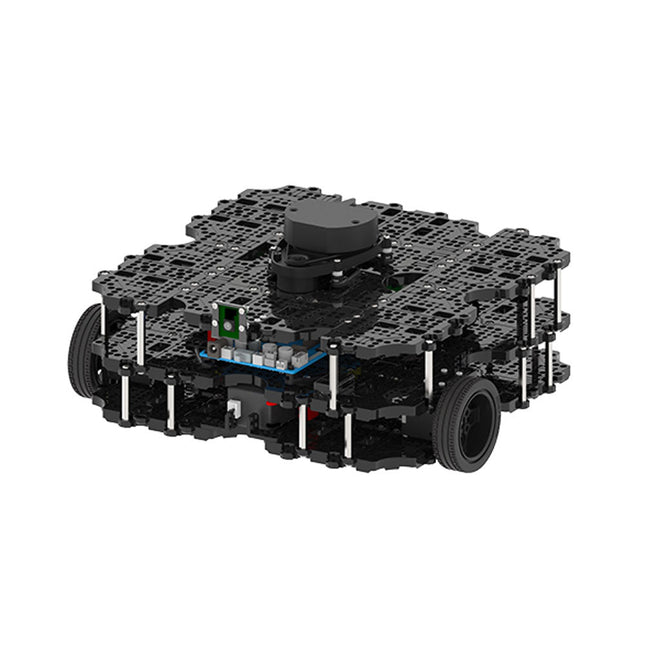
Robotis Robotis TurtleBot3 Waffle Pi (inkl. Raspberry Pi 4)
Weltweit beliebteste ROS-Plattform TurtleBot ist der beliebteste Open-Source-Roboter für Bildung und Forschung. Die neue Generation TurtleBot3 ist ein kleiner, kostengünstiger, voll programmierbarer, ROS-basierter mobiler Roboter. Er ist für Bildung, Forschung, Hobby und Produktprototyping gedacht. Erschwingliche Kosten TurtleBot wurde entwickelt, um die kostenbewussten Bedürfnisse von Schulen, Laboren und Unternehmen zu erfüllen. TurtleBot3 ist der erschwinglichste Roboter unter den SLAM-fähigen mobilen Robotern, die mit einem 360°-Laser-Distanzsensor LDS-01 ausgestattet sind. ROS Standard Die Marke TurtleBot wird von Open Robotics verwaltet, das ROS entwickelt und pflegt. Heutzutage ist ROS die bevorzugte Plattform für alle Robotiker auf der ganzen Welt geworden. TurtleBot kann mit bestehenden ROS-basierten Roboterkomponenten integriert werden, aber TurtleBot3 kann eine erschwingliche Plattform für diejenigen sein, die mit dem Erlernen von ROS beginnen möchten. Erweiterbarkeit TurtleBot3 ermutigt Benutzer, seine mechanische Struktur mit einigen alternativen Optionen anzupassen: Open Source Embedded Board (als Steuerplatine), Computer und Sensoren. Der TurtleBot3 Waffle Pi ist eine zweirädrige Plattform mit Differentialantrieb, kann aber strukturell und mechanisch in vielerlei Hinsicht angepasst werden: Autos, Fahrräder, Anhänger und so weiter. Erweitern Sie Ihre Ideen jenseits der Vorstellungskraft mit verschiedenen SBC, Sensoren und Motoren auf einer skalierbaren Struktur. Modularer Aktuator für mobilen Roboter TurtleBot3 ist in der Lage, durch den Einsatz von 2 DYNAMIXEL's in den Radgelenken präzise räumliche Daten zu erhalten. Die DYNAMIXEL der XM-Serie können in einem von 6 Betriebsmodi betrieben werden (XL-Serie: 4 Betriebsmodi): Geschwindigkeitsregelung für die Räder, Drehmomentregelung oder Positionsregelung für die Gelenke, usw. DYNAMIXEL kann auch für die Herstellung eines mobilen Manipulators verwendet werden, der leicht ist, aber mit Geschwindigkeits-, Drehmoment- und Positionssteuerung präzise gesteuert werden kann. DYNAMIXEL ist eine Kernkomponente, die den TurtleBot3 perfekt macht. Er ist einfach zu montieren, zu warten, zu ersetzen und neu zu konfigurieren. Offene Steuerplatine für ROS Die Steuerplatine ist sowohl hardware- als auch softwareseitig für die ROS-Kommunikation offengelegt. Die Open-Source-Steuerungsplatine OpenCR1.0 ist leistungsfähig genug, um nicht nur DYNAMIXELs, sondern auch ROBOTIS-Sensoren zu steuern, die häufig für grundlegende Erkennungsaufgaben auf kostengünstige Weise verwendet werden. Verschiedene Sensoren wie z. B. Berührungssensor, Infrarotsensor, Farbsensor und eine Handvoll weiterer sind verfügbar. Das OpenCR1.0 verfügt über einen IMU-Sensor im Inneren des Boards, so dass es die präzise Steuerung für unzählige Anwendungen verbessern kann. Das Board verfügt über 3,3 V, 5 V und 12 V Stromversorgungen, um die verfügbaren Computergeräte zu verstärken. Open Source Die Hardware, Firmware und Software von TurtleBot3 sind Open Source, was bedeutet, dass die Benutzer willkommen sind, die Quellcodes herunterzuladen, zu ändern und zu teilen. Alle Komponenten des TurtleBot3 werden aus kostengünstigem Kunststoff im Spritzgussverfahren hergestellt, die 3D-CAD-Daten sind jedoch auch für den 3D-Druck verfügbar. Technische Daten Maximale Translationsgeschwindigkeit 0,26 m/s Maximale Rotationsgeschwindigkeit 1,82 rad/s (104.27 deg/s) Maximale Nutzlast 30 kg Abmessungen (L x B x H) 281 x 306 x 141 mm Gewicht (+ SBC + Batterie + Sensoren) 1,8 kg Schwelle des Kletterns 10 mm oder niedriger Voraussichtliche Betriebsdauer 2h Voraussichtliche Ladezeit 2h 30m SBC (Single Board Computer) Raspberry Pi 4 (2 GB RAM) MCU 32-bit ARM Cortex-M7 mit FPU (216 MHz, 462 DMIPS) Fernbedienung RC-100B + BT-410 Set (Bluetooth 4, BLE) Aktuator XL430-W210 LDS (Laser-Abstandssensor) 360 Laser-Abstandssensor LDS-01 or LDS-02 Kamera Raspberry Pi Camera Module v2.1 IMU Gyroskop 3 AchsenBeschleunigungsmesser 3 Achsen Stromanschlüsse 3,3 V/800 mA5 V/4 A12 V/1 A Erweiterungspins GPIO 18 PinsArduino 32 Pin Peripherie 3x UART, 1x CAN, 1x SPI, 1x I²C, 5x ADC, 4x 5-pin OLLO DYNAMIXEL Ports 3x RS485, 3x TTL Audio Several programmable beep sequences Programmierbare LEDs 4x User LED Status-LEDs 1x Board Status LED1x Arduino-LED1x Power-LED Tasten und Schalter 2x Drucktasten, 1x Reset-Taste, 2x Dip-Schalter Akku Lithium Polymer 11,1 V 1800 mAh / 19,98 Wh 5C PC-Verbindung USB Firmware-Upgrade via USB / via JTAG Netzadapter (SMPS) Eingang: 100-240 VAC 50/60 Hz, 1,5 A @maxAusgang: 12 VDC, 5 A Downloads ROS Robot Programming GitHub E-Manual Community
€ 1.879,00
Bestpreis


