
Suchergebnisse für "android OR open OR accessory"
-

Elektor Digital Android Open Accessory (DE) | E-book
Android Open Accessory (kurz AOA) ist ein einfaches und sicheres Protokoll zur Verbindung von Mikrocontroller-gesteuerten Geräten mit einem Android-Smartphone oder -Tablet. Dieses Buch zeigt anhand von leicht nachbaubaren Schaltungen und den dazu gehörenden Programmbeispielen, wie man AOA in Verbindung mit der Mikrocontroller-Plattform Arduino verwendet, um täglich anfallende Aufgaben im Haus zu automatisieren: Beleuchtung, Belüftung, Klimatisierung und Musik-Entertainment-Systeme – bequem und komfortabel mit dem Smartphone, wohlgemerkt!Die Grundkenntnisse des Arduino-Frameworks voraussetzend, versorgt das visionäre Autorenduo Göransson/Cuartielles Ruiz den Leser mit den Werkzeugen (Tools), die er braucht, um nützliche und anspruchsvolle Projekte realisieren zu können. Detaillierte Erklärungen, hilfreiche Beispiele und verfügbare Prototypen befähigen ihn dazu, den maximalen Nutzen aus der Android-Technik zu ziehen.In diesem Buch finden Sie:• Die Bewertungen der verschiedenen Möglichkeiten, einen Arduino-basierten Prototyp mit einem Android-Smartphone zu verbinden.• Die Behandlung der Datenkommunikationsgrundlagen und die Vorstellung von MQTT.• Die Erklärung, wie man eine Android-Bibliothek baut und eine Android-Accessory-Anwendung erstellt.• Die Baubeschreibung der hier vorgestellten Prototypen und die Einbindung der verschiedenen Sensoren, Displays und Aktuatoren.Die Programmbeispiele aus diesem Buch stehen auf der Elektor-Website zum Gratis-Download bereit.
€ 39,80
Mitglieder: € 35,82
-

Great Scott Gadgets Great Scott Gadgets HackRF Pro SDR (100 kHz – 6 GHz) + GRATIS E-Book
AKTION: HackRF Pro bestellen und das neue E-Book "SDR mit HackRF One & HackRF Pro" im Wert von 20 € gratis sichern! HackRF Pro ist das neueste Software Defined Radio (SDR) von Great Scott Gadgets und der leistungsstarke Nachfolger des legendären HackRF One. Mit einem Frequenzbereich von 100 kHz bis 6 GHz deckt es ein enormes Spektrum zum Senden und Empfangen von Funksignalen ab. Als Open-Source-Hardware-Plattform konzipiert, ist das HackRF Pro das ideale Werkzeug für die Analyse und Entwicklung moderner Funktechnologien. Es lässt sich flexibel als USB-Peripheriegerät nutzen oder für den Standalone-Betrieb programmieren. Technische Daten Frequenz: 100 kHz bis 6 GHz Einstellbar von 0 Hz bis 7,1 GHz Halbduplex-Transceiver Bis zu 20 Millionen Abtastungen pro Sekunde 8-Bit-Quadraturabtastung (8-Bit-I und 8-Bit-Q) Kompatibel mit GNU Radio, SDR# und mehr Softwarekonfigurierbare RX- und TX-Verstärkung sowie Basisbandfilter Softwaregesteuerte HF-Port-Leistung (50 mA bei 3,3 V) SMA-HF-Anschluss SMA-Takt-Ein- und -Ausgang für Synchronisation und Triggerung Praktische Tasten zur Programmierung Interne Stiftleisten für Erweiterung High-Speed USB 2.0 mit USB-C Anschluss USB-Stromversorgung Open-Source-Hardware Im Vergleich zu seinem Vorgänger bietet HackRF Pro eine Vielzahl neuer Funktionen, darunter: Erweiterter Betriebsfrequenzbereich Verbesserte HF-Leistung mit flacherem Frequenzgang USB-C Anschluss Integrierter TCXO-Quarzoszillator für überlegene Timingstabilität Logik-Upgrade von einem CPLD zu einem energieeffizienten FPGA Beseitigung von Gleichspannungsspitzen Modus mit erweiterter Präzision und 16-Bit-Abtastwerten für niedrige Abtastraten (typische ENOB: 9-11) Modus mit halber Präzision und 4-Bit-Abtastwerten bei bis zu 40 MS/s Mehr RAM und Flash-Speicher für benutzerdefinierte Firmware Abschirmung des Funkmoduls Trigger-Ein- und -Ausgang über Taktanschlüsse zugänglich Aussparung in der Leiterplatte bietet Platz für zukünftige Erweiterungen Verbessert Energiemanagement Verbesserter HF-Portschutz Funktion zum hardwareseitigen Deaktivieren des Sendemodus Volle Kompatibilität: Dank der bewährten Architektur kann bestehende Software für das HackRF One direkt auch mit dem HackRF Pro genutzt werden. Das HackRF Pro bietet nahtlose Abwärtskompatibilität bei gleichzeitig deutlich gesteigerter Performance. Hinweis: Eine Antenne ist nicht im Lieferumfang enthalten. Wir empfehlen die ANT500 für den optimalen Einstieg. Lieferumfang HackRF Pro SDR mit Kunststoffgehäuse Neues E-Book: SDR mit HackRF One & HackRF Pro (Normalpreis: 20 €) Downloads Documentation GitHub
€ 489,00€ 429,00Bestpreis
-

iFixit iFixit iOpener Toolkit
Elektronikgeräte mit verklebten Displays und Akkus sind immer stärker im Umlauf. Die Versiegelung schützt zwar vor Schmutz und Wasser, erschwert aber ein einfaches Öffnen des Gerätes – und damit auch jede Reparatur. Tschüss, Klebebefestigung: Mit dem iOpener Kleber lösen Bis jetzt, denn mit dem iOpener löst du problemlos und schnell Klebeverbindungen, ohne das Risiko, mit einer Heißluftpistole und zu viel Hitze dein Gerät zu beschädigen. Entwickelt wurde er zunächst zum Öffnen von Apple iPads, eignet sich aber auch für Tablets von Samsung, Smartphones von Sony und jedem anderen Hersteller, der inzwischen lieber klebt, statt schraubt. Und so funktioniert es iOpener erhitzen und auflegen: Den iOpener erwärmst du ganz einfach in der Mikrowelle oder in einem Topf mit kochendem Wasser. Anschließend positionierst du ihn auf der Kante deines Elektronikgeräts. Die Wärme löst den Klebstoff, ohne dein Gadget in Mitleidenschaft zu ziehen, sodass du ein Opening Pick zwischen Display und Gehäuse klemmen kannst. Danach wiederholst du den Vorgang für alle weiteren verklebten Stellen, denn der iOpener ist beliebig oft wiederverwendbar. Klebstoffreste mit Opening Tools entfernen: Mit den richtigen Werkzeugen kannst du dein Gerät nun mühelos öffnen. Die Opening Picks sind scharf genug, um Klebestreifen zu durchtrennen. Mit einem Opening Tool hebelst du abschließend das Gehäuse deines Gerätes auf oder hebst ein Display mit einem Saugheber oder iSclack ab. Ein Muss für Elektronikreparaturen Den nervigsten Teil einer Reparatur hast du damit schon hinter dir – so wird der Rest fast schon zum Selbstläufer. Ob Einsteiger oder Fachmann – der iOpener gehört in jeden Werkzeugkoffer, denn leichter lässt sich Kleber nicht lösen. Deine Vorteile auf einen Blick Löst Klebebefestigungen zielgerichtet Unkompliziert in der Mikrowelle oder kochendem Wasser zu erhitzen Wiederverwendbar Auf Wunsch mit zusätzlichen Öffnungswerkzeugen Inhalt aus lebensmittelechtem Glycerin Schont Geldbeutel und Umwelt Lieferumfang iOpener Spudger (Spatel) iFixit Öffnungswerkzeug 6x Fixit Opening Pick (Plektrum) iFixit Battery Isolation Pick Plastikkarten Saugheber Gebogene Pinzette Schraubendreher aus Kunststoff mit magnetischem Bithalter (4 mm), gummierter Griffzone und Drehkappe Präzisions-Bits (4 mm) in folgenden Größen: Kreuzschlitz (Phillips) #00 Schlitz 2.5 mm
€ 24,54
-
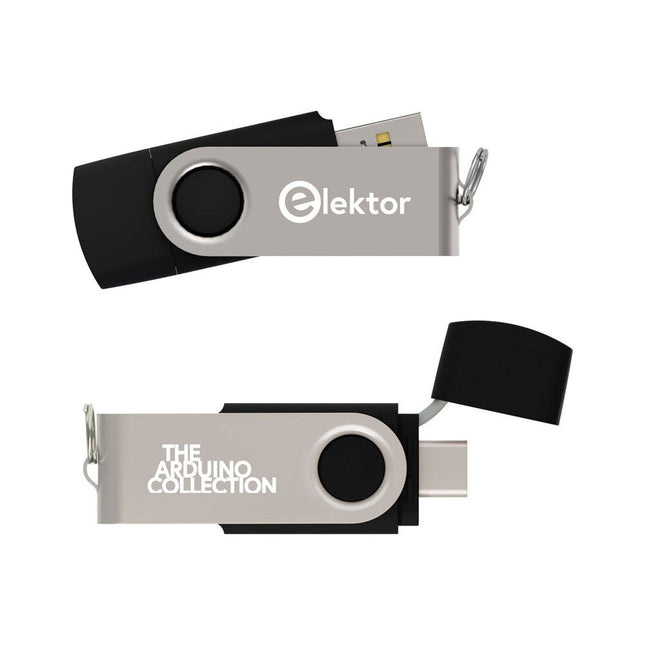
Elektor Classics The Elektor Arduino Collection (USB-Stick)
Dieser USB-Stick enthält eine Auswahl von über 300 Arduino-bezogenen Artikeln, die im Elektor-Magazin veröffentlicht wurden. Der Inhalt umfasst sowohl Hintergrundartikel als auch Projekte zu folgenden Themen: Software- und Hardware-Entwicklung: Tutorials zur Arduino-Softwareentwicklung mit der Arduino IDE, Atmel Studio, verschiedenen Shields und grundlegenden Programmierkonzepten. Lernen: Das Mikrocontroller-Bootcamp bietet einen strukturierten Einstieg in die Programmierung eingebetteter Systeme. Datenerfassung und -messung: Projekte wie ein 16-Bit-Datenlogger, ein Drehbank-Tachometer und ein AC-Netzanalyzer ermöglichen die Erfassung und Analyse von Echtzeitsignalen. Drahtlose Kommunikation: Erfahren Sie, wie man drahtlose Netzwerke implementiert, eine Android-Schnittstelle erstellt und effektiv mit Mikrocontrollern kommuniziert. Robotik und Automatisierung: Lernen Sie den Arduino Nano Robot Controller, unterstützende Automatisierungs-Boards sowie diverse Arduino-Shields zur Funktionserweiterung kennen. Selbstbauprojekte: Einzigartige DIY-Projekte wie Laserprojektion, eine Numitron-Uhr mit Thermometer, ein ELF-Empfänger, Theremino-Module und Touch-LED-Schnittstellen zeigen kreative Einsatzmöglichkeiten auf. Egal, ob Sie Einsteiger oder erfahrener Maker sind – diese Sammlung ist eine wertvolle Ressource zum Lernen, Experimentieren und Erweitern der Möglichkeiten mit Arduino.
€ 49,95€ 34,95Bestpreis
-
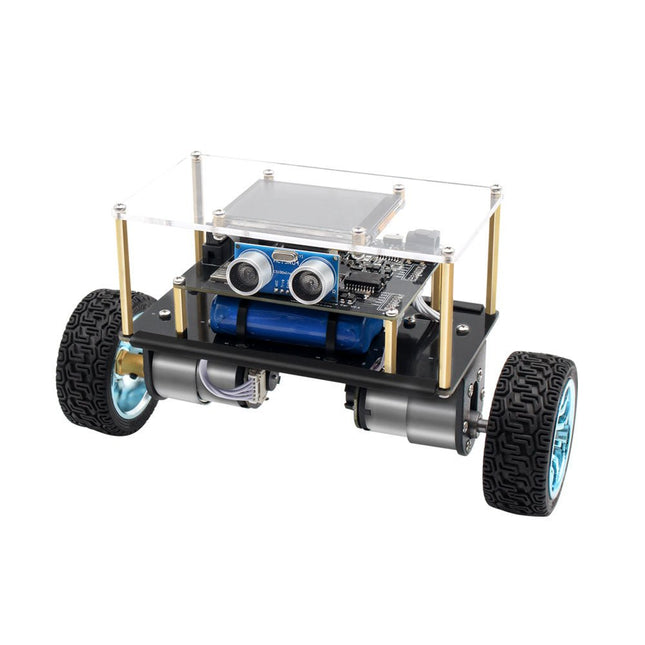
Elektor Labs Elektor Mini-Wheelie Selbstbalancierender Roboter
Der Elektor Mini-Wheelie ist eine experimentelle autonome selbstbalancierende Roboterplattform. Der selbstbalancierende Roboter basiert auf einem ESP32-S3-Mikrocontroller und ist mithilfe der Arduino-Umgebung und Open-Source-Bibliotheken vollständig programmierbar. Dank seiner drahtlosen Fähigkeiten kann er über WLAN, Bluetooth oder ESP-NOW ferngesteuert werden oder mit einem Benutzer oder sogar einem anderen Roboter kommunizieren. Zur Erkennung von Hindernissen steht ein Ultraschallwandler zur Verfügung. Über das Farbdisplay lassen sich niedliche Gesichtsausdrücke oder für den bodenständigeren Nutzer auch kryptische Debug-Meldungen darstellen. Der Roboter wird als Komplettbausatz mit Teilen geliefert, die Sie selbst zusammenbauen müssen. Alles ist dabei, sogar ein Schraubenzieher. Hinweis: Der Mini-Wheelie ist eine pädagogische Entwicklungsplattform, die zum Lernen, Experimentieren und zur Entwicklung von Robotern gedacht ist. Er ist nicht als Kinderspielzeug klassifiziert, und seine Funktionen, Dokumentation und Zielgruppe spiegeln diesen Zweck wider. Das Produkt richtet sich an Studenten, Dozenten und Entwickler, die Robotik, Programmierung und Hardware-Integration in einem pädagogischen Umfeld erforschen möchten. Technische Daten ESP32-S3 Mikrocontroller mit WLAN und Bluetooth MPU6050 6-achsige Inertial Measurement Unit (IMU) Zwei unabhängig gesteuerte 12 V-Elektromotoren mit Drehzahlmesser Ultraschallwandler 2,9" TFT-Farbdisplay (320 x 240) MicroSD-Kartensteckplatz Batterieleistungsmonitor 3S wiederaufladbarer Li-Po-Akku (11,1 V/2200 mAh) Batterieladegerät im Lieferumfang enthalten Arduino-basierte Open-Source-Software Abmessungen (B x L x H): 23 x 8 x 13 cm Lieferumfang 1x ESP32-S3 Mainboard + MPU6050 Modul 1x LCD-Board (2,9 Zoll) 1x Ultraschallsensor 1x Akku (2200 mAh) 1x Batterieladegerät 1x Motorreifen-Set 1x Gehäuseplatine 1x Acrylplatte 1x Schraubendreher 1x Schutzstreifen 1x Flexkabel B (8 cm) 1x Flexkabel A (12 cm) 1x Flexkabel C 4x Kupfersäule A (25 mm) 4x Kupfersäule B (55 mm) 4x Kupfersäule C (5 mm) 2x Kunststoff-Nylonsäule 8x Schrauben A (10 mm) 24x Schrauben B (M3x5) 8x Nüsse 24x Metallscheiben 2x Kabelbinder 1x MicroSD-Karte (32 GB) Downloads Documentation
€ 99,95€ 79,95Bestpreis
-

UFactory UFactory uArm Swift Pro
Der uArm Swift Pro ist ein hochwertiger Roboterarm, der in einer Vielzahl von Anwendungen eingesetzt werden kann. Der uArm Swift Pro wurde für den Einsatz in der Ausbildung entwickelt und optimiert, was bedeutet, dass viele Pakete bereits für Open-Source-Plattformen wie ROS verfügbar sind. Der uArm Swift Pro hat eine Positionswiederholgenauigkeit von 0,2 mm und ist zudem mit einem Schrittmotor und einem 12-Bit-Encoder ausgestattet. Dies sind nur einige Gründe, die den uArm Swift Pro zu einer ausgezeichneten Wahl für den Einsatz in der Ausbildung machen. Ein weiteres großartiges Merkmal ist das 3D Druck-Kit, das den uArm Swift Pro in weniger als 1 Minute in einen 3D Drucker verwandelt. Das uArm unterstützt die folgenden Entwicklungsplattformen/Systeme: UFACTORY SDK Arduino Python ROS GRABCAD OpenMV Smartphone-App Die Smartphone-App für iOS ist bereits im App Store erhältlich und ermöglicht eine einfache Steuerung und Überwachung des Roboterarms. Die App für Android befindet sich in der Entwicklung und wird bald verfügbar sein. An example of the Machine Vision Das folgende GIF zeigt den uArm in Kombination mit der OpenMV Machine Vision Cam M7 und den Gesichtserkennungsanwendungen, die in MicroPython implementiert werden können. Technische Daten Freiheitsgrade: 4 Wiederholbarkeit: Bis zu 0,2 mm Nutzlast: 500 g Arbeitsbereich: 50-320 mm Positioniergeschwindigkeit: 100 m/s Positionsrückmeldung: 12-Bit-Encoder Abmessungen: 150 x 140 x 281 mm Gewicht: 2,2 kg Lieferumfang UFactory uArm Swift Pro Bluetooth & Vakuumgreifer Downloads Datasheet
€ 939,00
Bestpreis
-

Elektor Publishing MIT App Inventor for AI and IoT
Build Smart Applications with Raspberry Pi, Arduino, and ESP32 Discover how easy and exciting mobile app development can be with MIT App Inventor. This hands-on guide takes you from basic concepts to building real-world mobile applications using a simple visual programming approach—no prior coding experience required. You will create IoT and AI-powered apps for Android devices and explore how App Inventor can also be used with iPhones and iPads. Connect your applications to platforms such as Arduino UNO R4 WiFi, ESP32, Raspberry Pi Pico (2)W and Raspberry Pi 5, enabling you to build smart, connected systems. Inside the book, you will learn how to: Build interactive apps using buttons, images, sound, and multimedia Create text-to-speech and speech-recognition applications Develop camera-based and location-aware (GPS) apps Design useful tools such as calculators and educational apps Work with smartphone sensors like accelerometers and light sensors Build AI-powered applications, including voice assistants and image-generation features Send and receive messages, and create communication-based apps Connect mobile apps to hardware using Wi-Fi and Bluetooth Control real devices such as LEDs, motors, and sensors Designed for beginners, students, and hobbyists, this book focuses on learning by doing. By the end, you will have the skills and confidence to create your own innovative applications that interact with both the digital and physical worlds. Start building and turning your ideas into reality.
€ 44,95
Mitglieder: € 40,46
-

SEQURE SEQURE HT140 (2-in-1) SMD Löt- & Entlötpinzette
Das SEQURE HT140 ist ein äußerst vielseitiges 2-in-1 Lötwerkzeug, das die Funktionalität einer Heißpinzette und eines Lötkolbens vereint. Es wurde speziell für präzise SMD-Löt- und Entlötarbeiten entwickelt. Mit der unabhängigen Steuerung für einseitiges Heizen funktioniert es mit einer Standardspitze wie ein herkömmlicher Lötkolben. Bei beidseitiger Heizfunktion verwandelt es sich in eine Heißpinzette – perfekt für die effiziente und präzise Entnahme von SMD-Bauteilen. Features Betriebstemperatur: 50-500°C Unterstützt mehrere Stromeingänge: PD 3.1/3.0/2.0, QC 3.0/2.0 (5-28 V DC), LiPo-Akkus und Netzteile. Das HT140 kombiniert eine Heißpinzette und einen Lötkolben mit unabhängiger ein- oder beidseitiger Heizung. Verwenden Sie es als Lötkolben mit Spitze oder als Heißpinzette zum einfachen Entlöten von SMD-Bauteilen. Spannung und Stromstärke lassen sich je nach Stromquelle anpassen. Mit dualer Temperaturregelung, Voreinstellungen, schneller Temperaturerhöhung und Feineinstellung. 128 x 32 OLED-Bildschirm mit einstellbarer Helligkeit und Ausrichtung. Umschaltbar zwischen °C und °F. Hochpräzises Heizelement mit einer Genauigkeit von ±1%. Schmelzt Lot in nur 2 Sekunden. Intelligente Standby-, Ruhe- und Aktivierungsfunktionen verlängern die Lebensdauer der Lötspitze und steigern die Effizienz. Unterstützt Temperaturkalibrierung und -kompensation für präzises Arbeiten. Inklusive 1,5 m langem, hitzebeständigem PD 150 W Silikonkabel und robuster HT-Station aus Metall. Austauschbare Lötspitzen und einstellbare Winkel für verschiedene SMD-Lötaufgaben. Technische Daten Betriebsspannung 5-28 V DC Maximale Leistung 140 W Betriebstemperatur 50-500°C Zinnschmelzzeit 2 s Schnittstellentyp USB-C, DC5525 Stromversorgung PD 3.1/3.0/2.0, QC 3.0/2.0, 28 V DC max Display 128 x 32 OLED Firmware-Upgrade Ja Menüsprachen Englisch, Russisch, Chinesisch Abmessungen 160 x 27 x 17,5 mm Gewicht 50 g Lieferumfang 1x SEQURE HT140 Host 2x HT140-IS Konisch gebogene Entlötspitzen 1x HT-Station 1x Zubehörpaket 1x Aufbewahrungstasche 1x 65 W PD-Netzteil (EU, UK & US) 1x 24 W PD-Silikonkabel (1,5 m) 1x GND-Kabel-Zubehörsatz (1,8 m) Downloads Manual Firmware V1.04
€ 119,95€ 99,95Bestpreis
-

Elektor Digital Android (NL) | E-book
Steeds vaker komen we op smartphones en tablet-computers het besturingssysteem Android tegen. Het aantal toepassingsprogramma's – de zogenaamde applicaties of kortweg apps - waarmee de apparaten individueel aan de voorkeuren en wensen van de gebruiker kunnen worden aangepast, neemt van dag tot dag toe. En de steeds betere technische uitvoering en uitrusting van de apparaten maken het nu mogelijk toepassingen te 'draaien' waarvoor een paar jaar geleden nog een desktop-PC of speciale hardware vereist was. Inmiddels kan elke smartphone de exacte (geografische) positie bepalen, video's opnemen – en nog veel meer. Maar bij het individualiseren van onze smartphone hoeven we ons niet te beperken tot kant-en-klare applicaties! Het is namelijk helemaal niet zo moeilijk om zelf Android-apparaten te programmeren en eigen apps te schrijven. Dit boek vormt een inleiding tot het programmeren van apps voor Android-apparaten. De werking van het Android-systeem wordt op begrijpelijke manier uitgelegd en we zien stap voor stap hoe applicaties kunnen worden geprogrammeerd. Aan de hand van een groot aantal voorbeelden worden allerlei toepassingsmogelijkheden getoond. Het scala loopt van eenvoudige rekenprogramma's via het uitlezen van sensoren en GPS-data tot het programmeren van applicaties voor internetcommunicatie. Naast het schrijven van applicaties in de programmeertaal Java wordt in dit boek ook besproken hoe apps met behulp van Javascript of PHP-scripts kunnen worden geprogrammeerd.
€ 29,95
Mitglieder: € 26,96
-
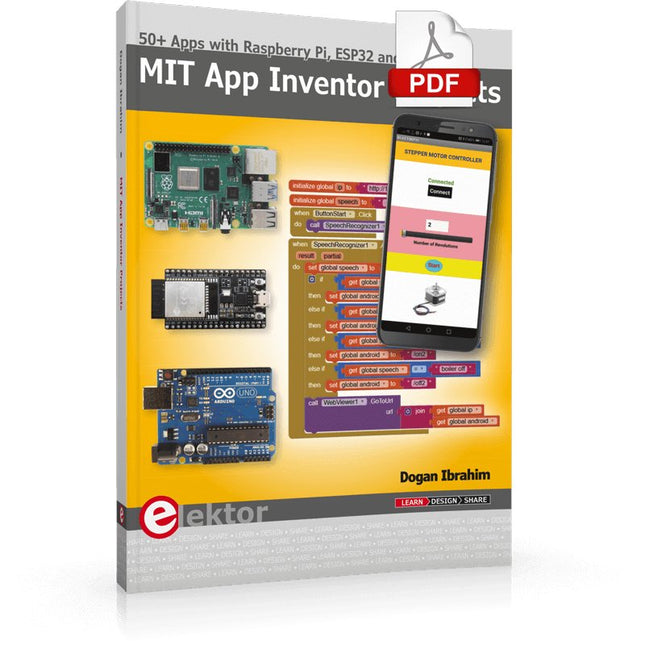
Elektor Digital MIT App Inventor Projects (E-book)
50+ Android Apps with Raspberry Pi, ESP32 and Arduino This book is about developing apps for Android compatible mobile devices using the MIT App Inventor online development environment. MIT App Inventor projects can be in either standalone mode or use an external processor. In standalone mode, the developed application runs only on the mobile device (e.g. Android). In external processor-based applications, the mobile device communicates with an external microcontroller-based processor, such as Raspberry Pi, Arduino, ESP8266, ESP32, etc. In this book, many tested and fully working projects are given both in standalone mode and using an external processor. Full design steps, block programs, circuit diagrams, QR codes and full program listings are given for all projects. The projects developed in this book include: Using the text-to-speech component Intonating a received SMS message Sending SMS messages Making telephone calls using a contacts list Using the GPS and Pin-pointing our location on a map Speech recognition and speech translation to another language Controlling multiple relays by speech commands Projects for the Raspberry Pi, ESP32 and Arduino using Bluetooth and Wi-Fi MIT APP Inventor and Node-RED projects for the Raspberry Pi The book is unique in that it is currently the only book that teaches how to develop projects using Wi-Fi and Node-RED with MIT App Inventor. The book is aimed at students, hobbyists, and anyone interested in developing apps for mobile devices. All projects presented in this book have been developed using the MIT App Inventor visual programming language. There is no need to write any text-based programs. All projects are compatible with Android-based mobile devices. Full program listings for all projects as well as detailed program descriptions are given in the book. Users should be able to use the projects as they are presented, modifying them to suit their own needs.
€ 32,95
Mitglieder: € 29,66







Kundenservice
Weiterlesen
-
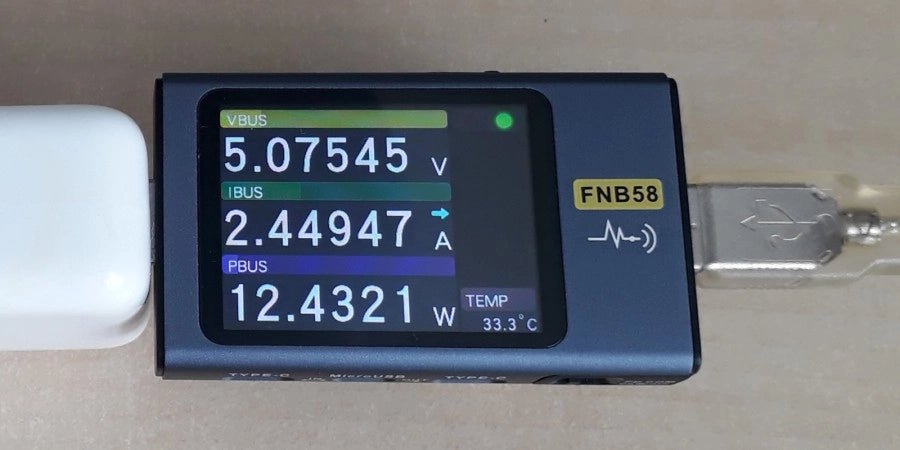
, von Jean-François Simon Fnirsi FNB58 USB-Tester (Review)
Der Fnirsi FNB58 ist ein vielseitiger USB-Tester für Spannungs-, Strom- und Energiemessungen mit vielen fortschrittlichen Funktionen. Probieren wir ihn aus!
